Use Graph Assistant in Modeler
The Graph Assistant feature in Modeler enables you to use natural language to create, review, and modify property graphs.
Before you use Graph Assistant, ensure that the following prerequisites are met:
- You are connected to an Oracle Autonomous AI Database instance
running Oracle AI Database 26ai, or to an Oracle Database instance with
DBMS_CLOUD installed.
See the following for more information:
- An AI profile is configured for the database environment. Graph Assistant uses the AI profile to interpret natural language prompts and generate or modify property graphs. See Generate SQL from Natural Language Prompts Using Select AI for more information.
- The Graph Assistant option is enabled in the Settings panel.
- Select the AI profile that you want Graph Assistant to use from the Profile list in the Graph Assistant section of the Settings panel.
To open Graph Assistant, expand the Graph Assistant panel by clicking the arrow on the left side of the Modeler page.
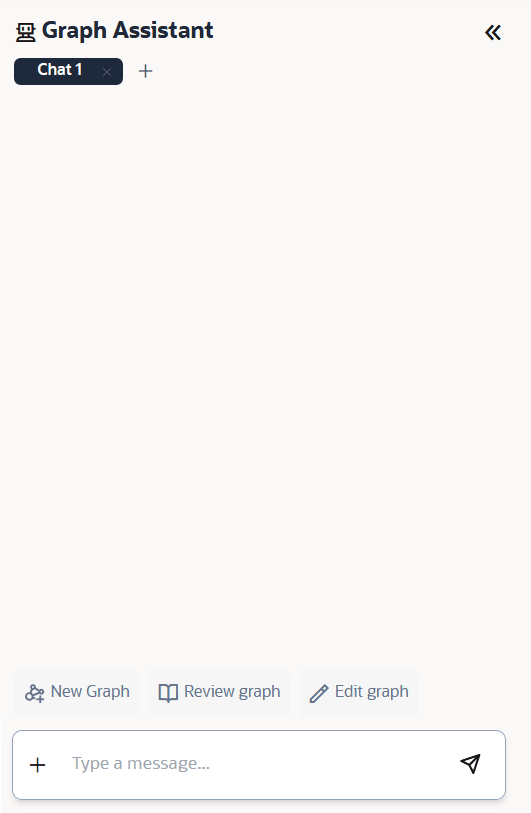
The Graph Assistant panel contains the following components:
- Message box: Enter a natural language prompt or follow-up instruction.
- Send: Submits the prompt to Graph Assistant.
- Conversation area: Displays the prompts and responses exchanged with Graph Assistant.
- Add (+): Starts a new conversation.
See also Store Chats and Clear Chats configurations in Configure Modeler Settings.
You can use Graph Assistant to perform the following tasks:
- Create a new property graph from a natural language description.
- Review an existing property graph and receive a summary of its structure.
- Modify an existing property graph by adding, removing, or updating vertices, edges, labels, or properties.
- Fix warnings while creating or editing a property graph.