Edit a Property Graph Using Graph Assistant

You can use Graph Assistant to edit a property graph only after the graph has been loaded into the Modeler.
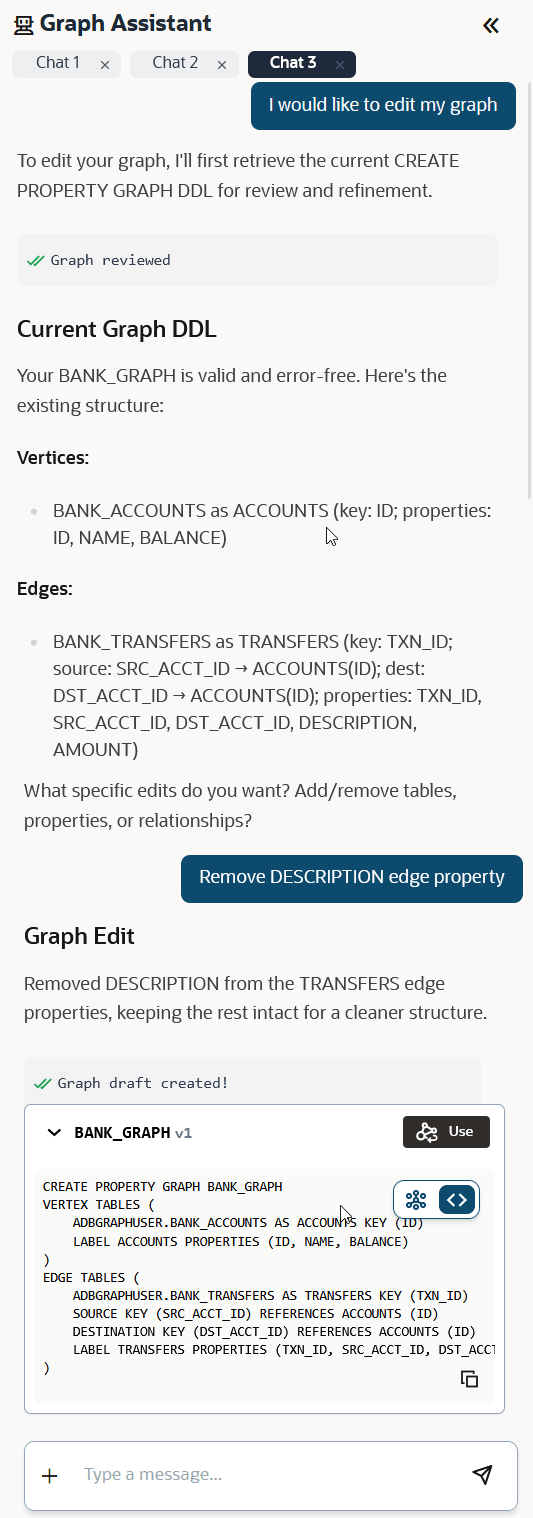
  1. Expand the Graph Assistant panel by clicking the arrow on the left side of the Modeler page.
  2. Click Edit graph above the message box.

    Note:

    Graph Assistant can review or modify only the graph that is currently loaded in Modeler. If you create a graph draft using Graph Assistant, click Use to load the generated graph into Modeler. Until you click Use, the graph DDL is not available and Graph Assistant cannot review or modify the graph.

    The summary of the property graph that is loaded in Modeler is retrieved and displayed.

  3. Prompt Graph Assistant to edit the graph as required.
  4. Review the generated graph and edit the graph as required.
  5. Click Update Graph on the top right of the page.
    The graph gets updated and can be queried in Graph Explorer.