Fixed Length Payload Support
B2B for Oracle Integration can consume positional flat or fixed length payloads (also called data files in native format) for inbound and outbound message translations. These files can be of fixed length for various fields, CSV, delimited, and other formats. B2B for Oracle Integration enables you to define a B2B schema and document from these various formats and include the document in a trading partner agreement.
How B2B for Oracle Integration Handles Fixed Length Payload
A fixed length payload include segments. Each segment includes a row that consists of multiple elements. Each element is defined by its length. A segment identifier can be present in the start of the fixed length payload as shown in Example 1, or it can be present anywhere else in the fixed length payload as shown in Example 2.
Example 1
This fixed length payload contains segments BGM and NAS. The segment identifier start position for BGM and NAS is at the beginning of each record. The BGM segment includes the element 04366170969 that can be a length of up to 35 characters, the element ZZ that can be a length of up to 4 characters, and so on.

After translation by the B2B action in an integration, the XML format looks as follows. Each segment consists of child elements corresponding to a unique row in the payload.
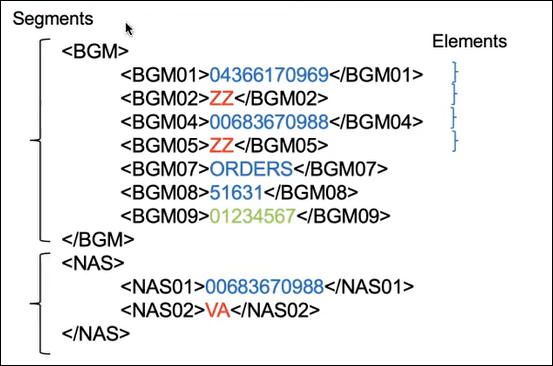
See When Segment Start Position is 1 (default).
Example 2
This fixed length payload contains segment INVBEG0. Note that the segment identifier start position is not at the start of the row. In this case, the segment identifier INVBEG0 is also an element. The INVBEG0 segment includes the element 00000001 that can be a length of up to 8 characters, the element INVBEG0 that can be a length of up to 7 characters, the element 012 that can be a length of up to 3 characters, and so on.
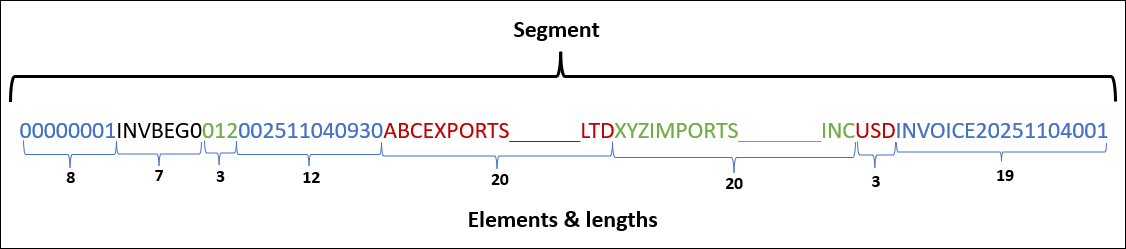
After translation by the B2B action in an integration, the XML format looks as follows. The segment consists of child elements corresponding to a unique row in the payload.
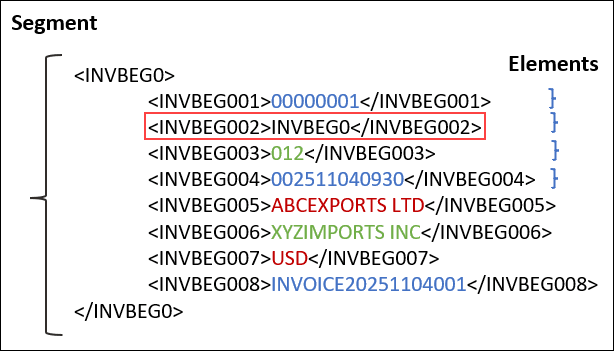
When segment start position is greater than 1, you have to ensure that the segment identifier field is added explicitly as a child element in the schema. As shown in the image above, even the segment identifier is a child element of the segment.
When Segment Start Position is 1 (default)
If the segment start position in the fixed length payload is 1 (which is the default position), then while creating a schema, you have to leave the default segment identifier start position value as 1. You only specify the characters to scan in order to identify the segment, and drag and drop the payload file into the user interface.
For example, while creating a schema with the following fixed length payload, you have to leave the segment identifier start position as the default value 1 and specify 3 as the characters to scan in order to create the schema segments from the first three characters in each row.
BGM94366179969                         ZZ               006836700988                       ZZ                 ORDERS51631
NAB568                92 Ritorazione e XXXXXXX Per XXXXXXX Srl presso Scuola XXXXXXX XXXXXXP.zza Vittorio Veneto 1 XXXXXXXX MI,
NAJ568                92 Ritorazione e XXXXXXX Per XXXXXXX Srl presso Scuola XXXXXXX XXXXXXP.zza Vittorio Veneto 1 XXXXXXXX MI,
NAI04366170969        VA Ritorazione e XXXXXXX Per XXXXXXX Srl                             Via Roma, 19
From this payload, four segments are created with default position and requirement options.
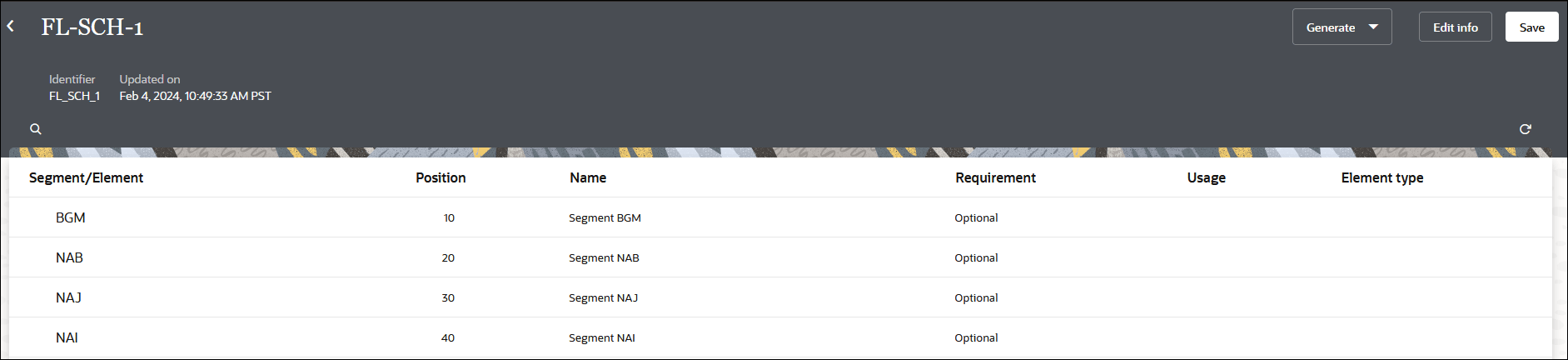
You can select Actions  to add child elements, new child elements, additional segments, and loops.
When Segment Start Position is Greater Than 1
If the segment start position in the fixed length payload is greater than 1, then while creating a schema, you have to specify the segment identifier start position as well as the characters to scan to identify the segment, and drag and drop the payload file into the user interface.
For example, while creating a schema with the following fixed length payload, you have to specify the segment identifier start position as 9 and the characters to scan in order to identify the segments in each row as 7.
00000001INVBEG0012002511040930ABCEXPORTS LTD     XYZIMPORTS INC      USDINVOICE20251104001
00000002INVHDR001200251104INV12345678   0000100000.00PAID   GOODS SHIPMENT  REF987654321
02A10234ITEMDTLBlue Notebook  00012.50STATIONERYA
02B20456ITEMDTLRed Pen        00001.20STATIONERYA
02C38791ITEMDTLOffice Chair   00125.00FURNITUREA
02D49285ITEMDTLWhiteboard     00045.99SUPPLIES  A
02E58302ITEMDTLUSB Cable      00003.49ELECTRONICAI
00000003INVEND00101000010000.00RECORDS=0003
In the Create schema panel, select the Document standard as Fixedlength, enter the Segment identifier start position as 9, enter the Scan for characters as 7, and then drag and drop the payload file.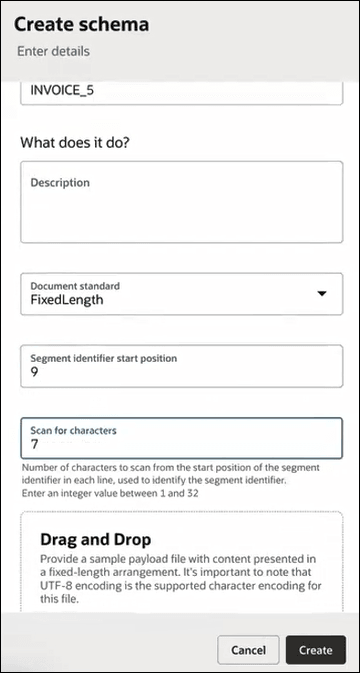
From this payload, four segments are created with default position and requirement options.
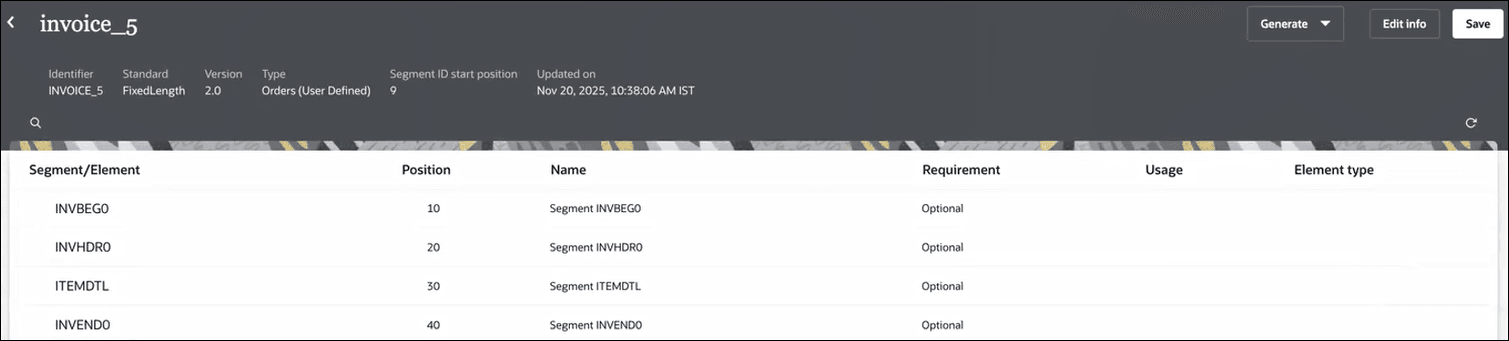
You can select Actions to add child elements, new child elements, additional segments, and loops.
Note:
When using a fixed length schema where the segment identifier’s start position is greater than 1, ensure that you explicitly map the segment element, along with other elements, while configuring the outbound payload for B2B message processing.Watch a video to learn more: