Assess a Predictive Model's Quality
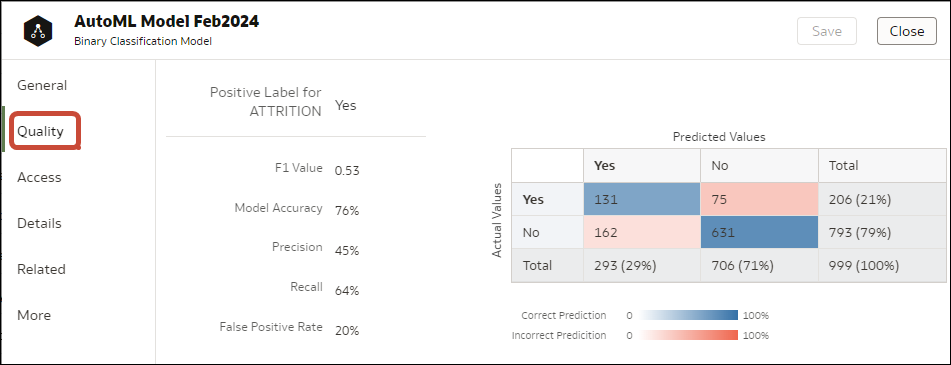
View information that helps you understand the quality of a predictive model. For example, you can review accuracy metrics like model accuracy, precision, recall, F1 value, and false positive rate.
Oracle Analytics provides similar metrics irrespective of the algorithm used to create the model, thereby making comparison between different models easy. During the model creation process, the input dataset is split into two parts to train and test the model based on the Train Partition Percent parameter. The model uses the test portion of the dataset to test the accuracy of the model that is built.
Based on your findings in the Quality tab, you may need to adjust the model parameters and retrain it.
- On your home page, click Navigator , and then click Machine Learning.
- Click the Models tab.
- Click the menu icon for a training model and select Inspect.
- Click the Quality tab to review the model's quality metrics and assess the model. For example, review the Model Accuracy score.
Tip: Click More to review details of the views generated for the model.