Generating RTCP
The Oracle Communications Session Border Controller can create and send RTCP reports using transcoding resources. This produces RFC 3550 compliant RTCP report information on media traffic for active sessions.
The system calculates these statistics using measurements on traffic between a target end station and itself. With respect to a given media session, the system does not produce end-to-end reports. In addition, the system can drop RTCP reports generated upstream so target stations don't receive RTCP reports that are redundant to its own.
RTCP reporting generated at the SBC provides the following benefits:
- Provide RTCP reporting to core applications that may otherwise not be receiving this data.
- Provide RTCP reporting to access elements, including mobile client applications, that may otherwise not be receiving this data.
- Generate valid RTCP data for transcoded calls.
- Generate RTCP data from the SBC's perspective.
- Applicable RTCP reports continue to be sent when a call is muted or placed on-hold.
- Send RTCP data when a call is placed on hold to keep the session alive.
You enable RTCP generation and specify the type of calls on which the system generates RTCP reports by creating rtcp-policy objects and applying them to realms. These objects specify whether to issue reports for transcoded calls, all calls, or in hold scenarios for transcoded or non-transcoded calls. You can also disable the policy.
To allow non-transcoded calls to use DSP resources for RTCP generation, you must create and apply a 'dummy' codec policy (one that allows all codecs) to the relevant realm.
How it Works
The SBC generates RTCP by sending RTCP sender report information to the media termination point within 5 seconds after an RTP session starts, according to RFC 3550. All RTCP messaging includes Sender Reports and, if the end station is receiving media, statistics corresponding to the received media. This messaging persists within 5-second windows for the duration of the session. The system sends a goodbye message no more than 20 ms after the call is complete. You must ensure that network NAT configuration does not block these final messages. Depending on call type and configuration, the system listens for and drops RTCP reports generated upstream. RTCP reports generated prior to transcoding provide unreliable information.
All reports include the source description with a CNAME string. The CNAME string is the IP address and port number used for the corresponding media stream's RTCP in the format:
<UDP Local Port Num for RTCP>@<IP address of the applicable steering pool>The system sources this data from the applicable steering pool configuration.
Using RTCP as a Keepalive Mechanism
Some VoLTE and CVoIP endpoints time out and terminate sessions when they do not receive RTP or RTCP traffic for a certain duration, such as when a call is on hold. You can prevent this by configuring the SBC to send RTCP reports while a call is on hold, even if you don't otherwise need RTCP.
RTCP generation uses transcoding (DSP) resources, even for non-transcoded calls. To mitigate potential performance impact, you can restrict the RTCP generation to occur during the hold duration only, rather than the whole call.
When configured this way, the SBC starts RTCP generation starts after receiving a 200 OK response to the reINVITE that initiates the hold. Non-terminal responses to the hold initiating reINVITE, such as 487 or 488, do not trigger RTCP generation. The SBC stops RTCP generation after receiving a 200 OK response to the reINVITE that resumes the call. Non-terminal responses to the call resuming reINVITE, such as 487 or 488, do not stop RTCP generation.
The behavior is the same for hairpin calls, with the SBC generating RTCP according to the configuration, and passing it through the proxy.
The SBC can send both RTCP and local media playback (ringback tones or music on hold) at the same time.
Because the SBC does not support transcoding for video m lines, RTCP cannot be generated for video calls.
Functional Matrix - Configuration vs. Call Type
RTCP generation and any corresponding RTCP blocking is a function of the type of call (transcoded or non-transcoded), and configuration.
The behavior depends on the setting of the rtcp-generate parameter of the rtcp-policy as follows:
- For non-transcoded calls:
- all-calls: RTCP is generated from the beginning of the call; existing RTCP is blocked.
- xcoded-calls-only or none: No RTCP is generated; existing RTCP passes.
- hold-calls-only or all-xcoded-and-hold-calls: When calls are placed on hold, RTCP is generated and existing RTCP is blocked. Generated RTCP stops when the call resumes and existing RTCP passes again. Transcoding resources are used only during the hold.
- For transcoded calls:
- none: No RTCP is generated; existing RTCP is blocked.
- all-calls or xcoded-calls-only: RTCP is generated from the beginning of the call; existing RTCP is blocked.
- hold-calls-only: Initially, no RTCP is generated and existing RTCP is blocked. When calls are placed on hold, RTCP is generated and existing RTCP is blocked. Generated RTCP stops when call resumes and existing RTCP continues to be blocked.
- all-xcoded-and-hold-calls: RTCP is generated from beginning of the call; existing RTCP is blocked. When calls are placed on hold, RTCP generation continues.
When RTCP generation is enabled for non-transcoded calls using the all-calls, hold-calls-only, or all-xcoded-and-hold-calls setting, these calls must negotiate a codec that the SBC can transcode. This ensures that the call utilizes the system's transcoding resources, which can then generate the RTCP.
Note:
A realm's rtcp-policy takes precedence over its block-rtcp setting. Specifically, if block-rtcp is disabled and the rtcp-policy is set to block, the system blocks existing RTCP.RTCP Generation Platform Support
RTCP Generation requires transcoding resources as the call would be treated as a transcoding call. For transcoding resources, the top codec in the offer requires a license in virtual SBC.
- Acme Packet 3950
- Acme Packet 4600
- Acme Packet 4900
- Acme Packet 6300
- Acme Packet 6350
- Acme Packet 6400
Virtual SBCs (vSBCs) require one or more transcoding cores in their startup configuration.
When generating RTCP for a non-transcoded call using DSPs, the system processes the call as transcoded, but uses a "null" transcoding methodology that sets the input codec equal to the output codec. This applies for RTCP generated for the entire call or for hold only.
The system provides alarms to help you verify the status of the hardware. See Maintenance and Troubleshooting earlier in the Transcoding chapter of this guide for more information about transcoding hardware status. See the Maintenance and Troubleshooting Guide for information about interface hardware status.
Use the show xcode xlist command to verify the presence of transcoding hardware with DSP modules.
RTCP Generation Call Flow
This section provides example call flows for RTCP generation, for transcoded and non-transcoded calls with and without holds.
Transcoded Call Flow
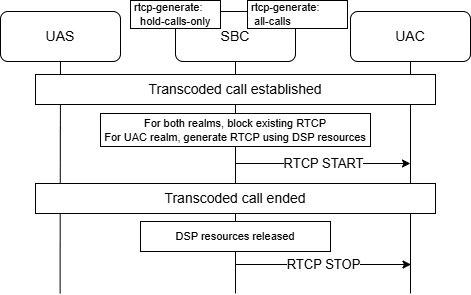
The following call flow shows a transcoded call when the UAS-facing realm has rtcp-generate set to hold-calls-only and the UAC-facing realm has rtcp-generate set to all-calls. In this flow, any existing RTCP is blocked for both realms. For the UAC-facing realm, RTCP generation starts when the call is established and stops after the call ends. For the UAS-facing realm, no RTCP is generated, because no holds occur in the flow. Because it is a transcoded call, DSP resources are in use for the call duration. The call flow would be the same if the UAS-facing realm had rtcp-generate set to none.
Non Transcoded Call Flow
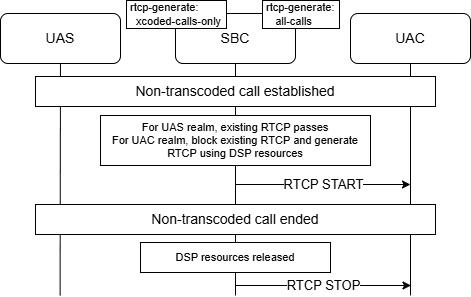
The following call flow shows a non-transcoded call when the UAS-facing realm has rtcp-generate set to xcoded-calls-only and the UAC-facing realm has rtcp-generate set to all-calls. In this flow, for the UAC-facing realm, any existing RTCP is blocked, RTCP generation starts when the call is established and stops after the call ends. For the UAS-facing realm, no RTCP is generated, because it is not transcoded. DSP resources are in use for the call duration. The call flow would be the same if the UAS-facing realm had rtcp-generate set to none.
Transcoded Call Flows with Hold
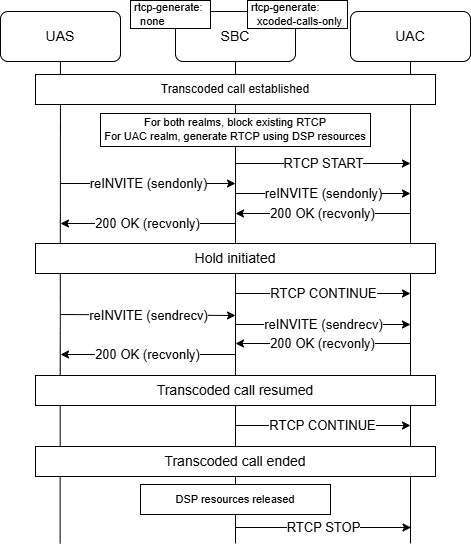
The following call flow shows a transcoded call when the UAS-facing realm has rtcp-generate set to none and the UAC-facing realm has rtcp-generate set to xcoded-calls-only. In this flow, any existing RTCP is blocked for both realms. For the UAC-facing realm, RTCP generation starts when the call is established, continues while the call is placed on hold, and stops after the call ends. For the UAS-facing realm, no RTCP is generated. Because it is a transcoded call, DSP resources are in use for the call duration.
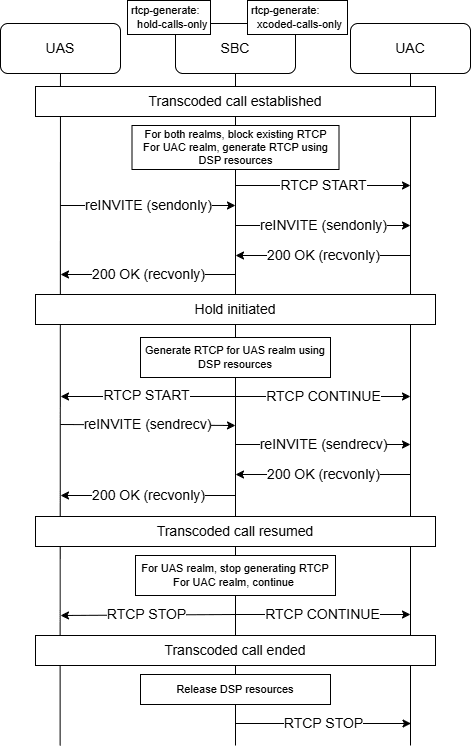
The following call flow shows a transcoded call when the UAS-facing realm has rtcp-generate set to hold-calls-only and the UAC-facing realm has rtcp-generate set to xcoded-calls-only. In this flow, any existing RTCP is blocked for both realms. For the UAC-facing realm, RTCP generation starts when the call is established, continues while the call is placed on hold, and stops after the call ends. For the UAS-facing realm, RTCP generation starts when the hold is initiated and stops when the call resumes. Because it is a transcoded call, DSP resources are in use for the call duration.
Non Transcoded Call Flows with Hold
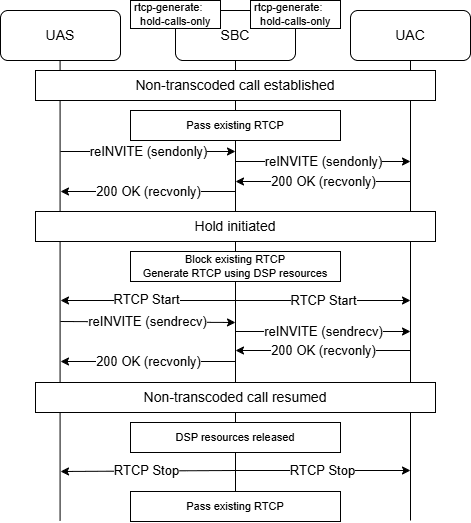
The following call flow shows a non-transcoded call when the both realms have rtcp-generate set to hold-calls-only and set a dummy codec policy.
In this flow, any existing RTCP is initially passed on. For both sides, RTCP generation starts when the hold is initiated and stops when the call resumes. DSP resources are in use for the hold duration only.
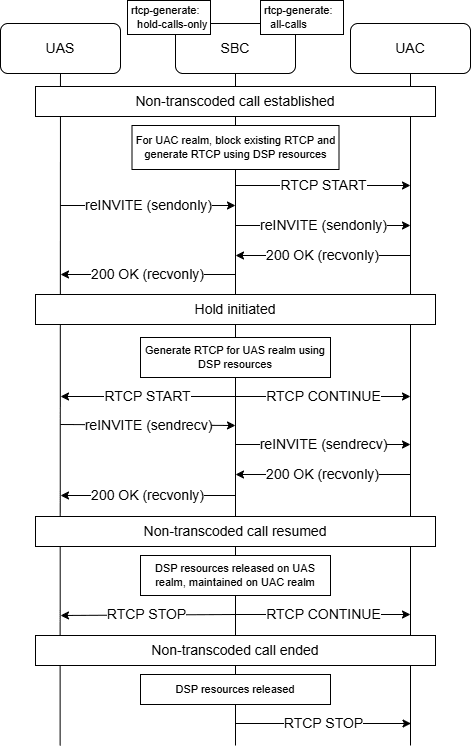
The following call flow shows a non-transcoded call when the UAS-facing realm has rtcp-generate set to hold-calls-only and the UAC-facing realm has rtcp-generate set to all-calls. Both realms have a dummy codec policy.
In this flow, for the UAC-facing realm, any existing RTCP is blocked, RTCP generation starts when the call is established, continues while the call is placed on hold, and stops after the call ends. For the UAS-facing realm, RTCP generation starts when the hold is initiated and stops when the call resumes. Because RTCP is generated at the start of the call for the UAC-facing realm, DSP resources are in use for the call duration.
Configuring RTCP Generation
The procedure below provides the steps needed to configure RTCP generation on the SBC.
Obtaining System Information about RTCP Generation
The Oracle Communications Session Border Controller provides information about RTCP report generation within log files.
The log.mbcd file, when configured to capture at the DEBUG level, includes system messages related to invoking and firing rtcp-policy rules.
An example of applicable log information is provided below.
[XC] NatFlow::check_transcoding()
[XC]  SessionSetRtcpPorts for A: src=10001 dest=20001
[XC] NatFlow::check_transcoding() SessionSetRtcpOptions(A):
[XC]  RtcpPolicy "my_rtcp_policy"; rtcp-generate set to: RTCP_GEN_MODE_ALL_CALLS
[XC]  Will generate RTCP with CNAME=192.160.1.100:10001
[XC] NatFlow::check_transcoding()
[XC]  SessionSetRtcpPorts for B: src=10001 dest=20001
[XC] NatFlow::check_transcoding() SessionSetRtcpOptions(B):
[XC]  RtcpPolicy "my_rtcp_policy"; rtcp-generate set to: RTCP_GEN_MODE_ALL_CALLS
[XC]  Will generate RTCP with CNAME=172.16.1.100:10101
Error and non-error system messages related to RTCP generation can be found in log.sipd, log.mbcd, and log.xserv.
Forced RTCP Receiver Report Generation
When the
Oracle Communications Session Border Controller (SBC) generates a Real-Time Control Protocol (RTCP) Sender Report using Digital Signalling Processors (DSP)s, the report includes blocks for both sender and receiver statistics in the same report per RFC 3550. When you want to generate a separate RTCP Receiver Report, for example to encapsulate the receiver statistics differently, add the
xcode-gratuitous-rtcp-report-generation option in the media-manager configuration. After you add the RTCP Receiver Report generation option and reboot the
SBC, the system runs RTCP Receiver Reports for all media sessions that generate RTCP from DSPs.
Only systems with transcoding resources can support RTCP Receiver Reports.
- for media streams.
- for media streams with IPv6 Media Bypass OFF.
- when the end point places a call on hold.
- when the system plays music on hold.
- for every secure call for every media stream the SBC receives and sends using TLS and SRTP.
- for every secure call for every media stream the SBC receives and sends using TLS and SRTP with IPv6 Media Bypass OFF.
You can configure
xcode-gratuitous-rtcp-report-generation from the ACLI and the Web GUI.
Generate an RTCP Receiver Report
When you want to generate a Real-Time Transport Control Protocol (RTCP) Receiver Report separately from the default Sender-Receiver Report (RFC 3550), for example to encapsulate the receiver statistics differently, add the
xcode-gratuitous-rtcp-report-generation option in the media-manager configuration. After you add the option and reboot the system, the
SBC runs RTCP Receiver Reports for all media sessions that generate RTCP from DSPs.
When you add the
xcode-gratuitous-rtcp-report-generation option, be sure to type the
+ character before the option. The
+ character appends the new option to the realm configuration's options list. Without the + character, the system overwrites any previously configured options.