2.14.1 Using Quorum Disks
Exadata uses quorum disks to maintain redundancy and high availability for critical Oracle ASM metadata and clusterware voting files on small Exadata systems.
Note:
Exadata only uses quorum disks in conjunction with Oracle ASM storage. Quorum disks are not required in conjunction with Oracle Exadata Exascale.
Oracle Clusterware uses voting files, also known as voting disks, as a quorum mechanism that ensures only one consistent set of nodes remains operational, which protects data integrity and cluster stability. Each node periodically writes a heartbeat (vote) to the voting files. The cluster uses these heartbeats to determine which nodes are active members of the cluster and which nodes to evict. To maintain high availability, the system maintains multiple voting file copies.
Each Oracle Automatic Storage Management (Oracle ASM) disk group stores critical metadata in an internal structure called the Partner Status Table (PST). The PST records disk metadata, including disk number, status (online or offline), partner disk number, failure group, and heartbeat status. Like the Clusterware voting files, the PST acts as a quorum mechanism to ensure that a disk group can mount safely. To maintain high availability, the system maintains multiple PST copies.
A failure group is a subset of the disks in an Oracle ASM disk group, which could fail at the same time because they share hardware. On Exadata, the storage in each storage server is automatically treated as a separate failure group.
To tolerate a simultaneous double storage failure, Oracle recommends using a minimum of five failure groups to store the PST and clusterware voting files. To tolerate a single failure, Oracle recommends a minimum of three failure groups. In line with these recommendations, each high redundancy disk groups requires a minimum of five failure groups. This configuration ensures that the entire system can tolerate a simultaneous double storage failure. Systems that use normal redundancy ASM disk groups can only tolerate a single failure. On such systems, a minimum of three failure groups are required for the PST and clusterware voting files.
A quorum failure group is a special type of failure group that does not contain user data. A quorum failure group contains only a quorum disk, which may be used to store copies of the PST and clusterware voting files. Quorum failure groups (and quorum disks) are only required on Exadata systems that do not contain enough storage servers to provide the required minimum number of failure groups. The most common requirement for quorum failure groups (and quorum disks) is on Exadata systems with high redundancy ASM disk groups and fewer than 5 Exadata storage servers.
You can create quorum failure groups (and quorum disks) with Oracle Exadata Deployment Assistant (OEDA) as part of the Exadata deployment process or create and manage them later using the Quorum Disk Manager Utility.
Quorum disks are implemented on Exadata database servers using iSCSI
devices. The iSCSI quorum disk implementation leverages high performance and high
availability by using the Exadata RDMA Network Fabric. As
illustrated in the following diagram, the quorum disks leverages a multipath device
where each path corresponds to a separate iSCSI device for each RDMA Network Fabric port on the database node (one for ib0 or
re0 and the other for ib1 or
re1).
Figure 2-1 Multipath Device Connects to Both iSCSI Devices in an Active-Active System
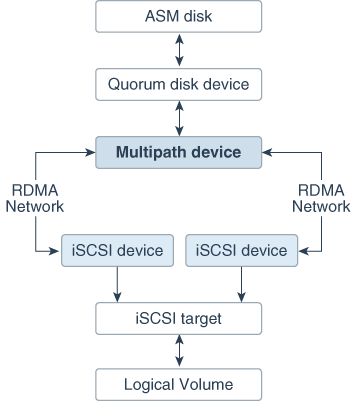
Description of "Figure 2-1 Multipath Device Connects to Both iSCSI Devices in an Active-Active System"
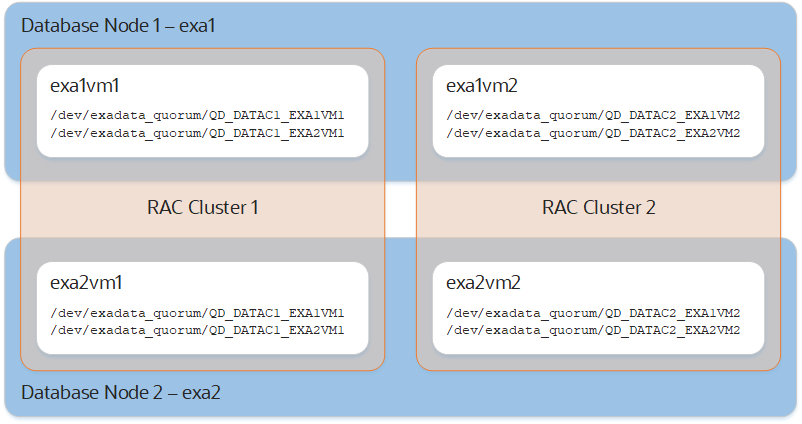
Quorum disks can be used on bare metal Exadata implementations or in conjunction with Virtual Machine (VM) clusters. On systems with VM clusters, the quorum disk devices reside in the VM guests as illustrated in the following diagram.
Note:
For pkey-enabled environments, the interfaces used for discovering the targets should be the pkey interfaces used for the Oracle Clusterware communication. These interfaces are listed using the following command:
Grid_home/bin/oifcfg getif | grep cluster_interconnect | awk '{print $1}'