Create an Application and a Database using the Essbase web interface
An Essbase application is a structure for managing one or more databases (cubes) and related artifacts/files.
There are several ways to create Essbase applications and cubes:
- Importing from an application workbook. See Design and Create Cubes Using Application Workbooks.
- Building from Cube Designer. See Work with Application Workbooks in Cube Designer.
- Using the Import LCM job or the lcmimport CLI command.
- Using the MaxL create application and create database statements.
- Using Essbase APIs.
- Creating from scratch in the Essbase web interface.
To create an application and database from scratch using the Essbase web interface,
- Log in to Essbase as a power user or a service administrator. Refer to Understand Your Access Permissions in Essbase.
- On the Home page, click Create.

- Enter names for the application and the database. Refer to Naming Conventions for Applications and Databases for restrictions.
- Select a database type, Aggregate storage, or Block storage. Refer to Comparison of Aggregate and Block Storage.
- Select whether to allow duplicate member names and enable scenarios.
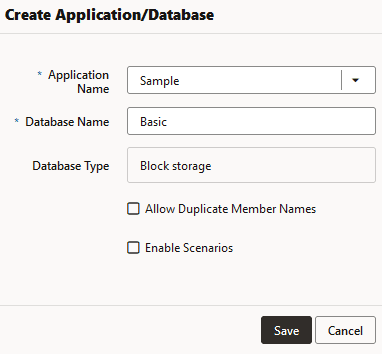
- Click Save.
See Also