Oracle Database Security Assessment Report - Operating System
The Oracle Database Security Assessment Report - Operating System section displays the following information:
| Name | Finding ID | Description | Link(s) |
|---|---|---|---|
| Installation Account | OS.INSTALLATIONUSER | This check specifies the Oracle installation owner. | - |
| OS Authentication | OS.AUTH | Displays information about operating system group names and users that can exercise administrative privileges. OS authentication allows operating system users within the specified user group to connect to the database with administrative privileges. This shows the OS group names and users that can exercise each administrative privilege. OS users with administrative privileges should be reviewed to prevent any unauthorized, malicious or unintentional access to the database. | - |
| Segregation of Production and Development Databases | OS.MULTIDB | Checks for databases/instances running on the same server. If there are multiple databases/instances running on the same server ensure that it is not hosting production and test/development databases. | |
| Process Monitor Processes | OS.PMON | Displays whether Process Monitor (PMON) processes are running under the The PMON process monitors user processes and frees resources when they terminate. This process should run with the user ID of the | - |
| Agent Processes | OS.AGENT | Displays whether Agent processes owners overlap with Listener or Process Monitor (PMON) process owners. Agent processes should run with a user ID separate from the database and listener processes. These processes should run under a user ID separate from the database and listener processes. | - |
| Listener Processes | OS.LISTENER | Displays whether Listener process owners overlap with Agent or Process Monitor (PMON) process owners. Listener processes accept incoming network connections and connect them to the appropriate database server process. These processes should run with a user ID separate from the database and agent processes. These processes should be administered only through local OS authentication. | |
| Listener Ports | OS.LISTENERPORTS | Displays listener ports. | - |
| CMAN Remote Admin | OS.CMANLOCAL | Checks if Oracle Connection Manager is installed in the server and if yes, if CMAN remote administration is configured. | |
| Diagnostic Destination | OS.DIAGNOSTICDEST | Checks value and permissions of DIAGNOSTIC_DEST. Checks that DIAGNOSTIC_DEST is set to either | |
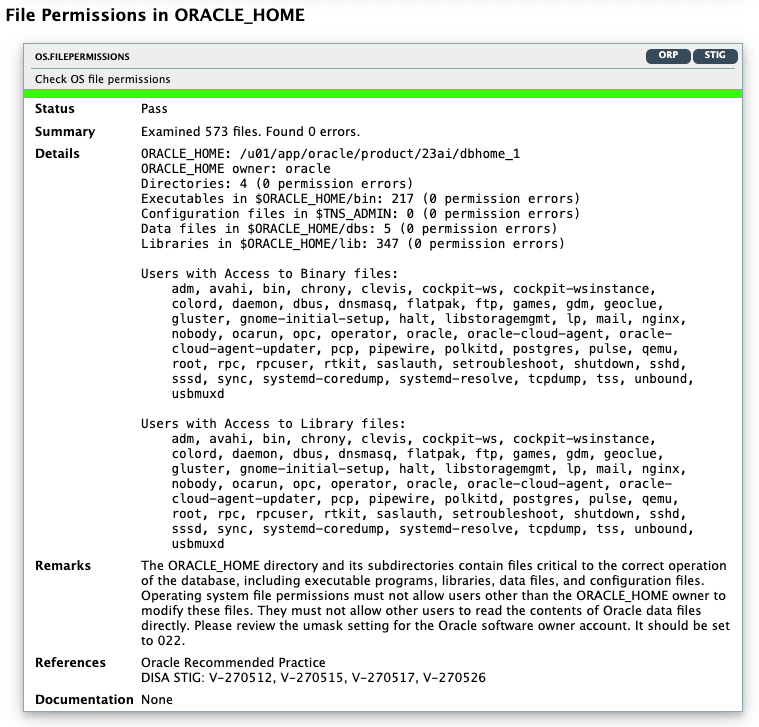
| File Permissions in ORACLE_HOME | OS.FILEPERMISSIONS | Displays information about file permissions errors in the The | - |
Note:
On Windows, the DBSAT Collector collects data only from SQL queries. Since the data from the operating system commands is missing, the DBSAT Reporter runs a subset of rules on this data. Operating System findings are not available for databases running on Windows platform.
The following figure displays an example of the Oracle Database Security Assessment Report - Operating System section:
Description of the illustration Oracle Database Security Assessment Report - Operating System