Oracle Database Security Assessment Report - Database Configuration
The Oracle Database Security Assessment Report - Database Configuration section displays the following information:
| Name | Finding ID | Description | Link(s) |
|---|---|---|---|
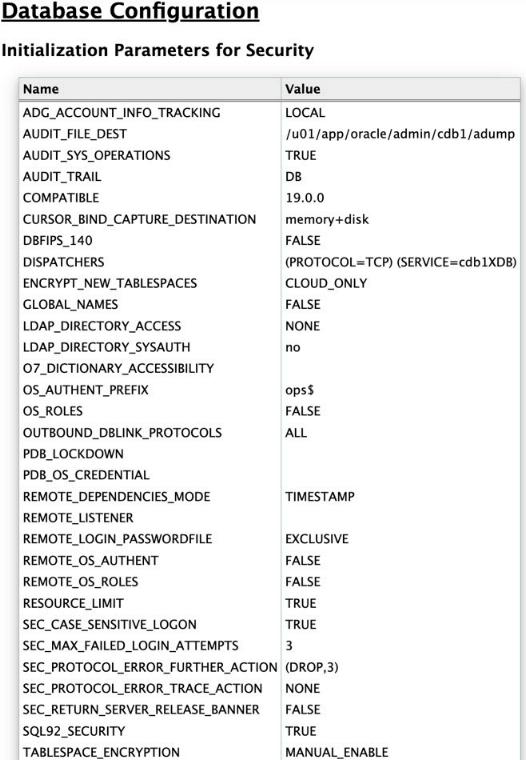
| Initialization Parameters for Security | - | Displays security related Database initialization parameters and their values. | - |
| Pre-Authenticated Request URL | CONF.PREAUTHREQUESTURL | Displays pre-authenticated URL information for Autonomous Database Serverless databases including who can manage them via the DBMS_DATA_ACCESS package. | - |
| Authentication Configuration | CONF.AUTHN | Displays information about the user account initialization parameters.
| |
| Lockdown Profiles | CONF.LOCKDOWNPROFILES | Checks whether a PDB lockdown profile is configured for the current PDB. If a profile is set, it lists the restricted functionalities along with their current status. Also verifies if the PDB_LOCKDOWN parameter is set and, if so, displays its value. | |
| PDB OS User | CONF.DEFAULTPDBOSUSER | Checks if the highly privileged Oracle OS user is set for the PDB_OS_CREDENTIAL parameter. | - |
| Control Files | CONF.CONTROLFILES | Checks if control files are multiplexed and lists all the control file locations. The | |
| Redo Log Files | CONF.REDOLOGS | Checks if the defined redo log files follow best practices and lists their location. Redo logs should be multiplexed and stored on different physical disks. | |
| Archive Log Mode | CONF.ARCHIVELOG | Checks if the database is in ARCHIVELOG or NOARCHIVELOG mode. If set, also displays the archive_log_destination or the recovery_file_destination. Also displays the archive_log_destination or the recovery_file_destination for the standalone databases. | |
| Database Backup | CONF.BACKUP | Displays information about Database backup records. Database should be backed up regularly to prevent loss of data in the event of a system failure. Oracle Recovery Manager (RMAN) allows performing backup and recovery tasks on your databases. Unencrypted backup data should not be transported on tape or disk to offsite storage for safekeeping. | |
| Instance Name Check | CONF.INSTANCENAME | Displays whether the instance name contains the Database version number. Instance names should not contain Oracle version numbers. Service names may be discovered by unauthenticated users. If the service name includes version numbers or other database product information, a malicious user may use that information to develop a targeted attack. | - |
| SQL Firewall | CONF.SQLFIREWALL | Checks if SQL Firewall is enabled and displays the users that are affected by the policy and whether the policy is in observing, blocking, or enforcing mode. Also, details if the SQL and context allow-lists are in enforcement mode or not. Only applicable to Oracle AI Database versions >= 26ai. | |
| Read-only ORACLE_HOME | CONF.READONLYHOME | Checks if the ORACLE_HOME is read-only. Only applicable to Oracle Database versions >=18c. | |
| Access to Dictionary Objects | CONF.SYSTEMOBJ | Displays whether access to dictionary objects is properly limited. When | - |
| Inference of Table Data | CONF.SQL92SECURITY | Displays whether data inference attacks are properly blocked. When SQL92_SECURITY is set to TRUE, UPDATE and DELETE statements that refer to a column in their WHERE clauses will succeed only when the user has the privilege to SELECT from the same column. This parameter should be set to TRUE so that this requirement is enforced in order to prevent users from inferring the value of a column which they do not have the privilege to view. | |
| Access to Password File | CONF.PASSWORDFILE | Displays whether the password file is configured correctly. The | |
| Network Communication | CONF.NETWORK | Displays information about initialization parameters that determine the database server response to malformed packets. Also, includes details on usage of a remote listener and if database server version information is hidden from unauthenticated client requests.
| |
| External OS Authentication | CONF.EXTERNALOSAUTH | Displays whether the Oracle Database roles are defined and managed by the database itself or by the host operating system (for local and remote authentication). The | |
| Unused Components | CONF.DBCOMPONENTS | Checks to see if components like XOQ, CONTEXT, SDO, DV, OLS are installed/enabled and not being used. | - |
| Job Details | CONF.JOBS | Checks the scheduled database jobs and users who can administer them. Checks include:
| - |
| Triggers | CONF.TRIGGERS | Displays information about logon triggers. A trigger is code that executes whenever a specific event occurs, such as inserting data in a table or connecting to the database. Disabled triggers are a potential cause for concern because whatever protection or monitoring they may be expected to provide is not active. | |
| Disabled Constraints | CONF.CONSTRAINTS | Displays information about disabled constraints. Constraints are used to enforce and guarantee specific relationships between data items stored in the database. Disabled constraints are a potential cause for concern because the conditions they ensure are not enforced. | |
| External Procedures | CONF.EXTERNALPROCS | Displays information about external procedures and services. External procedures allow code written in other languages to be executed from PL/SQL. Note that modifications to external code cannot be controlled by the database. Be careful to ensure that only trusted code libraries are available to be executed. Although the database can spawn its own process to execute the external procedure, it is advisable to configure a listener service for this purpose so that the external code can run as a less-privileged OS user. The listener configuration should set | |
| Source Code Analysis | CONF.SOURCEANALYSIS | Checks DBA_SOURCE for non-oracle maintained procedures and functions using RAISE_APPLICATION_ERROR and DBMS_OUTPUT.PUT_LINE. | |
| Directory Objects | CONF.DIRECTORYOBJ | Displays information about directory objects. Directory objects allow access to the server's file system from PL/SQL code within the database. Access to files that are used by the database kernel itself should not be permitted, as this may alter the operation of the database and bypass its access controls. | |
| Directory Separation for Multi-applications | CONF.DIRECTORYSEPARATION | Displays information about the file paths for data files, redo log files, and audit files (AUDIT_FILE_DEST). | - |
| Database Links | CONF.DATABASELINKS | Displays information about database links. Database links allow users to execute SQL statements that access tables in other databases. This allows for both querying and storing data on the remote database. It is advisable to set | |
| Network Access Control | CONF.NETWORKACL | Displays information about Network Access Control Lists (ACLs). Network ACLs control the external servers that database users can access using network packages such as UTL_TCP and UTL_HTTP. Specifically, a database user needs the connect privilege to an external network host computer if he or she is connecting using the | |
| XML Database Access Control | CONF.XMLACL | Displays information about XML Database Access Control Lists (ACLs). XML ACLs control access to database resources using the XML DB feature. Every resource in the Oracle XML DB Repository hierarchy has an associated ACL. The ACL mechanism specifies a privilege-based access control for resources to principals, which are database users or roles. Whenever a resource is accessed, a security check is performed, and the ACL determines if the requesting user has sufficient privileges to access the resource. Make sure that these privileges are limited to the minimum required by each user. | |
| File System Access | CONF.FILESYS | Checks for UTL_FILE_DIR for older database versions where the parameter is not deprecated. | - |
| Trace Files | CONF.TRACEFILELIMIT | Displays information about the initialization parameters for trace files. The hidden parameter | - |
| Database Resource Plans | CONF.RESOURCEMANAGER | Check for users with EXECUTE on DBMS_RESOURCE_MANAGER package and with ADMINISTER RESOURCE MANAGER system privilege. Also lists the existing resource plans. | |
| Database Shared Memory | CONF.SGA | Checks if only the Oracle software installation owner can have read and write access to the SGA. Checks for ALLOW_GROUP_ACCESS_TO_SGA. | |
| Database Vault Configuration | CONF.DATABASEVAULT | Checks for Database Vault integrity. Validates the presence of both the DVSYS and DVF schemas, checks for invalid Database Vault objects, identifies rules that are not associated with any rule sets, and flags any empty rule sets. | - |
| Security Assessment | CONF.ASSESSMENT | Displays a count of findings in each section that should be reviewed. | - |
The following figure displays an example of the Oracle Database Security Assessment Report - Database Configuration section:
Oracle Database Security Assessment Report - Database Configuration
Description of the illustration Oracle Database Security Assessment Report - Database Configuration