Overview
The Oracle Database API for MongoDB enables MongoDB applications, drivers, and tools to connect to Oracle Database. The API receives commands through the MongoDB wire protocol and translates those commands into SQL statements.
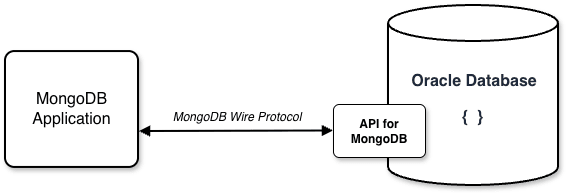
The API for MongoDB is intended to support the following use cases:
-
Drop-in compatibility: Migration from MongoDB to Oracle Database can be as simple as updating the connection string. Consolidating applications on a single database platform can reduce maintenance and licensing costs. The API is included with an Oracle Database license; no additional options or fees apply. See Migrating Data and Applications.
-
Leveraging existing skill sets: Developers who build applications for MongoDB can continue to work without learning SQL. At the same time, DBAs and analysts can run SQL or REST queries on the same collections for analytics and reporting.
-
Multiple data and workload types: MongoDB mainly supports operational workloads over collections of JSON documents. Oracle Database is a converged, translytical platform for demanding OLTP and OLAP workloads across relational, JSON, graph, spatial, and vector data. MongoDB applications can do more when connected to Oracle Database.
-
Advanced performance: Oracle Database provides capabilities such as parallel query processing, storage-cell query evaluation, and Oracle Real Application Clusters. Oracle’s binary JSON format (OSON) offers efficient in-place data access and performs faster than MongoDB’s BSON format, which requires linear scans. MongoDB applications that run against Oracle Database often deliver higher responsiveness, resilience, and scalability.
Getting started
A MongoDB application behaves the same way whether it connects to MongoDB or to Oracle Database. Consider this MongoDB shell session (mongosh):
mongosh 'mongodb://admin:####@ORACLEDB.oraclecloudapps.com:27017/admin?...'

// create a collection named "employees"
admin> db.createCollection('employees')
{ ok: 1 }

// insert three employee documents into the collection
admin> db.employees.insertOne({_id:1, "name":"SMITH", "job":"CLERK", "sal":800});
{ acknowledged: true, insertedId: 1 }
admin> db.employees.insertOne({_id:2, "name":"ALLEN", "job":"SALESMAN", "sal":1600});
{ acknowledged: true, insertedId: 2 }
admin> db.employees.insertOne({_id:3, "name":"WARD", "job":"SALESMAN", "sal":1250});
{ acknowledged: true, insertedId: 3 }

// find the name and job for employees where the salary is greater than 1200
admin> db.employees.find({"sal" : {$gt : 1200}}, {"name" : 1, "job" : 1,  "_id" : 0});
[
  { name: 'ALLEN', job: 'SALESMAN' },
  { name: 'WARD', job: 'SALESMAN' }
]
This shell session creates a collection, inserts documents, and then retrieves some of the data. The behavior of this script will be the same regardless of whether it runs against MongoDB or Oracle Database. However, when it runs against Oracle Database, each command received by the API will be transparently converted into a corresponding SQL statement. The following table shows SQL similar to what would be internally generated by the API in this example:
| Command | mongosh | SQL |
|---|---|---|
| CREATE | db.createCollection('employees'); |
create json collection table "employees"; |
| INSERT | db.employees.insertOne(
{_id:1, "name":"SMITH", "job":"CLERK", "sal":800}
); |
insert into "employees" values(
  '{_id:1, "name":"SMITH", "job":"CLERK", "sal":800}'
); |
| FIND | db.employees.find(
{"sal" : {$gt : 1200}},
{"name" : 1, "job" : 1, "_id" : 0}
); |
select e.data."name", e.data."job"
from employees e
where e.data."sal" > 1200;
|
These SQL/JSON statements the API uses internally can also be submitted directly from SQL clients like sqlcl or using the $sql aggregation stage. Regardless of whether you access a collection through MongoDB clients, SQL tools, or REST endpoints, the data resides in the same Oracle Database schema. Teams can combine these access patterns without duplicating data or building complex data movement processes. SQL is always available when it helps but never required when it doesn’t.
Enabling the API
The Oracle Database API for MongoDB is available with Oracle Database 23ai and later, including Autonomous Database deployments. The activation steps vary by database type. Use the following links for detailed instructions:
| Database Type | Description |
|---|---|
| Autonomous AI Database Serverless |
Available as part of the managed service. Using Oracle Database API for MongoDB Quick Start Guide for MongoDB Migrations |
| Autonomous AI Database Dedicated |
Available as part of the managed service. Use MongoDB API with Oracle Autonomous AI Database on Dedicated Exadata Infrastructure |
| All other Oracle Database versions |
User-managed outside the database as part of Oracle REST Data Services. Oracle Database API for MongoDB Support Oracle Database API for MongoDB – Best Practices |
The remainder of this documentation applies to all three deployment options. Examples use the MongoDB Shell (mongosh) unless stated otherwise.