Import Agentic Flows from External Frameworks
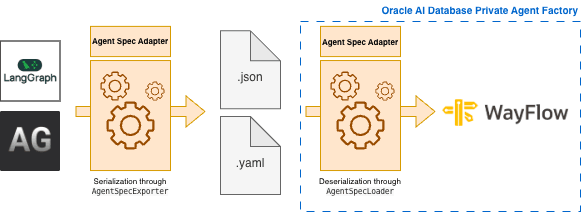
You can import flows created with the LangGraph or AutoGen frameworks into the Agent Factory by generating JSON or YAML representations using the Open Agent Specification, a standard that enables serialization and deserialization of agentic flows via runtime adapters.
-
Create a flow using LangGraph or AutoGen.
-
Use PyAgentSpec library to generate the JSON or YAML representation of your flow.
-
In Agent Factory, go to My Custom Flows in the left sidebar and select Import flow button.
-
Enter a name and description for the flow, then upload the JSON or YAML file you generated in Step 2. Select Confirm to start the import.
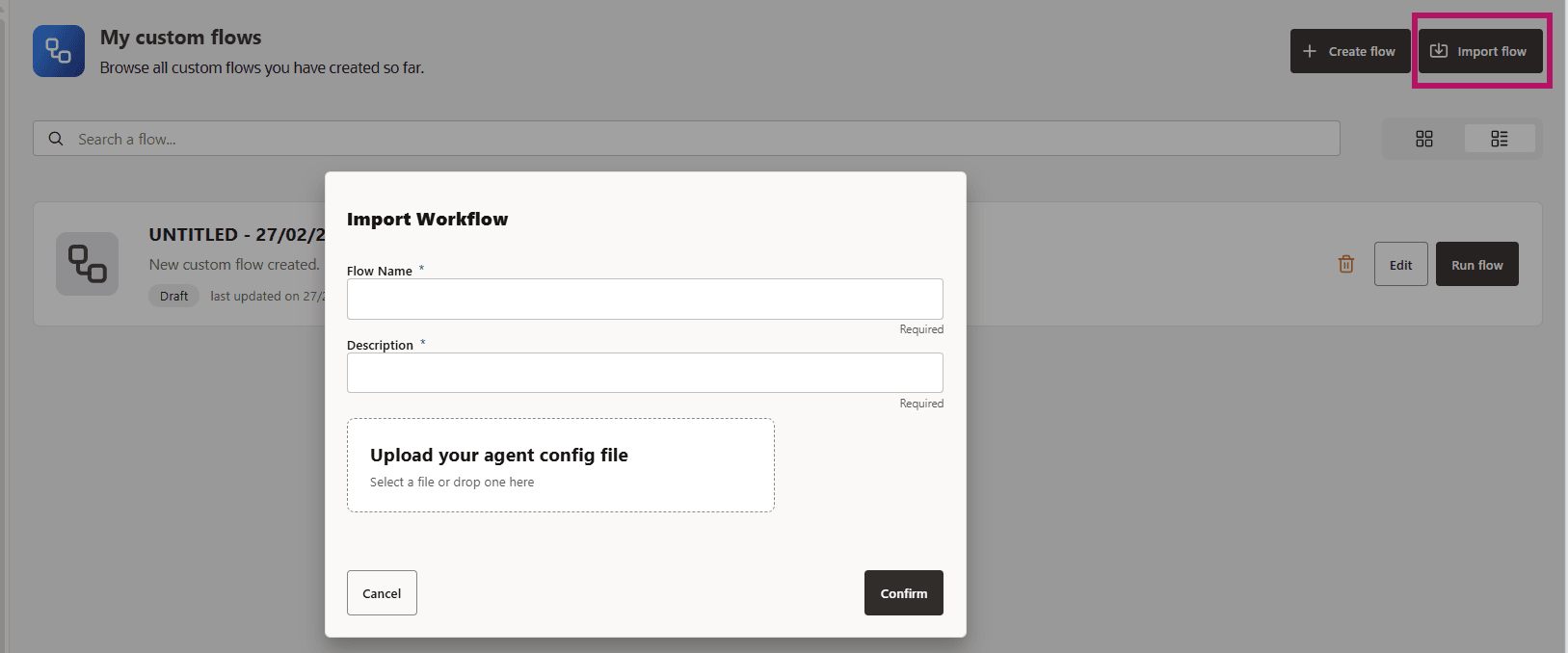
Note: Tool use is not currently supported for imported flows. Upload JSON or YAML files of agentic flows without any tool references. If your agent configuration file has references to tools, the import will fail with “Tools are missing to be declared” error.
Once the import completes successfully, you can view the flow on the My Custom Flows page. You can run or delete the imported flow; editing imported flows is not currently supported.