Prepare Database Connection, System, and Parameter Settings
Learn about configuring database connection, system, and parameter settings for Oracle GoldenGate for Oracle.
Enable GoldenGate Replication and Archive Mode
Step 1: Enable GoldenGate Replication
The database services required to support Oracle GoldenGate Extract and Replicat must be enabled explicitly for Oracle AI Database.
To enable Oracle GoldenGate replication, set the following database initialization parameter. All instances in Oracle RAC must have this value set to TRUE if using Oracle GoldenGate on any of the nodes.
ALTER SYSTEM SET enable_goldengate_replication = true SCOPTE=both;For more information about this parameter, see Initialization Parameters.
Steps 2: Enable the Archive Mode
Oracle Databases must be in ARCHIVELOG mode so that Extract can process the log files. To switch on the ARCHIVELOG mode, follow the steps provided in Changing the Database Archiving Mode.
Setting Flashback Query
To know about the data that Oracle GoldenGate fetches, see Details of Support for Oracle Data Types and Objects.
By default, Oracle GoldenGate uses Flashback Query to fetch the values from the undo (rollback) tablespaces. That way, Oracle GoldenGate can reconstruct a read-consistent row image as of a specific time or SCN to match the redo record.
For best fetch results, configure the source database as follows:
-
Set a sufficient amount of redo retention by setting the Oracle initialization parameters
UNDO_MANAGEMENTandUNDO_RETENTIONas follows (in seconds).UNDO_MANAGEMENT=AUTO UNDO_RETENTION=86400 UNDO_RETENTION can be adjusted upward in high-volume environments. -
Calculate the space that is required in the undo tablespace by using the following formula.
*undo_space* = UNDO_RETENTION * *UPS* + *overhead*Where:
-
undo_space is the number of undo blocks.
-
UNDO_RETENTIONis the value of theUNDO_RETENTIONparameter (in seconds). -
UPS is the number of undo blocks for each second.
-
overhead is the minimal overhead for metadata (transaction tables, etc.).
Use the system view
V$UNDOSTATto estimate UPS and overhead. -
-
For tables that contain
LOBs, do one of the following:-
Set the
LOBstorage clause toRETENTION. This is the default for tables that are created whenUNDO_MANAGEMENTis set toAUTO. -
If using
PCTVERSIONinstead ofRETENTION, setPCTVERSIONto an initial value of 25. You can adjust it based on the fetch statistics that are reported with theSTATS EXTRACTcommand. If the value of theSTAT_OPER_ROWFETCHCURRENTBYROWIDorSTAT_OPER_ROWFETCH_CURRENTBYKEYfield in these statistics is high, increasePCTVERSIONin increments of 10 until the statistics show low values.
-
Oracle GoldenGate provides the following parameters to manage fetching.
| Parameter or Command | Description |
|---|---|
STATS EXTRACT command with REPORTFETCH option |
Shows Extract fetch statistics on demand. |
STATOPTIONS parameter with REPORTFETCH option |
Sets the STATS EXTRACT command so that it always shows fetch statistics. |
MAXFETCHSTATEMENTS parameter |
Controls the number of open cursors for prepared queries that Extract maintains in the source database, and also for SQLEXEC operations. |
MAXFETCHSTATEMENTS parameter |
Controls the default fetch behavior of Extract: whether Extract performs a flashback query or fetches the current image from the table. |
FETCHOPTIONS parameter with the USELATESTVERSION or NOUSELATESTVERSION option |
Handles the failure of an Extract flashback query, such as if the undo retention expired or the structure of a table changed. Extract can fetch the current image from the table or ignore the failure. |
REPFETCHEDCOLOPTIONS parameter |
Controls the response by Replicat when it processes trail records that include fetched data or column-missing conditions. |
Handling Other Database Properties
There are some database properties that may affect Oracle GoldenGate and the parameters used to resolve or work around certain conditions.
The following table lists the database properties and the associated concern/resolution.
| Database Property | Concern/Resolution |
|---|---|
| Table with interval partitioning | To support tables with interval partitioning, make certain that the WILDCARDRESOLVE parameter remains at its default of DYNAMIC. |
| Table with virtual columns | Virtual columns are not logged, and Oracle does not permit DML on virtual columns. You can, however, capture this data and map it to a target column that is not a virtual column by doing the following: Include the table in the Extract In the Replicat |
| Table with inherently updateable view | To replicate to an inherently updateable view, define a key on the unique columns in the updateable view by using a KEYCOLS clause in the same MAP statement in which the associated source and target tables are mapped. |
| Redo logs or archives in different locations | The TRANLOGOPTIONS parameter contains options to handle environments where the redo logs or archives are stored in a different location than the database default or on a different platform from that on which Extract is running. |
TRUNCATE operations |
To replicate
|
| Sequences | To replicate DDL for sequences ( To replicate just sequence values, use the |
Configure a Multitenant Container Database
Oracle GoldenGate with Oracle AI Database allows the implementation of pluggable databases (PDBs) for source and target. Extract is registered for a specific PDB, which is called a per-PDB Extract.
Note: Root level access with the c##ggadmin user is not recommended, except in case of downstream Extract configuration. Use Extract at the per-PDB level instead of root level Extract.
The following diagram shows the configuration for different approaches in a multitenant container database configuration:
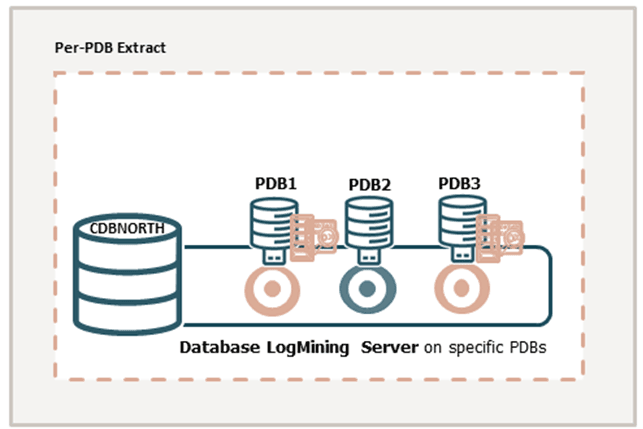
Adding Extract directly from the PDB captures from isolated PDBs, managing ownership and responsibility at the PDB level.
Using a per-PDB Extract, you can connect as the local PDB user (for example, ggadmin) and then register this Extract with the database. As you are already logged in as the PDB user, an additional container clause is not required. Similarly, the SOURCECATALOG or a three-part naming convention is also not needed.
To set up an Extract, see Add an Extract.
Considerations for Multitenant Container Database Configuration
Consider the following guidelines when configuring a multitenant container databases for data replication using Oracle GoldenGate:
-
The different pluggable databases in the multitenant container database can have different character sets. Oracle GoldenGate captures data from any multitenant database with different character sets into one trail file and replicates the data without corruption due to using different character sets.
-
To create and register a per-PDB Extract, you will need to connect to the PDB user such as
ggadmincreated for PDB-level access. Use theUSERIDALIASparameter to configure a SQLNet connection string such asggadmin@pdbeast. You do *not need the container clause or theSOURCECATALOGto set up the per-PDB Extract. -
If the PDB user name, CDB user name, or GLOBAL_NAME contains a dash in it, then Oracle GoldenGate throws the following error:
ERROR OGG-08221 Cannot register or unregister EXTRACT <extract_name> because of the following SQL error: OCI Error ORA (status = 44004-ORA-44004: invalid qualified SQL name -
To support source CDB 12.2, Extract must specify the trail format as release 12.3. Due to changes in the redo logs, to capture from a multitenant database that is Oracle 12.2 or higher, the trail format release must be 12.3 or higher.
-
DDL replication works as a normal replication for multitenant databases.
See Add Database Connections to add a multitenant container database user in Oracle GoldenGate credentials. See Grant User Privileges for Oracle Database 21c and Lower or Grant User Privileges for Oracle AI Database 26ai and Higher depending on the Oracle AI Database installation that you need to configure.
Flush Sequence for Multitenant Container Database
You can only use the FLUSH SEQUENCE command within Oracle GoldenGate, if the sequence.sql script applies the database procedures into the GoldenGate Admin schema of the database.
Use the FLUSH SEQUENCE command immediately after you start Extract for the first time during an initial synchronization or a re-synchronization. This command updates an Oracle sequence, so that initial redo records are available at the time that Extract starts to capture transaction data. Normally, redo is not generated until the current cache is exhausted. The flush gives Replicat an initial start point with which to synchronize to the correct sequence value on the target system. From then on, Extract can use the redo that is associated with the usual cache reservation of sequence values. 1. The following Oracle procedures are used by FLUSH SEQUENCE:
 | Database | Procedure | User and Privileges |
 | --- | --- | --- |
 | Source | `updateSequence` | Grants `EXECUTE` to the owner of the Oracle GoldenGate DDL objects, or other selected user if not using DDL support. |
 | Target | `replicateSequence` | Grants `EXECUTE` to the Oracle GoldenGate Replicat user. |

 {: summary="This table lists the Oracle procedures used by FLUSH SEQUENCE. It gives the database, procedure, and user and privileges." }

The `sequence.sql` script installs these procedures. Normally, this script is run as part of the Oracle GoldenGate installation process, but make certain that was done before using `FLUSH SEQUENCE`. If `sequence.sql` was not run, the flush fails and an error message similar to the following is generated:

<pre class="copy"><code>Cannot flush sequence {0}. Refer to the Oracle GoldenGate for Oracle documentation for instructions on how to set up and run the sequence.sql script. Error {1}.</code></pre>
- Before using
FLUSH SEQUENCE, connect to the database using theDBLOGINcommand.
FLUSH SEQUENCE must be issued at the PDB level, to create an Oracle GoldenGate user in each PDB for which the sequence replication is required. Use DBLOGIN to log into that PDB, and run the FLUSH SEQUENCE command.
It is recommended that you use the same schema in each PDB, so that it works with the GGSCHEMA GLOBALS parameter file.
In the following example, the environment setup is for Oracle 21c to Oracle 21c Replication, with integrated Extract, parallel Replicat using Oracle GoldenGate 21c (21.3.0).
The following table lists the names of source and target CDB, PDBs, and their corresponding user credentials for connecting to the database.
| Source CDB | Target CDB |
|---|---|
NORTH |
SOUTH |
PDB Name: DBEAST |
PDB Name: DBWEST |
Common user: PDB user for sequences: |
PDB User: ggadmin |
sqlplus system/manager
ALTER SESSION SESSION SET CONTAINER=CERTMISSN;
CREATE USER ggate IDENTIFIED BY *password* DEFAULT TABLESPACE USERS TEMPORARY TABLESPACE TEMP QUOTA UNLIMITED ON USERS CONTAINER=CURRENT;
Run @sequence.sql
sqlplus system/manager
ALTER SESSION SET CONTAINER=DBEAST;
@sequence.sql
When prompted enter the following:
GGADMINRun the FLUSH SEQUENCE command:
DBLOGIN USERIDALIAS ggeast DOMAIN OracleGoldenGate
FLUSH SEQUENCE DBEAST.HR.*
Target Oracle GoldenGate Configuration:
sqlplus system/manager
ALTER SESSION SET CONTAINER =PDBWEST;
@sequence.sql
When prompted, enter the PDB user name ggadmin.
This also applies to the @sequence.sql script, which you must also run on each PDB from where you are going to capture.