Authoring assistant
Embedded directly into your rich text areas, the new authoring assistant generates html-formatted content based on your input. You can tell it what you want to write about to create something entirely new or have it recommend changes to something that already exists in an article.
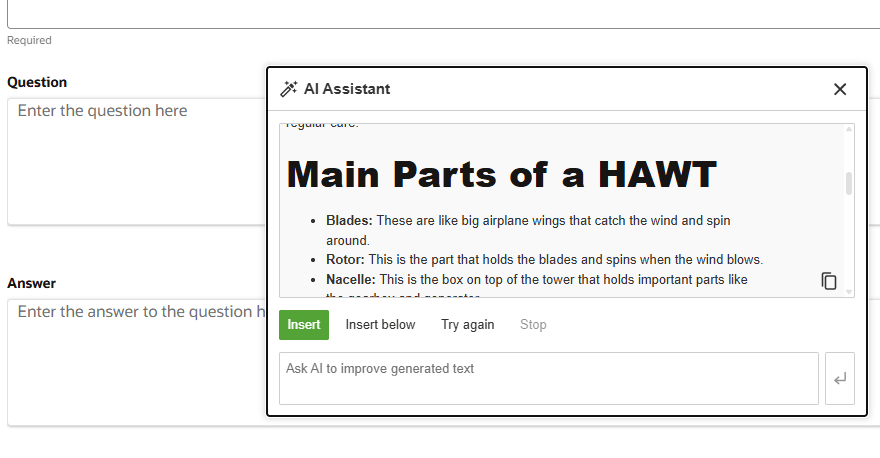
Authoring assistant in use
Because this is directly within the rich text area, users don't have to pivot between an external tool or UI and their authoring screen. None of the issues you may have encountered with copying and pasting from another AI interface will slow your authors down, and the html it produces is clean, making sure it looks the way you expect it to in the many places content ends up today.
Steps to enable and configure
This feature is enabled by default. You can disable it via the appropriate Authoring Rich Text Editor admin. If you are working with a Knowledge Management Content Type such as "FAQ" or "HCM-Solution" then you will want to use the "Manage Knowledge Authoring Rich Text Editor" task in Setup and Maintenance. If you are working with a Custom Content Source created from AI Agent Studio then you will need the "Manage Content Intelligence Authoring Rich Text Editor" task in Setup and Maintenance.
Once you have found the correct administrative UI:
- Select the department for which you wish to turn the feature off
- Locate the magic wand button
- Uncheck it
- Click Save
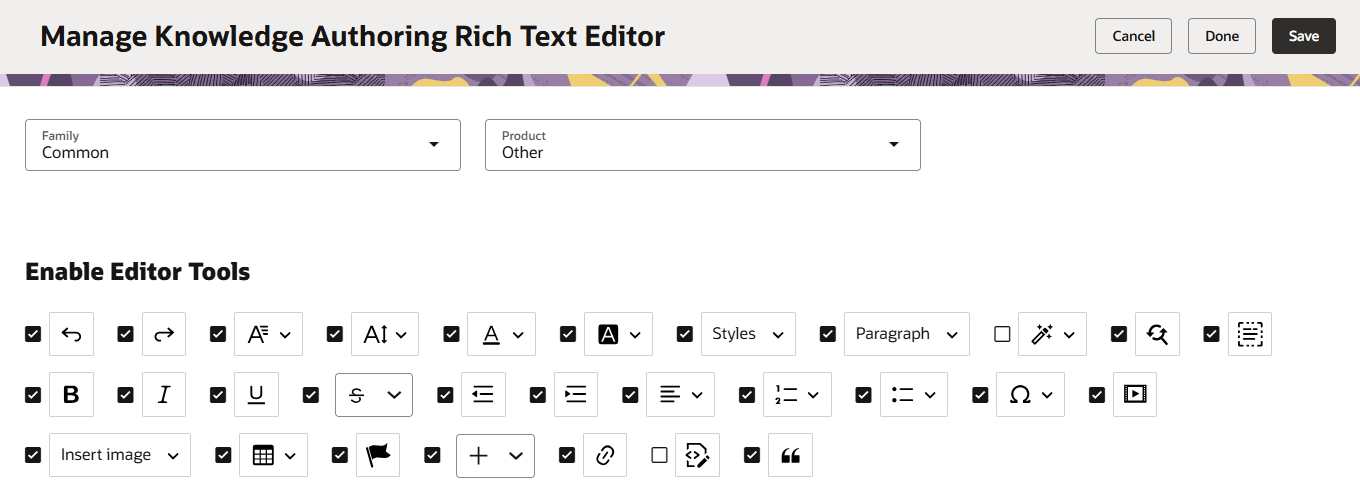
Rich text editor admin with assistant turned off