Notifications Now Appear Only on the Active Tab
The Fusion Service Center workspace now supports tab-specific notifications, allowing notifications to appear only on the active tab where the action occurred. This is enabled through a new global function within the existing CX Service Actions, so system implementors can configure this behavior using action chains — no coding required.
Example Use Cases:
- Service Request Update — An customer service rep working on multiple service requests gets a confirmation message only on the tab where they just saved changes, not across all open tabs.
- Validation Warning — A warning notification appears only on the tab where a required field was skipped, keeping other workspaces clean.
- Workflow Trigger Confirmation — When a service rep escalates a case, the success message shows only on that case tab, so other active tabs remain unaffected.
Users of the Service Center workspace no longer see notifications from unrelated tabs, reducing confusion and improving focus. System Implementors can design cleaner, more contextual business logic without custom code, leading to faster implementations and a better agent experience overall.
Steps to enable and configure
Leverage the Visual Builder Studio to expose your applications. To learn more about extending your application using Visual Builder, visit Oracle Help Center > your apps service area of interest > Books > Configuration and Extension.
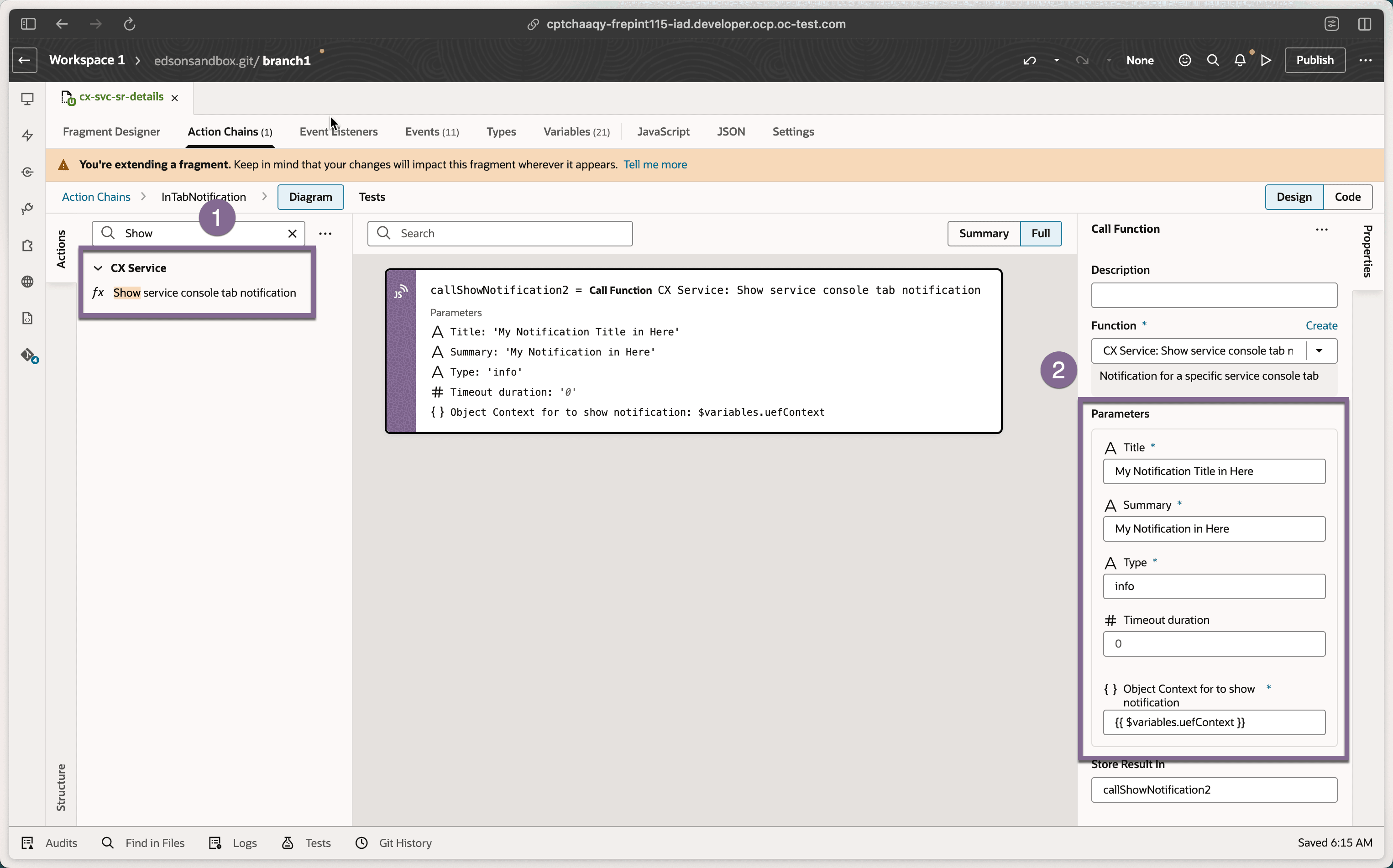
Steps to Enable
- Open Visual Builder Studio within Oracle Fusion Service Console.
- Navigate to the relevant Action Chain where you use the Notification action.
- Replace or extend the existing notification step with the new Show service console tab notification provided in the CX Service action group
- Map the function to fire on the active tab context only.
- Test across multiple open tabs to validate tab isolation behavior.
Note: Use $base.variables.uefContext for UEF Context.
Tips and considerations
- This feature is no-code — no JavaScript or custom development is needed.
- Existing action chains using the standard Notification action will not automatically change; you need to update them manually.
- Test with multiple tabs open to confirm notifications only appear where expected.
- This enhancement works within the existing UI Events Framework — no new tools or licenses required.