AI Agentic App: Production Shift Operations Workspace
Production Shift Operations Workspace is an AI-powered agentic application that enables production supervisors to efficiently manage shop floor activities for the shift. The application consolidates operational insights, highlights exceptions, and provides intelligent recommendations to improve decision-making and execution.
Production supervisors often rely on multiple systems—such as production execution, quality, and maintenance to monitor operations. This fragmentation makes it difficult to quickly interpret data, prioritize actions, and respond to issues in real time. Supervisors need a unified, intelligent workspace that simplifies decision-making for their shift and reduces manual effort.
The key capabilities include:
-
Provides an AI-powered, unified workspace to manage end-to-end production shift activities.
-
Presents contextual insights using dynamic information displays tailored for the current shift, context work center, and manufacturing plant.
-
Enables conversational insights through Ask Oracle by synthesizing inputs from multiple advisors.
-
Delivers targeted insights through specialized advisors such as Work Order, Production Health, Operators, and Exceptions.
-
Recommends priority actions to address work order priorities and exceptions.
-
Highlights production risks and anomalies using key operational metrics.
-
Supports faster issue resolution and team coordination, including shift handover communications.
To access the Production Shift Operations Workspace, select Show More from Quick Actions, and then select Production Shift Operations Workspace.
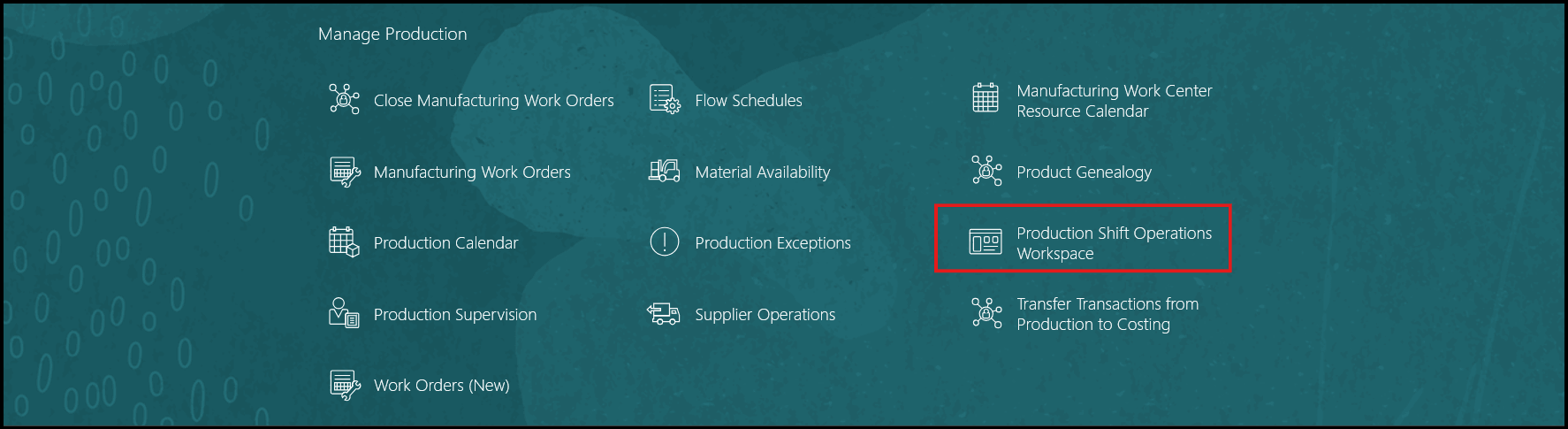
Quick Actions Menu: Manage Production
Production Shift Operations Workspace provides a centralized, context-aware workspace that supports supervisors through all stages of a production shift, including planning, execution, exception resolution, and shift handover. The solution is built using Oracle AI Agent Studio and leverages Oracle Fusion Manufacturing data models to continuously interpret operational data and provide actionable insights. This AI agentic app comprises specialized advisors that collaborate to interpret shop floor activities and information. These advisors dynamically generate UI panels to present insights, recommendations, and actions in a unified workspace.
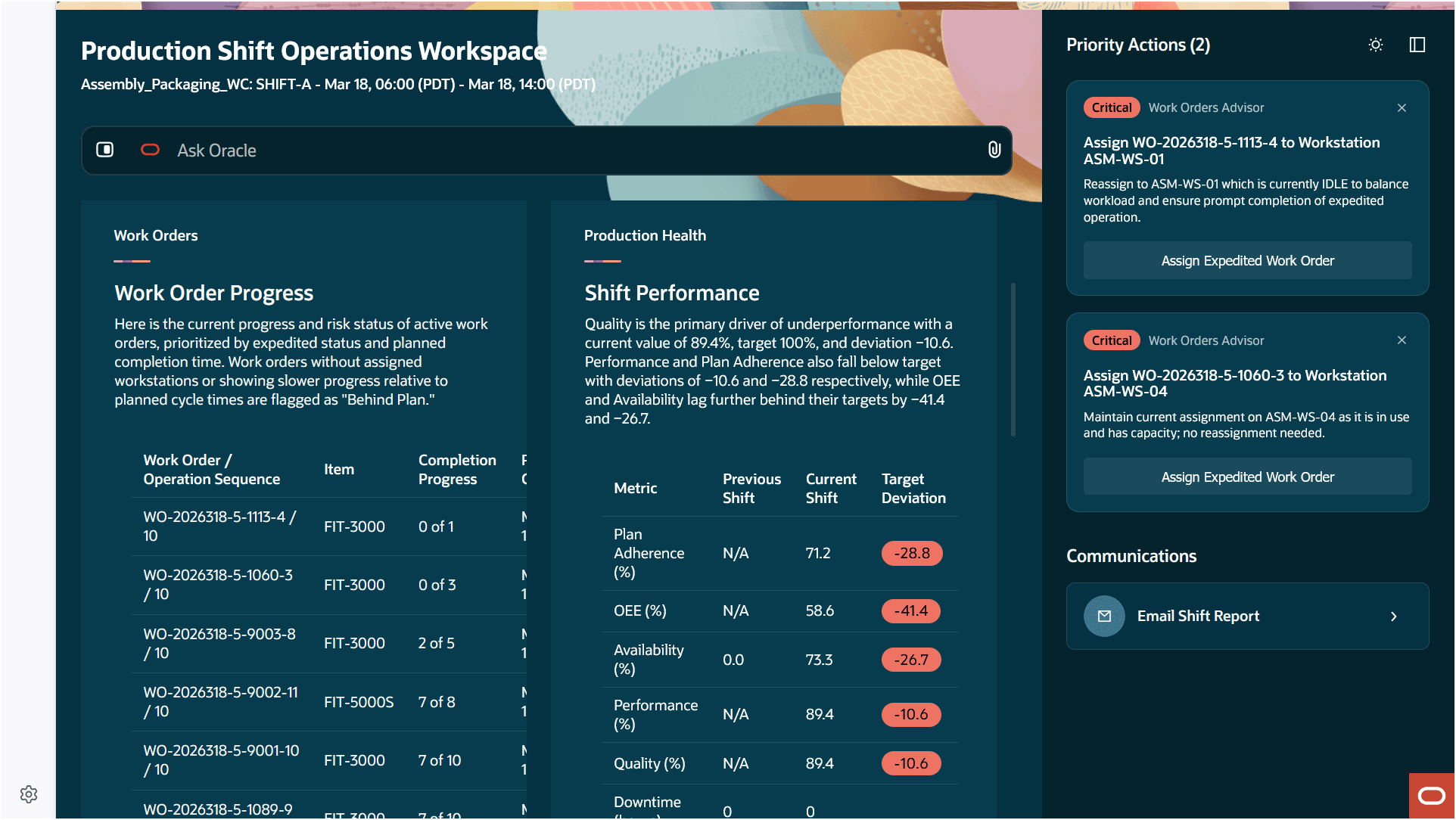
Production Shift Operations Workspace
Production Shift Operations Workspace contains the following sections:
- Ask Oracle: Ask Oracle provides a conversational interface that routes queries to one or more advisors based on the context. Responses are synthesized into a single, unified answer. For example, the question 'Why is OEE low in the current shift?' generates insights based on data collected from multiple agents and presents this as a unified response.
- Information Displays: Advisors present insights through structured information displays. These displays provide contextual visibility into production operations and are dynamically rendered. Each advisor displays information aligned to a specific operational context, and these displays get refreshed as the context evolves. The following advisors are supported in this update:
- Work Order Advisor
- Production Health Advisor
- Assigned Operators Advisor
- Exceptions Advisor
- Priority Actions: Advisors analyze operational conditions and recommend actionable steps, such as reprioritizing work orders or reallocating operators. These suggested actions are system-generated and help mitigate a potential problem.
- Communication: Advisors recommend communication actions to facilitate coordination across teams using this panel. You can use this to generate an email with the shift handover report.
Work Order Advisor:
The Work Order Advisor presents a consolidated list of pending work orders in the current shift across workstations, along with their current execution status. The advisor identifies bottlenecks and exceptions and recommends corrective actions, such as reprioritizing work orders or reassigning them based on constraints such as machine downtime or operator unavailability. The advisor also highlights the risk in completing operations based on the plan.
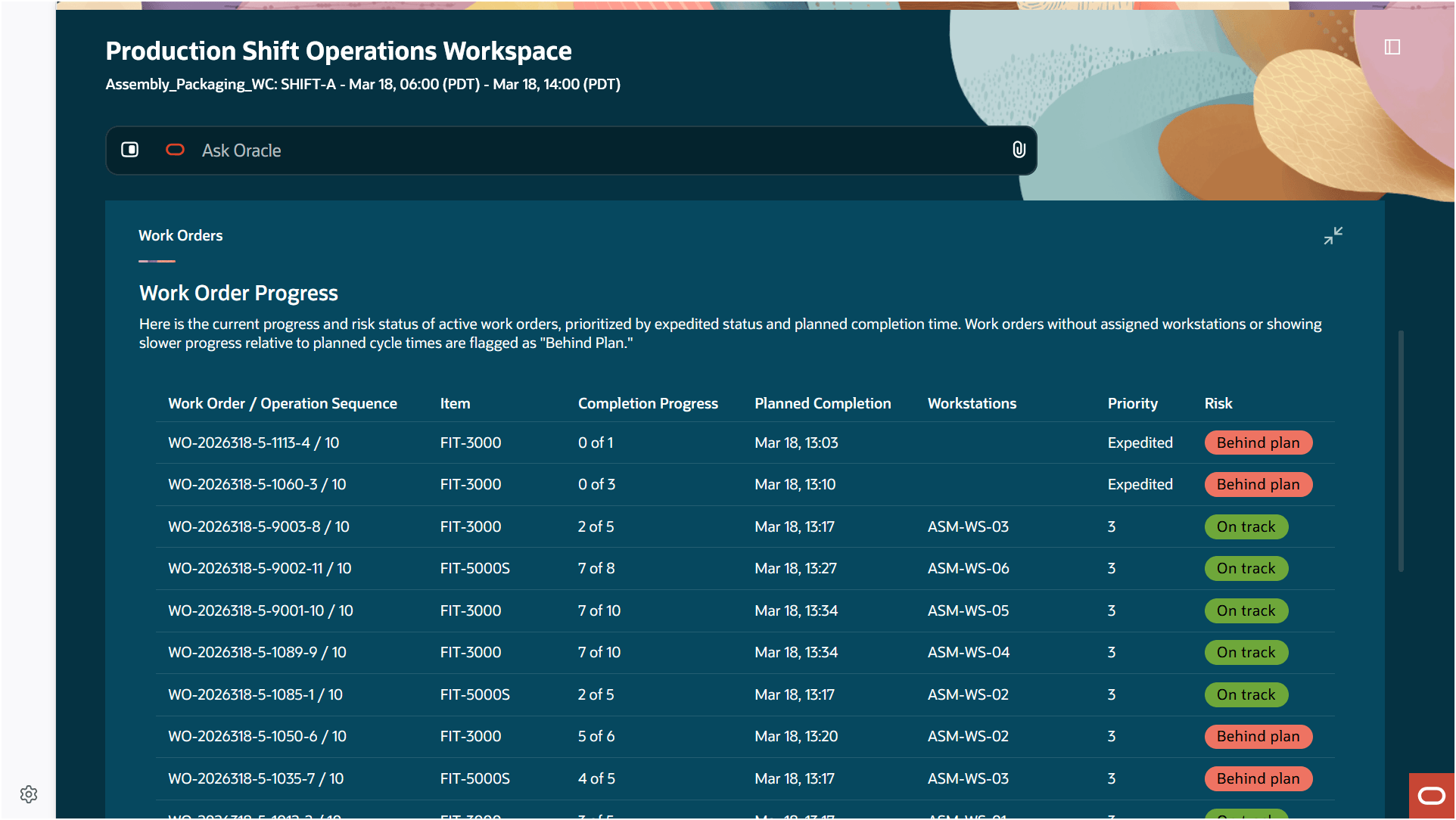
Work Order Advisor
Production Health Advisor:
The Production Health Advisor provides a comprehensive view of production performance by including key metrics such as plan adherence, overall equipment effectiveness (OEE), yield, scrap percentage, and work order completion status. The advisor surfaces anomalies, exceptions, and predictive insights related to shifts, work orders, workstations, and operators. This enables supervisors to proactively monitor production health and identify potential risks before they affect operations.
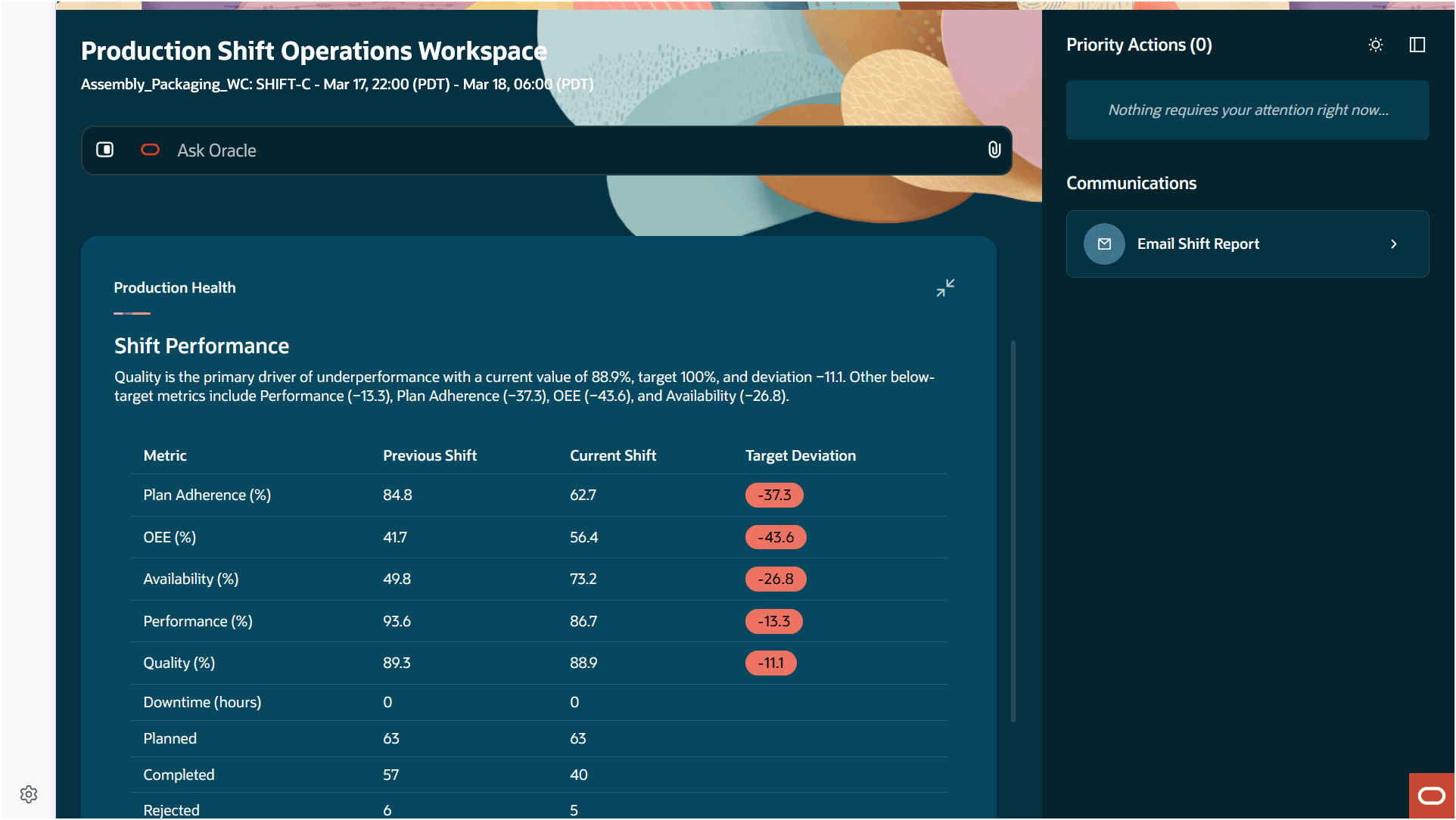
Production Health Advisor
Assigned Operators Advisor:
The Assigned Operators Advisor displays information about assigned operators and their check-in status. The advisor analyzes workload distribution and identifies potential imbalances.
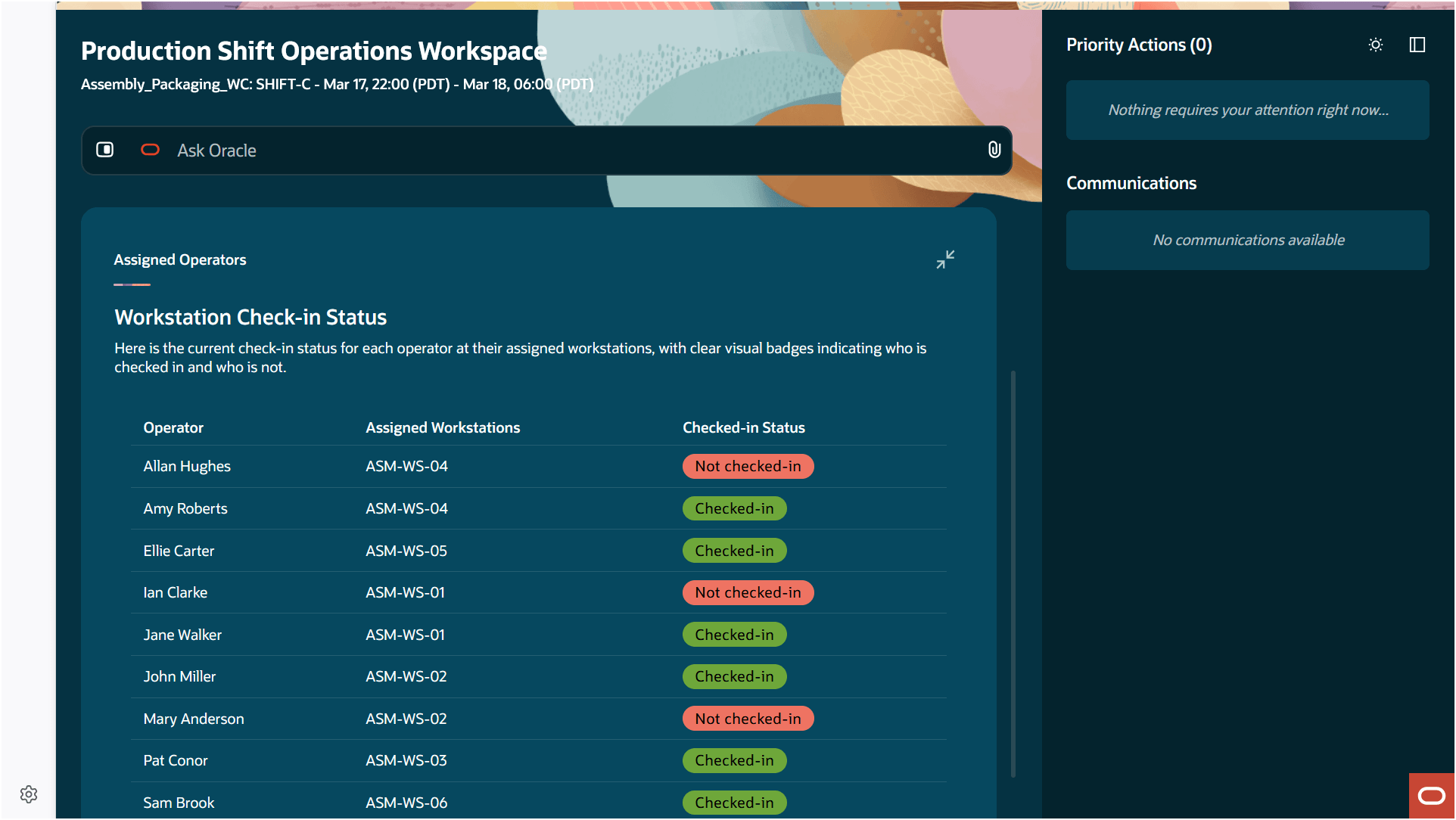
Assigned Operators Advisor
Exceptions Advisor:
The Exceptions Advisor aggregates and prioritizes critical production exceptions across the shop floor. The advisor provides supervisors with a clear view of issues that require immediate attention and supports faster diagnosis by highlighting relevant context and potential causes. This helps reduce downtime and ensures timely resolution of production issues.
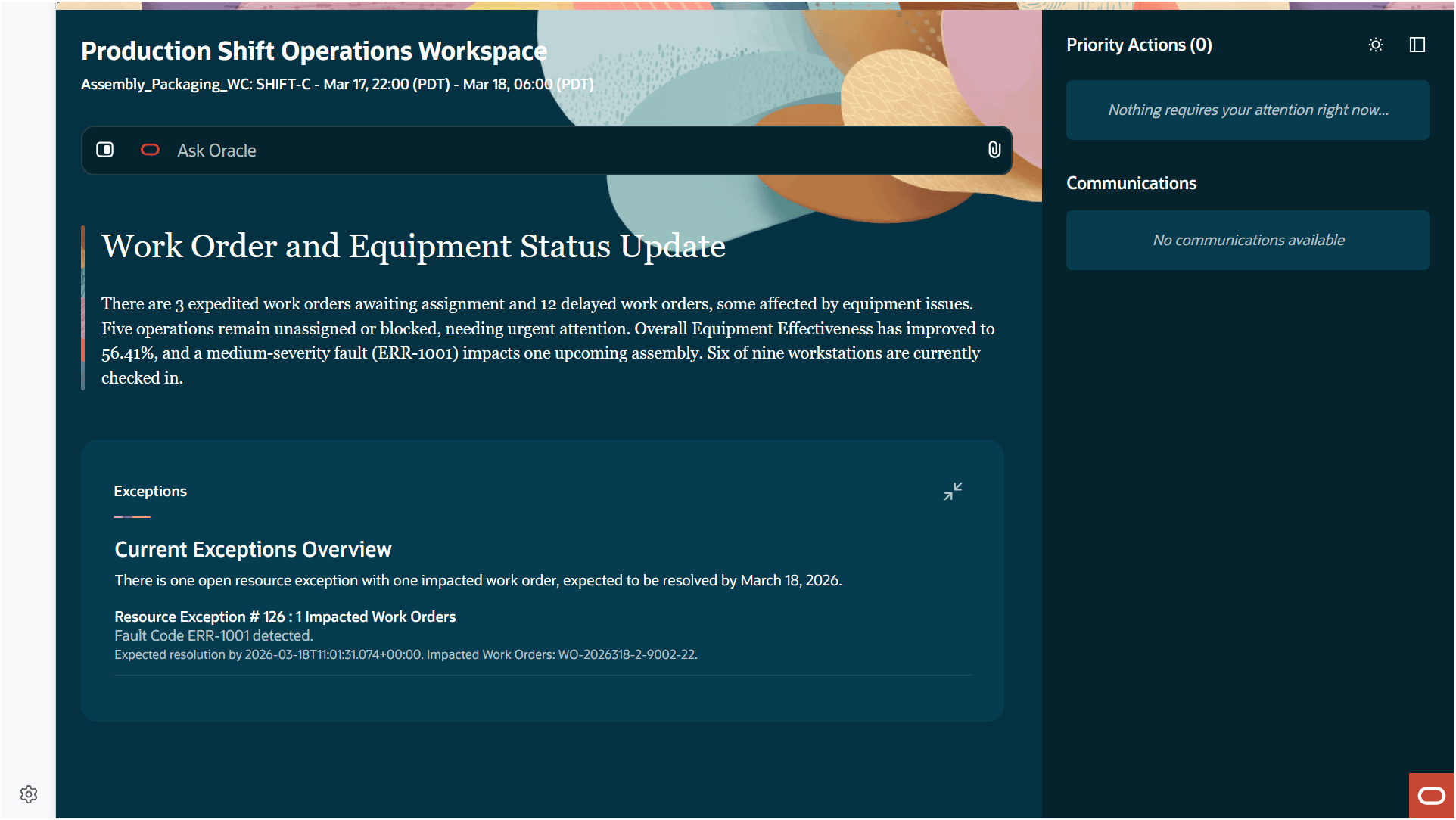
Exceptions Advisor
The Production Shift Operations Workspace AI agentic app provides a unified, intelligent workspace that consolidates operational data, simplifies decision-making, and enables faster response to production issues.
Here's the demo of these capabilities:
Steps to enable and configure
Follow these steps to use this feature:
Set up the profile option to enable the AI agentic app:
- In the Setup and Maintenance work area, search for and select the Manage Administrator Profile Values task.
- On the Manage Administrator Profile Values page, search for and select the ORA_WIE_PRODUCTION_SHIFT_OPERATIONS_WORKSPACE_AGENTIC_APP_ENABLED profile option code.
- In the Profile Values section, set the Site level to Yes.
- Click Save and Close. Changes in the profile value will affect users the next time they sign in.
Ensure that the user has the appropriate privileges, as enumerated under Access Requirements.
Tips and considerations
- Review AI recommended priority actions for accuracy before applying. Always validate AI suggestions against your business priority.
- This is an early release version which may be enhanced in subsequent updates.
Key resources
- Oracle Fusion Cloud SCM: Using Manufacturing guide, available on the Oracle Help Center.
- Oracle Fusion Cloud SCM: Implementing Manufacturing and Supply Chain Materials Management guide, available on the Oracle Help Center.
Access requirements
Users who are assigned a configured job role that contains these privileges can access this feature:
-
Access Production Shift Operations Workspace (WIP_ACCESS_PRODUCTION_SHIFT_OPERATIONS_WORKSPACE)
- Supervise Production (WIP_SUPERVISE_PRODUCTION_PRIV)
- Manage Workstation Queue (WIP_MANAGE_WORKSTATION_QUEUE_PRIV)
- Manage Assignment of Operators to Workstation (WIP_MANAGE_WORKSTATION_OPERATORS_PRIV)
- View Production Exceptions (WIP_VIEW_PRODUCTION_EXCEPTIONS_PRIV)
- View Production Shift Details (WIP_GET_PROD_SHIFT_DETAILS_PRIV)