AI Agentic App: Maintenance Operations Workspace
Oracle Cloud Maintenance introduces the Maintenance Operations Workspace, an agentic, decision-centric experience for maintenance supervisors operating in high-pressure environments. Supervisors manage competing priorities - overdue work, failures, material shortages, technician constraints, and production commitments - while critical signals remain fragmented across work orders, inventory, asset health, and scheduling. This fragmentation forces manual analysis, delaying decisions, surfacing risks too late, and eroding the weekly plan.
Traditional dashboards fall short by presenting data rather than decisions, requiring supervisors to navigate multiple screens and stitch together context, creating latency at critical moments.
The Maintenance Operations Workspace shifts to active decision support through embedded agentic capabilities. It continuously analyzes context to identify at-risk work, early failure signals, and execution constraints such as parts or resource gaps, synthesizing them into prioritized actions.
By surfacing decision-ready insights in a unified experience, the workspace enables proactive plan adjustments, reduces unplanned work, improves execution reliability, and drives more predictable maintenance outcomes.
The key capabilities include:
- A unified, AI-powered workspace that brings together critical maintenance signals and actions for supervisors in a single, decision-focused experience
- Highlights exceptions and emerging risks, including overdue work, incomplete assignments, material shortages, and asset health alerts
- Surfaces contextual insights through dynamic views tailored to the organization, maintenance schedule, and current operational priorities
- Enables conversational insights with Ask Oracle, aggregating and contextualizing outputs from multiple agents into a unified response
- Displays asset-driven predictions and anomalies using real-time operational signals
- Recommends corrective actions such as re-assigning labor, resolving shortages through substitutes, transfers, or requisitions, and initiating proactive maintenance
- Supports coordination through guided actions, drill-down to child apps and automated communications such as summary emails and exports
To access the Maintenance Operations Workspace, select Show More from Quick Actions, and then under Manage Maintenance select Maintenance Operations Workspace.
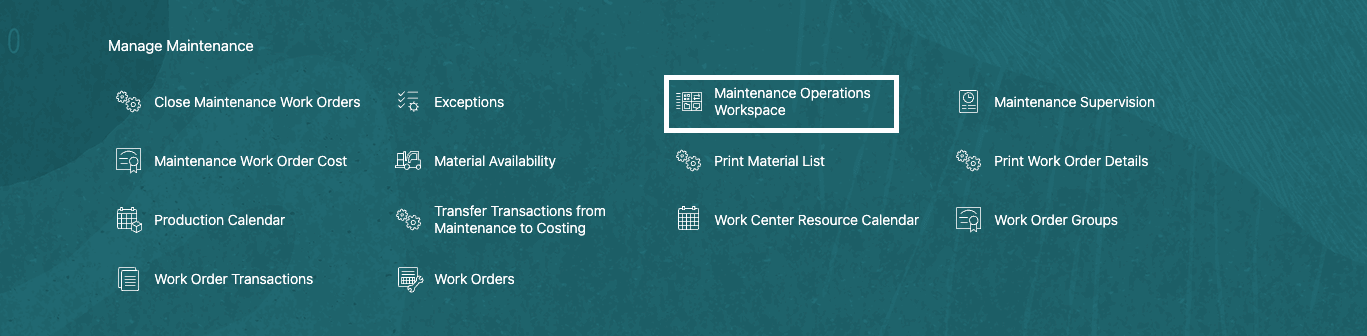
Quick Actions Menu: Maintenance Operations Workspace
Maintenance Operations Workspace contains the following sections:
-
Ask Oracle: Ask Oracle provides a conversational interface that routes queries to one or more agents based on the context. Responses are synthesized into a single, unified answer. For example, the question “Which work orders are at risk this week?” can generate insights based on data collected from multiple agents and presents this as a unified response.
-
Information Displays: Agents present insights through structured information displays in multiple displays. These displays provide contextual visibility into maintenance operations and are dynamically rendered. Each display contains information aligned to a specific operational context, and these displays refresh as the context evolves. The following information displays are currently available:
- Work Orders at Risk and Overdue
- Parts Shortages and Material Readiness
- Asset Health
- Emerging Corrective Work Hotspots
- Work Order Costs and Estimates
- Drill-down Agentic apps: The displays are complemented by context-aware, agentic child applications that inherit the parent workspace context and enable deeper analysis and action. These include Maintenance Work Order Resources (from Work Orders at Risk and Overdue), Maintenance Work Order Material Shortages (from Parts Shortages and Material Readiness), and Maintenance Asset Costs (from Emerging Corrective Hotspots)
-
Priority Actions: Agents analyze operational conditions and recommend actionable steps to initiate proactive maintenance actions based on asset health alerts. These suggested actions are system-generated and help mitigate operational risk.
-
Communication: Advisors recommend communication actions to facilitate coordination across teams using this display. You can use this to generate summary emails and a PDF for the top assets with recurring corrective work orders that need to be reviewed.
Here is a screenshot showing an overview of the Maintenance Operations Workspace sections for Ask Oracle, Information Displays, Priority Actions and Communication.
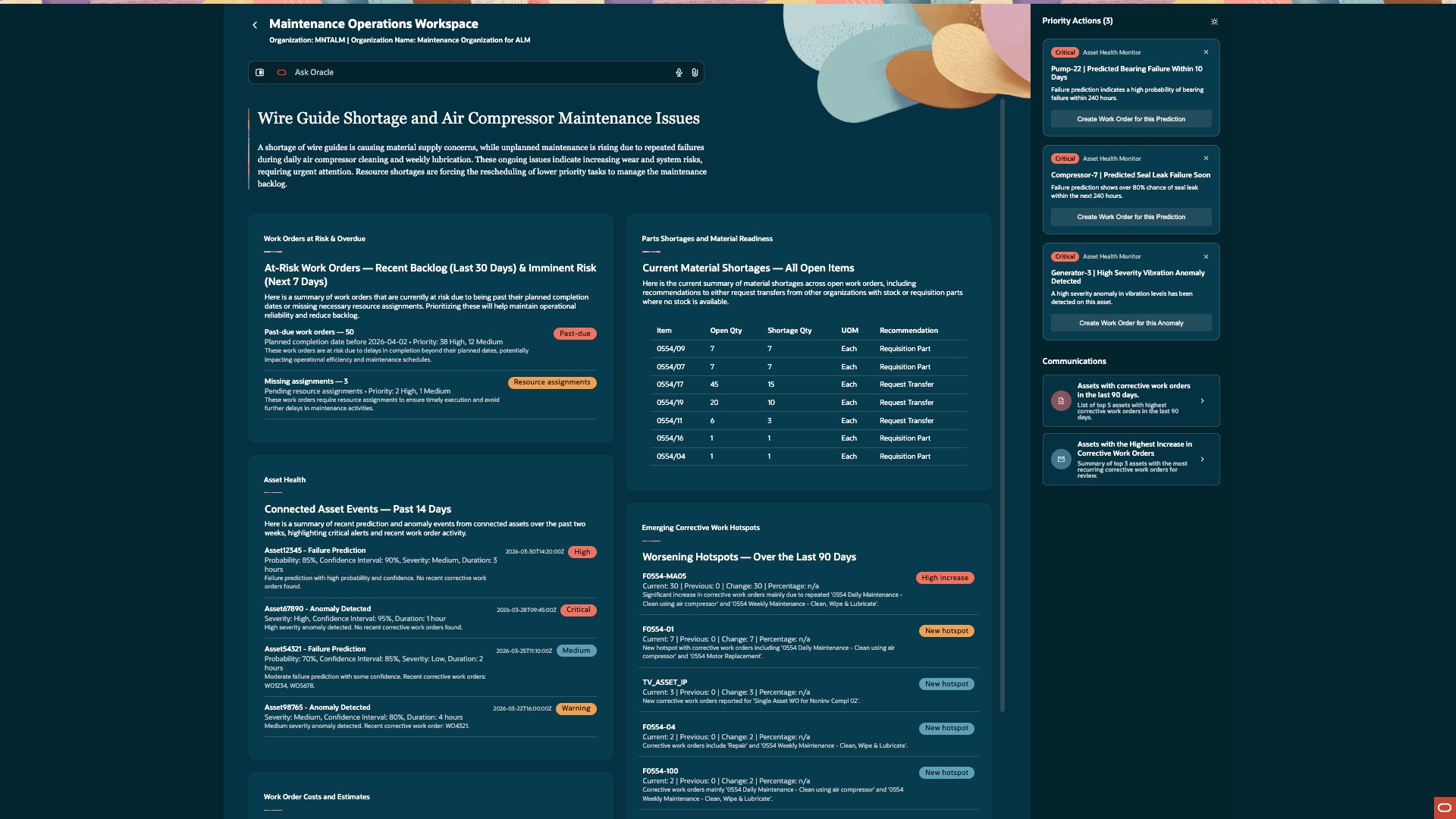
Maintenance Operations Workspace Overview
To enable the Maintenance Operations Workspace and get organization-specific data, enter your organization code using the keyword “organization” in Ask Oracle. Example: Set organization to MNTALM or Set org to MNTALM.
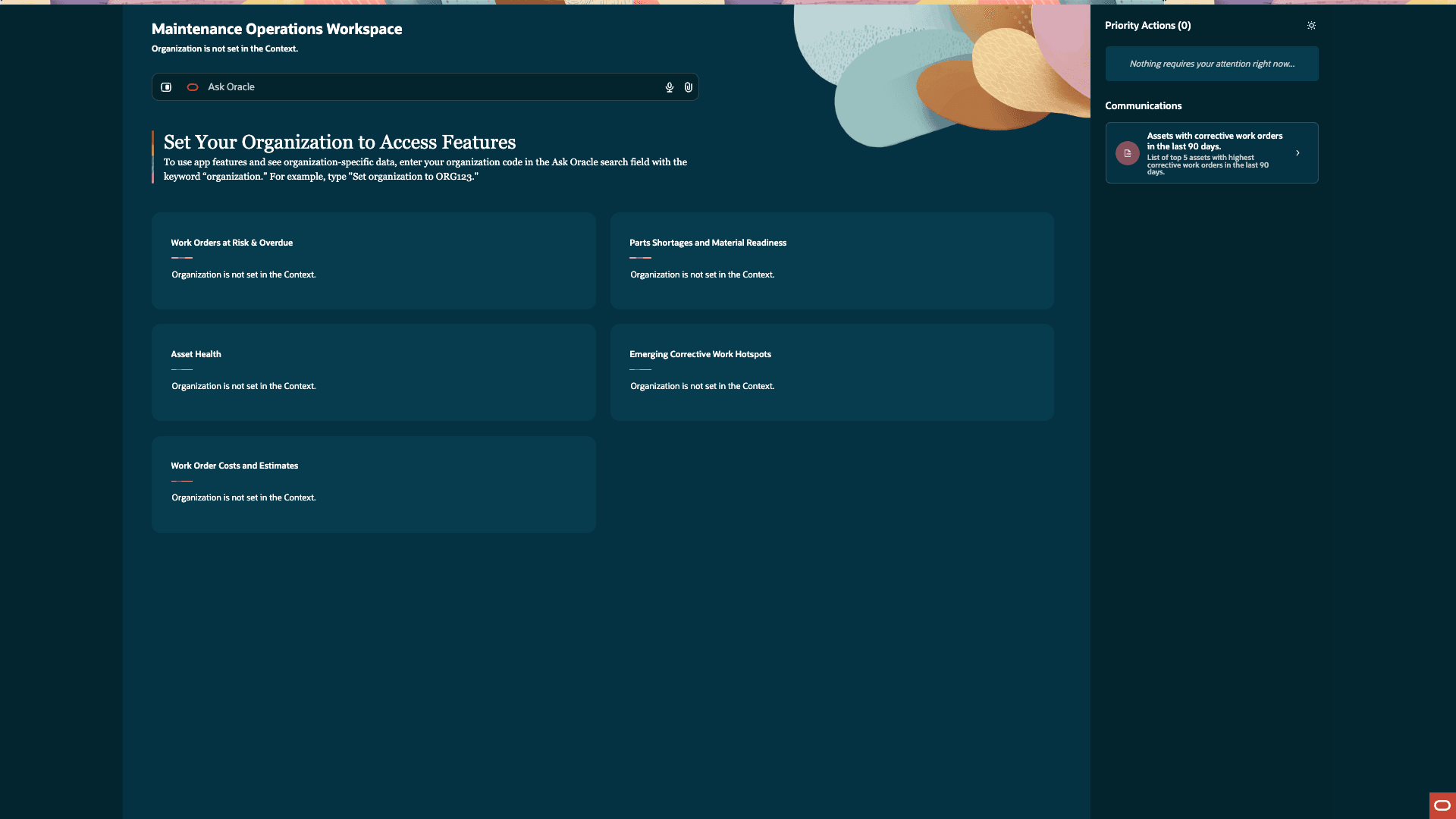
Set Organization Context in Ask Oracle
Work Orders at Risk and Overdue: At-Risk Work Orders - Recent Backlog (Last 30 Days) & Imminent Risk (Next 7 Days)
The information display presents a consolidated list of at-risk work orders in the maintenance organization, including those past due and those missing resource assignments, along with their current status. The display identifies exceptions and recommends corrective actions, such as assigning resources to unassigned work orders either in bulk by selecting Manage or individually by selecting a specific work order from the display below. When you manage resource assignments for a work order or a group of work orders, the application launches the Maintenance Work Order Resources child application.
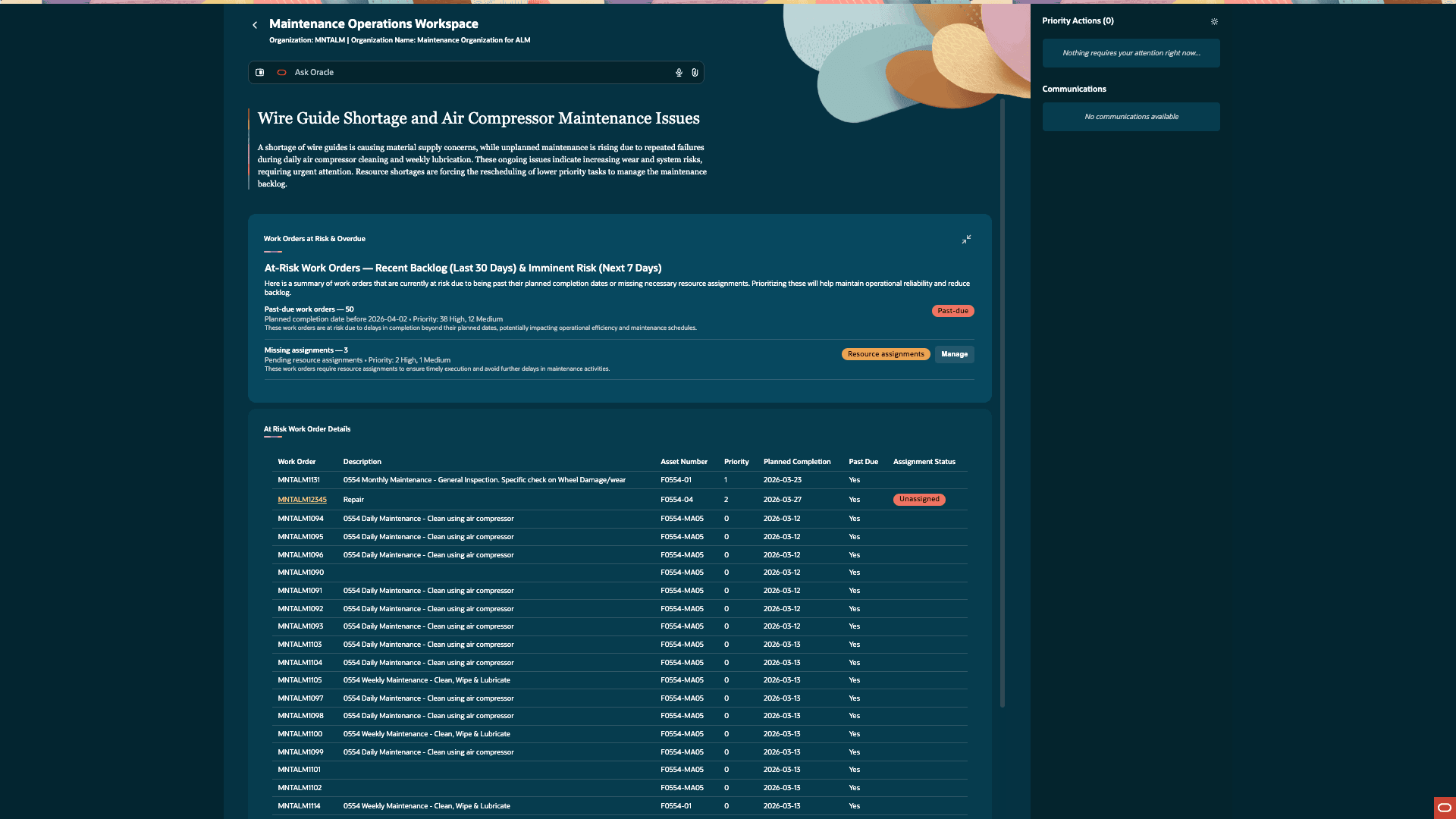
Screenshot showing the Work Orders at Risk & Overdue information display
Part Shortages and Material Readiness: Current Material Shortages - All Open Items
The information display presents a consolidated list of material shortages across open work orders, including shortage quantities and item-level recommendations. The display identifies material readiness exceptions and recommends corrective actions, such as Requisition Part, Request Transfer, or Use Substitute. When you expand the display, you can also view the required quantity, lead time, and organizations with available stock. In the Material Readiness - Detailed Breakdown (Past 30 Days to Next 7 Days) display, you can select a work order to take action, including finding item substitutes or initiating a transfer from another organization to resolve the shortages. When you take actions for materials, the application launches the Maintenance Work Order Material Shortages child application.
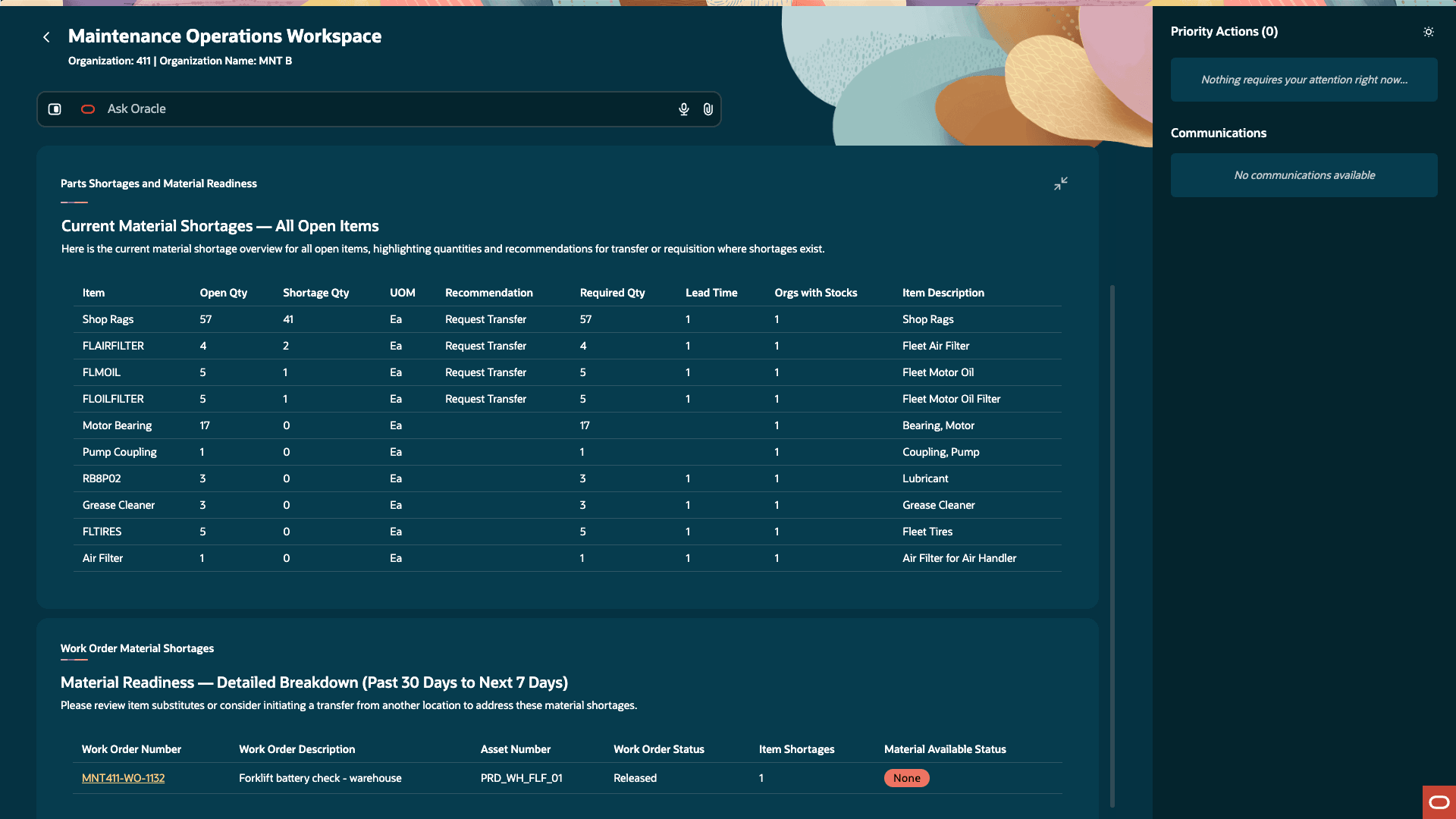
Screenshot showing the Parts Shortages and Material Readiness information display
Asset Health: Connected Asset Events - Past 14 Days
The information display presents a consolidated view of short-horizon asset health signals, including predicted failures and operational anomalies, along with their current priority. The display identifies exceptions, where predictions indicate a modeled likelihood of failure and anomalies indicate behavior outside expected operating thresholds, and recommends corrective actions by converting these signals into prioritized actions. The display enables you to create corrective work orders directly from these actions, and once a corrective work order is created, the action is removed and related upcoming work is highlighted.
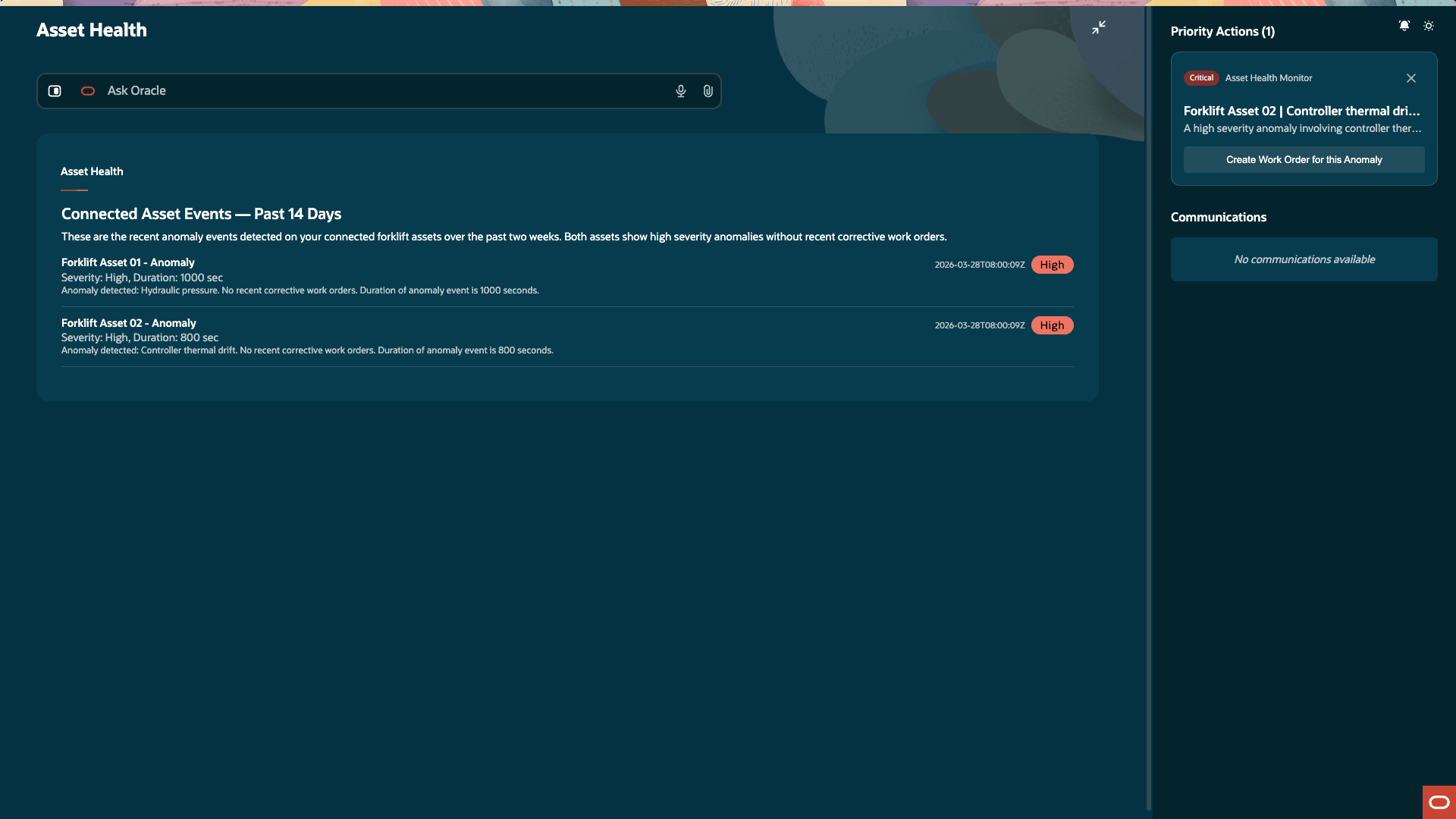
Screenshot showing the Asset Health information display
Work Order Costs and Estimates: Planned Cost Estimates - Past 30 Days to Next 7 Days
The information display presents a consolidated view of actual costs and estimated costs for work orders, along with the current cost status. The display enables you to estimate total labor and material costs for in-progress work orders to support cost tracking.
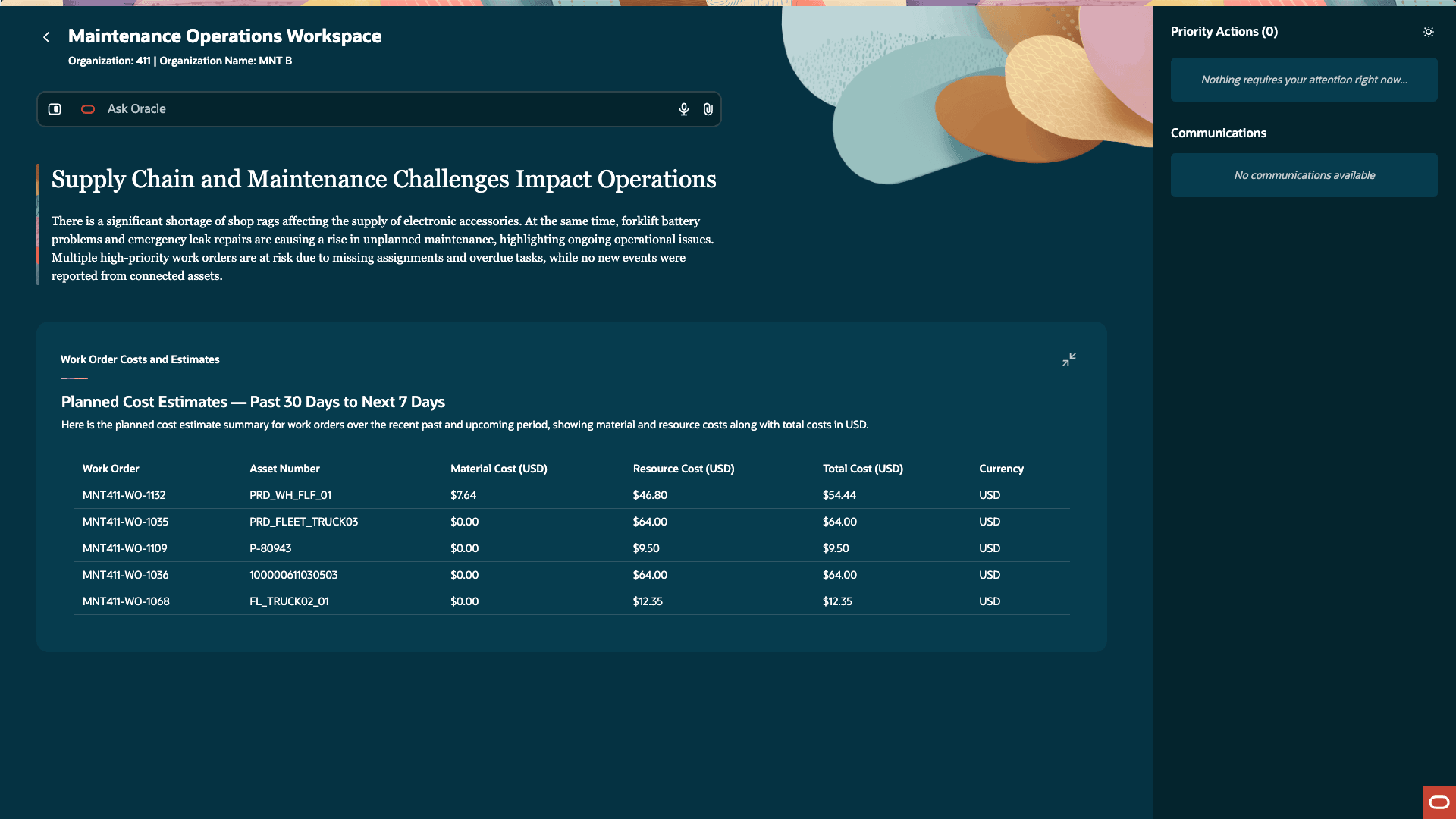
Screenshot showing the Work Order Costs and Estimates information display
Emerging Corrective Work Hotspots: Worsening Hotspots - Over the Last 90 Days
The information display presents a consolidated view of assets with the largest increase in corrective work over the past 90 days, along with their recent corrective work trends. The display identifies emerging problem areas by analyzing work history and enables supervisors to review asset cost performance by selecting an asset number to view total costs for a selected period. When you expand the display, you can also see additional detail on planned versus corrective work order trends to help supervisors understand where attention is shifting and adjust the planned maintenance schedule accordingly. When you click on an asset to review the costs, the application launches the Maintenance Asset Costs child application.
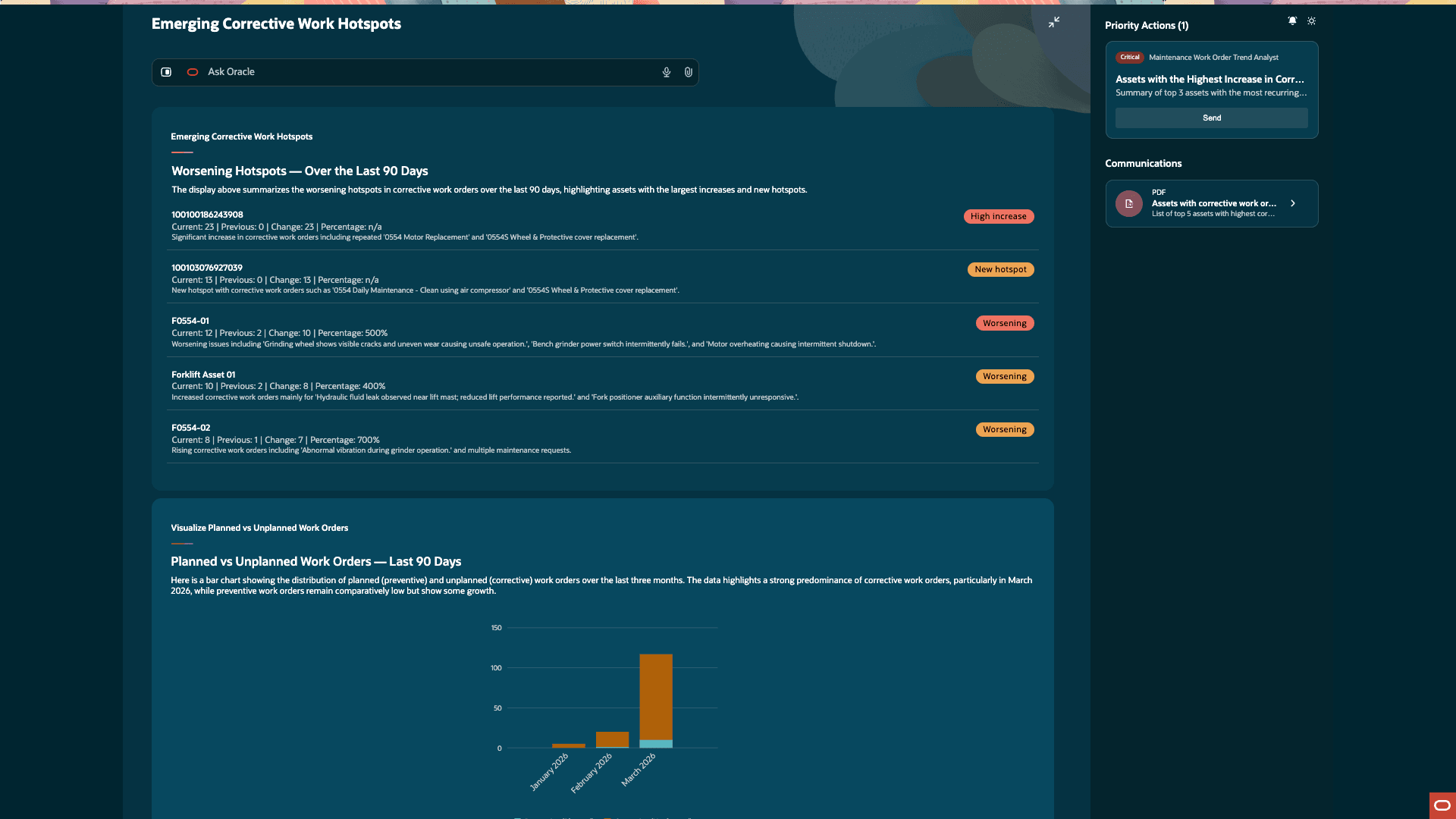
Screenshot showing the Emerging Corrective Work Hotspots information display
Reduce unplanned downtime with real-time alerts on assets, overdue work, and emerging incident hotspots, while streamlining execution by consolidating work orders, parts readiness, and technician load into one adaptive workspace. Improve productivity with AI-guided prioritization and balanced assignments, and lower maintenance costs by preventing repeat failures, improving visibility into repair estimates, and ensuring timely procurement of critical parts.
Steps to enable and configure
- In the Setup and Maintenance work area, search for and select the Manage Administrator Profile Values task.
- On the Manage Administrator Profile Values page, search for and select the profile option code for ORA_MNT_MAINTENANCE_OPERATIONS_WORKSPACE_AGENTIC_APP_ENABLED
- In the Profile Values section, set the Site level to Y or N. The default value of the profile option is N.
- Y = enables the feature
- N = disables the feature
- Click Save and Close. Changes in the profile value will affect users the next time they sign in.
For additional instructions on enabling a profile option, refer to the Set Profile Option Values topic.
Tips and considerations
- Review AI-recommended priority actions for accuracy before applying them, and ensure they align with your business priorities.
- This is an early release version and may be enhanced in future updates.
- If values or data appear to be missing, confirm that the required scheduled processes have completed successfully.
- The Maintenance Work Order Resources, Maintenance Work Order Material Shortages, and Maintenance Asset Costs applications are intended as supporting tools within the Maintenance Operations Workspace and should not be used independently.
Key resources
Review the 26B What's New - Build Agentic Apps Using Agents from AI Agent Studio.
Access requirements
Users who are assigned this configured job role can access the Maintenance Operations Workspace:
- Maintenance Manager Job Role
Users must be assigned a configured job role that contains these duty roles:
- ORA_DR_FAI_GENERATIVE_AI_AGENT_RUNTIME_DUTY