AI Agentic App: Cost Accounting Close Workspace
The Cost Accounting Close Workspace is an AI-powered workspace where cost accountants and financial controllers can continuously review the readiness for period close status. Key capabilities include:
- Provides AI-generated summary that surfaces key insights and recommends actions.
- Supports Ask Oracle to get contextual information regarding period close, such as key account balances and exceptions.
- Enables AI-recommended actions, such as running cost accounting processes, directly from the command center without navigating away.
- Monitors transaction processing status by reviewing period end validations and take priority actions to resolve errors.
To open the Cost Accounting Close Workspace:
- Go to the Home page and navigate to Supply Chain Execution.
- Go to Quick Actions and select the Show More menu.
- Under the Cost Processing section, select Cost Accounting Close Workspace.
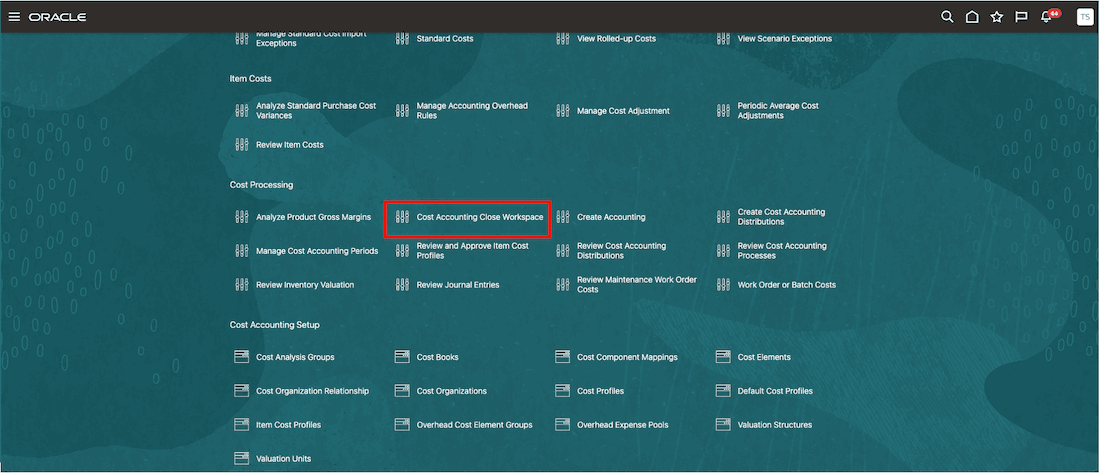
Navigate to Cost Accounting Close Workspace
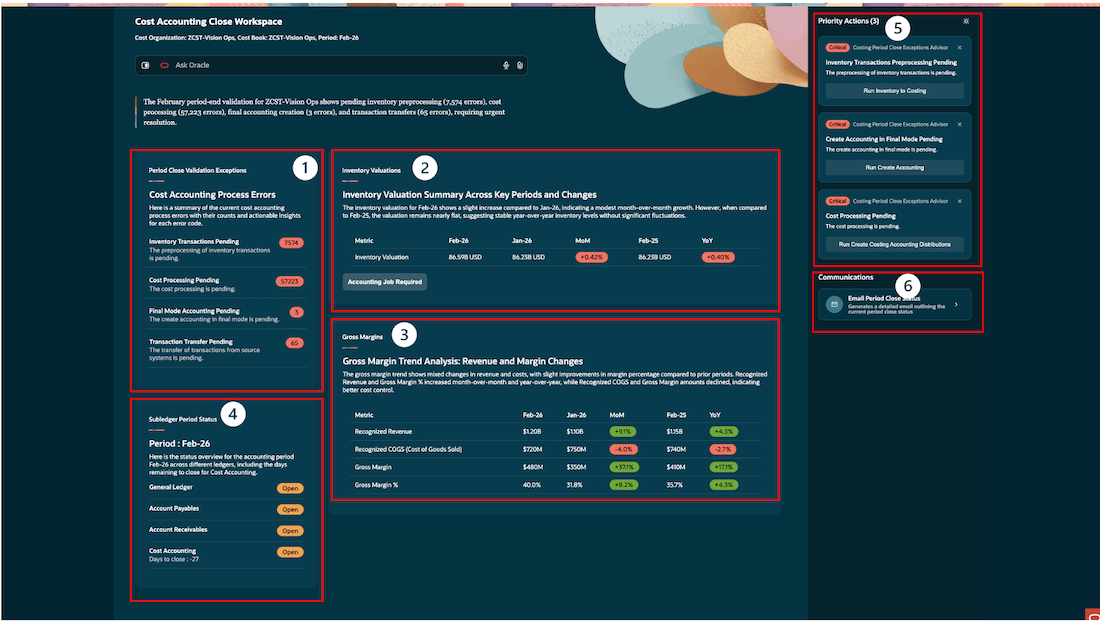
Cost Accounting Close Workspace
The Cost Accounting Close Workspace provides AI-powered workflows through 6 panels:
- Period Close Validation Exceptions
- Introduces a centralized exception summary to provide visibility into bottlenecks prior to period close, reducing last-minute surprises.
- Provides error categorization with transaction-level counts for faster triage.
- Highlights high-impact blockers (Inventory, Cost Processing, Final Accounting, Transfers).
- Recommends actions in Priority Actions.
- Inventory Valuations
- Adds a period-over-period inventory valuation summary (MoM and YoY).
- Highlights key valuation trends and stability indicators for decision-making.
- Introduces automated insights narrative explaining valuation movements.
- Flags when accounting jobs are required to ensure that the costed value in a period matches the accounted value.
- Explains period activity by highlighting top items through Ask Oracle.
- Gross Margins
- Introduces a gross margin trend analysis across revenue and COGS.
- Highlights MoM and YoY changes in revenue, cost, and margin percentage.
- Enables data-driven margin diagnostics for finance and operations teams.
- Highlights performance trends in a single unified view for faster analysis.
- Subledger Period Status
- Adds a consolidated subledger status view for period close readiness and highlights remaining days to close for proactive planning.
- Displays real-time status across General Ledger, Payables, Receivables, and Cost Accounting, which enables quick identification of open subledgers blocking Cos Accounting period close.
- Improves alignment between subledger and General Ledger close timelines.
- Priority Actions
- Introduces a dynamic Priority Actions panel for guided close execution.
- Automatically highlights critical pending processes (For example, interface jobs, cost processing, accounting).
- Provides one-click access to run required processes directly from the workspace.
- Communications
- Adds automated period close status communication through email.
- Generates context-aware summaries of current close status.
- Enables stakeholder alignment with minimal manual effort.
Steps to enable and configure
Follow these steps to enable the Cost Accounting Close Workspace agentic app:
- Navigate to the Setup and Maintenance work area.
- Search for and select the Manage Cost Accounting Profile Options task.
- On the Manage Cost Accounting Profile Options page, search for and select the ORA_CST_PERIOD_CLOSE_AGENTIC_APP_ENABLED profile option code.
- In the Profile Values section, set the Site level to Yes. The default value is No.
- Select Save and Close. The changes will take effect the next time users sign in.
Tips and considerations
- To set the context for the Cost Accounting Close Workspace:
- You can view the period close readiness information for any of the cost organizations that you have access to, but one cost organization and cost book at a time.
- Cost Organizations, Cost Books, and Period Names are case-sensitive and must be specified exactly as they are defined in the application.
- To change Organization Context just Ask Oracle: "Change Cost Organization to <Cost Organization Name>, Cost Book to <Cost Book Name>, Period to <Period Name>". For example: "Change Cost Organization to ZCST-Vision Ops, Cost Book to Primary, Period to APR-26".
- Ensure the Cost Reports processor runs on a schedule to update the inventory valuation, COGS, and gross margin information.
- Cost Accounting consumes invoice information from upstream subledgers, such as Accounts Payables and Accounts Receivables. Ensure that you close these subledgers first and process all invoices in Cost Accounting before closing the Cost Accounting subledger.
- Review AI-recommended priority actions for accuracy before applying. Always validate AI suggestions against your business priority.
- Some capabilities in the workspace may continue to evolve, and additional functionality may be introduced in future updates.
Key resources
Access requirements
Users who are assigned a configured job role that contains the following privileges can access this feature:
- Manage Cost Processor errors by Web Service (CST_MANAGE_COST_PROCESSOR_ERRORS_WEB_SERVICE_PRIV)
- Create Cost Distributions by Web Service (CST_CREATE_COST_DISTRIBUTIONS_WEB_SERVICE_PRIV)
- Manage Cost Periods by Web Service (CST_MANAGE_COST_PERIOD_WEB_SERVICE_PRIV)
- View Cost Organization Relationship by Web Service (CST_VIEW_COST_ORG_RELATIONSHIP_WEB_SERVICE_PRIV)
- Manage Cost Organization Relationship by Web Service (CST_MANAGE_COST_ORG_RELATIONSHIP_WEB_SERVICE_PRIV)
- Run Inventory Valuation Report by Web Service (CST_RUN_INVENTORY_VALUATION_REPORT_WEB_SERVICE_PRIV)
- Analyze Cost of Goods Sold and Gross Margins Using REST Service (CST_ANALYZE_PRODUCT_GROSS_MARGINS_WEB_SERVICE_PRIV)
- Get Enterprise Structures Using REST Service (FUN_GET_ENTERPRISE_STRUCTURES_REST_SERVICE_PRIV)
Users assigned a configured job role that contains the following duty role and SAS role can access this feature:
- Costing Period Close Workspace Duty (ORA_DR_CST_PERIOD_CLOSE_APP_WORKFLOW_DUTY)
To interact with AI agents in product pages, users must be assigned a configured job role that contains this duty role:
- Fai Genai Agent Runtime Duty (ORA_DR_FAI_GENERATIVE_AI_AGENT_RUNTIME_DUTY)
In the Security Console, filter by Roles and Permission Groups to find this duty role.
To allow users to interact with agents, you must also enable permission groups in the Security Console on those users' configured job roles that contain the Fai Genai Agent Runtime Duty role. You can enable permission groups when you manage the basic information of your configured job roles.
Users' configured job roles must also contain privileges that allow access to the pages where AI agents are enabled.
See Access Requirements for AI Agent Studio (for administrators) and How can I give users access to AI agents (for end-users) for more information.