AI Agentic App: Warehouse Operations Workspace
Warehouse managers are accountable for keeping warehouse operations running smoothly and efficiently. When problems occur, they’re responsible for resolving them quickly so operators can continue working without disruption. In larger facilities, supervisors or assistant managers may help identify and prevent issues, but problems can still slip through. While there are multiple pages and dashboards that can signal an issue, or indicate one is about to occur, you often have to jump between screens to confirm what’s happening, then navigate through additional pages to determine the right corrective action. What you really need is a single, consolidated workspace that proactively provides all current and emerging issues and recommends resolutions, so you can act fast without searching through multiple pages and reports.
The Warehouse Operations workspace provides that unified experience by bringing together operational insights, AI-driven recommendations, and intelligent assistance in a single place. The workspace introduces four specialized advisors aligned with the key operational pillars of the warehouse: stock, outbound, inbound, and workforce. These advisors help managers monitor warehouse activities, identify issues early, and take corrective action quickly.
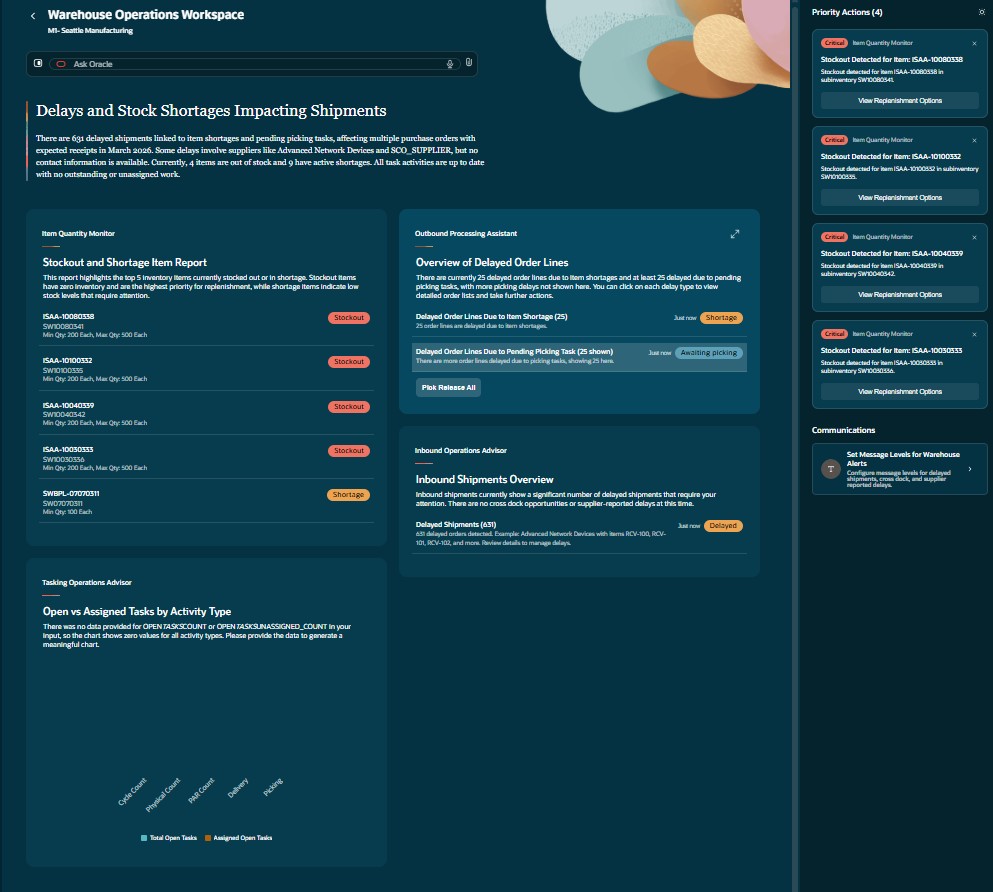
Warehouse Operations Workspace
Item Quantity Monitor
The Item Quantity Monitor focuses on maintaining inventory health and ensuring supply and demand alignment across warehouse organizations. It analyzes inventory conditions to identify potential shortages, stockouts, and other risks that could disrupt warehouse operations or customer fulfillment.
The monitor highlights items that are currently out of stock or experiencing supply shortages across organizations, enabling warehouse managers and inventory planners to quickly evaluate inventory gaps, assess availability, and prioritize corrective actions to maintain service levels and operational continuity.
With the Item Quantity Monitor, warehouse managers can:
- Detect potential stock shortages and stockouts by monitoring on-hand inventory against demand.
- Review consolidated supply and demand insights for items without navigating across multiple pages or reports.
- Initiate corrective actions, such as requesting internal transfers from other warehouses or triggering replenishment through new purchase orders.
- Use Ask Oracle to analyze inventory situations, such as checking item availability or exploring options to resolve shortages.
- Generate supply and demand trend reports that can be shared with planning teams to support long-term inventory planning.
To provide deeper analysis and decision support, the Item Quantity Monitor incorporates multiple specialized agents that work together within the monitor to analyze supply, demand, replenishment strategies, and inventory availability.
Here are the agents within the Item Quantity Monitor:
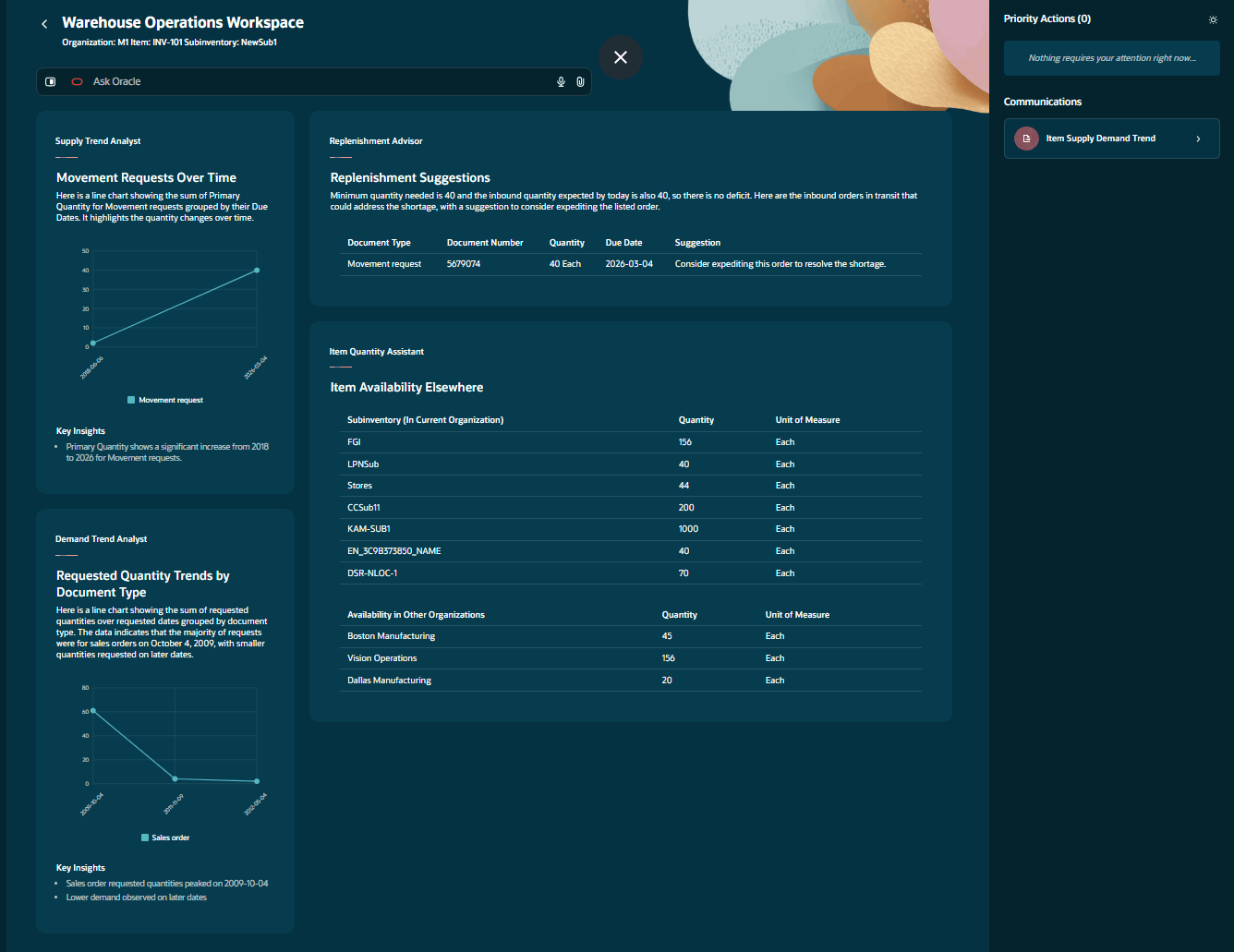
- Supply Trend Analyst: The Supply Trend Analyst analyzes supply data for specific items and organizations. It helps inventory planners and supply chain analysts evaluate inbound supply patterns, monitor expected and received quantities, and assess supply performance to support informed planning and replenishment decisions.
- Demand Trend Analyst: The Demand Trend Analyst analyzes demand data for specific items and organizations. It assists planners and operations managers in reviewing consumption trends, identifying demand patterns, and supporting data-driven fulfillment and allocation decisions.
- Replenishment Advisor: The Replenishment Advisor recommends replenishment strategies for items within organizations. It helps inventory planners and supply chain managers evaluate supply and demand alignment and determine appropriate replenishment actions to maintain optimal stock levels while preventing shortages or excess inventory.
- Item Quantity Assistant: The Item Quantity Assistant provides detailed on-hand quantity information for items across organizations. It assists warehouse operators and inventory planners in validating stock balances and ensuring accurate inventory visibility for operational decision making.
Item Quantity Monitor
Outbound Processing Assistant
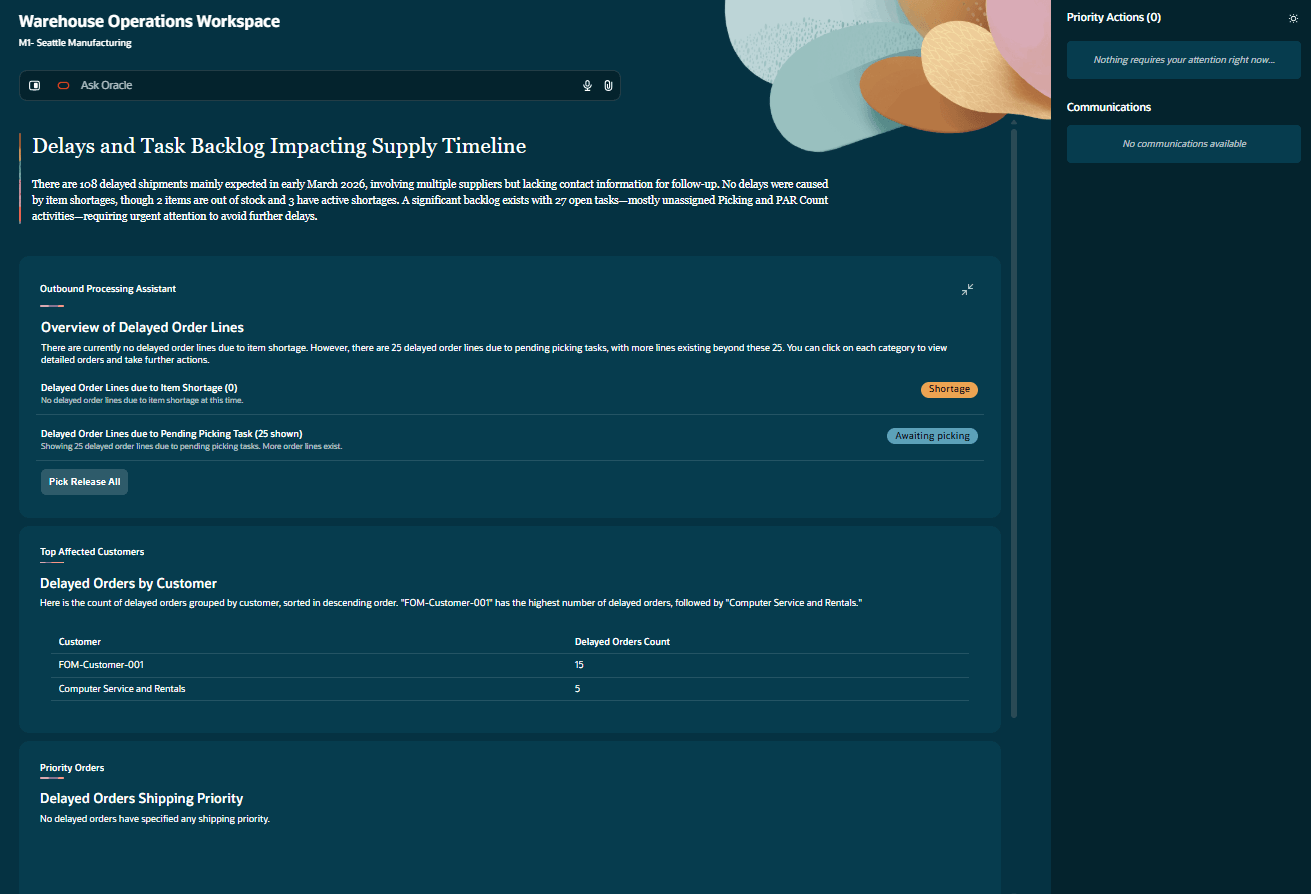
The Outbound Processing Assistant focuses on order fulfillment and shipping performance, helping warehouse managers ensure that customer commitments are met and shipments leave the warehouse on time. It summarizes delayed outbound demand and highlights potential fulfillment risks, enabling warehouse operators and order management teams to quickly review order status, fulfillment details, and priority shipments. By providing visibility into outbound processing and recommended corrective actions, the assistant helps teams identify potential delays early and take the necessary steps to maintain reliable fulfillment performance and reduce shipment disruptions. The assistant also provides recommendations for handling priority orders by aligning outbound demand with available fulfillment options. This helps warehouse managers and order fulfillment teams evaluate priority handling strategies and expedite critical shipments to maintain service levels. In addition, the assistant provides relevant outbound configuration information such as shipping parameters and picking rules, enabling warehouse supervisors and fulfillment teams to review operational settings and support planning, troubleshooting, and exception handling during outbound processing.
With the Outbound Processing Assistant, warehouse managers can:
- Explore alternative fulfillment options, such as reallocating inventory, borrowing stock from future-dated orders, or identifying substitute items.
- Take recommended actions directly from the workspace to maintain reliable fulfillment performance.
- Identify orders at risk of shipment delays and proactively intervene before fulfillment commitments are missed.
- Review the status of sales orders across the fulfillment lifecycle.
- Pick release priority orders and generate pick slips so these orders can be processed and shipped first.
Outbound Processing Assistant
Inbound Operations Advisor
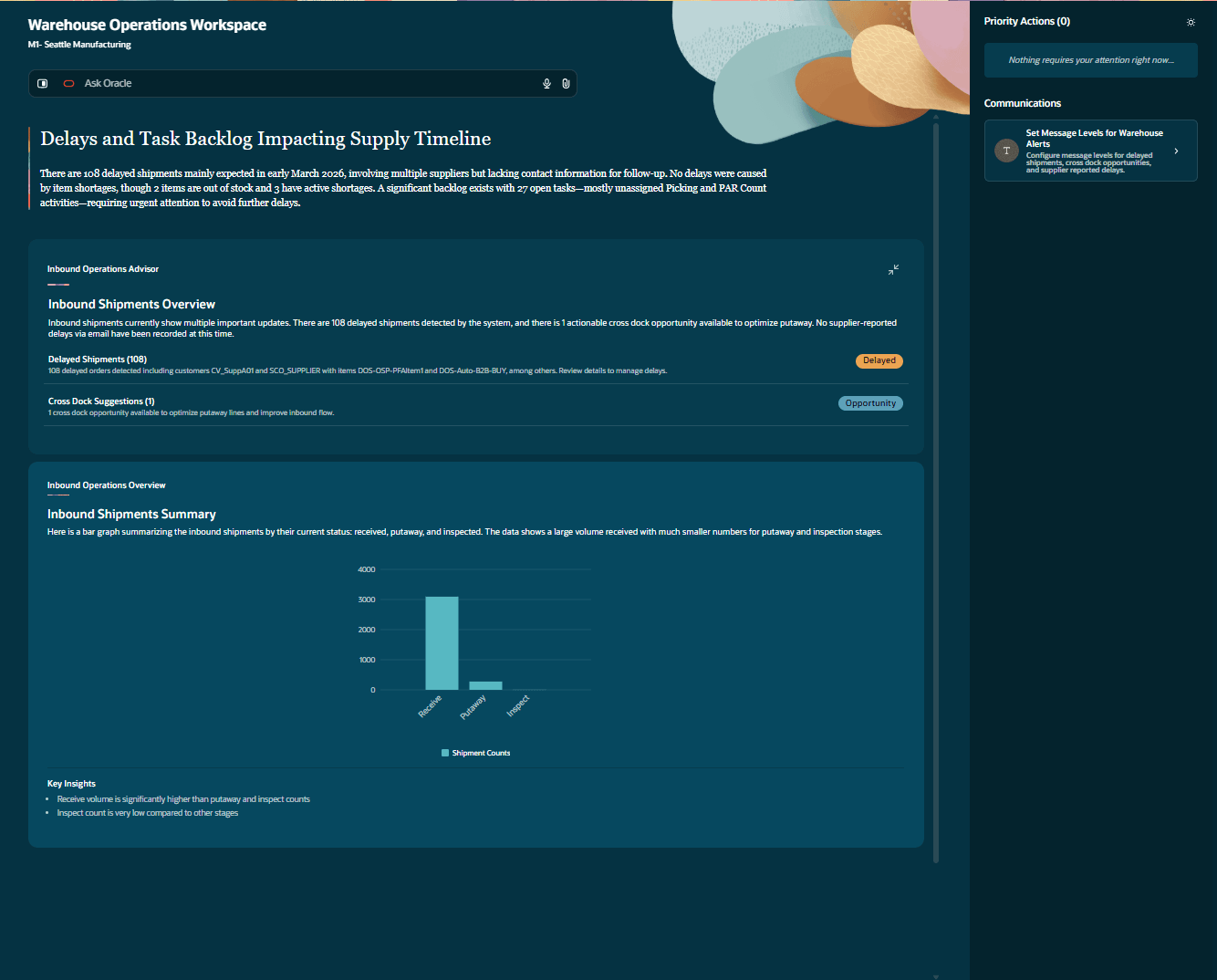
The Inbound Operations Advisor provides visibility into receiving operations and incoming shipments, helping warehouse managers anticipate disruptions and streamline receiving workflows. It highlights inbound exceptions such as delayed shipments and short-supplied purchase or transfer orders, enabling receiving managers and warehouse teams to quickly assess supply alignment and maintain efficient receiving operations. The advisor also identifies opportunities to improve warehouse throughput by aligning inbound supply with outbound demand. By recommending cross-docking opportunities, it helps reduce storage time, minimize handling steps, and optimize material flow across the warehouse. In addition, the advisor supports shipment receipt operations by detecting delayed shipments, identifying rush order requirements, and providing operational exceptions. It also provides additional operational details to help warehouse managers and receiving teams investigate issues, reconcile discrepancies, and make informed decisions during receiving activities.
With the Inbound Operations Advisor, warehouse managers can:
- Monitor expected inbound shipments and identify delays or discrepancies before they impact warehouse operations.
- Use the Email Assistant to automatically process supplier communications, such as notifications about partial shipments, by extracting purchase order numbers, item details, and other key information.
- Initiate corrective actions directly from processed emails, such as updating purchase orders or identifying alternate supply options.
- Detect cross-docking opportunities by matching incoming receipts with open shipment lines that require the same items.
- Enable direct movement of goods from receiving docks to shipping docks, reducing handling steps and eliminating unnecessary storage.
- Improve receiving efficiency by aligning inbound inventory with outbound demand.
Inbound Operations Advisor
Task Execution Advisor
The Task Execution Advisor provides visibility into labor utilization and operational workload, helping warehouse managers ensure that labor resources are effectively deployed across warehouse activities. It enables warehouse teams to monitor task execution, evaluate workload distribution, and maintain efficient warehouse operations. The advisor assists warehouse administrators in configuring and optimizing tasking rules, priorities, and operational parameters. By aligning tasking configurations with operational objectives and workforce strategies, it helps improve the efficiency and effectiveness of warehouse execution processes. The advisor can dynamically assign tasks to warehouse resources based on workload, priority, resource availability, and operational constraints. This helps warehouse supervisors balance resource utilization, reduce task delays, and improve overall task execution efficiency. In addition, the advisor provides detailed operational insights into tasking activities, enabling warehouse supervisors and operations teams to review task information, investigate issues, and perform performance analysis to support continuous operational improvement.
With the Task Execution Advisor, warehouse managers can:
- Monitor employee workload and task assignments across warehouse operations.
- Identify unassigned, delayed, or overloaded tasks, enabling quick redistribution of work to prevent operational bottlenecks.
- Review workforce performance and productivity insights to maintain operational efficiency.
- Use Ask Oracle to analyze workforce situations, such as identifying areas with high workload or tasks requiring reassignment.
- Optimize labor allocation and task distribution to maintain consistent operational throughput.
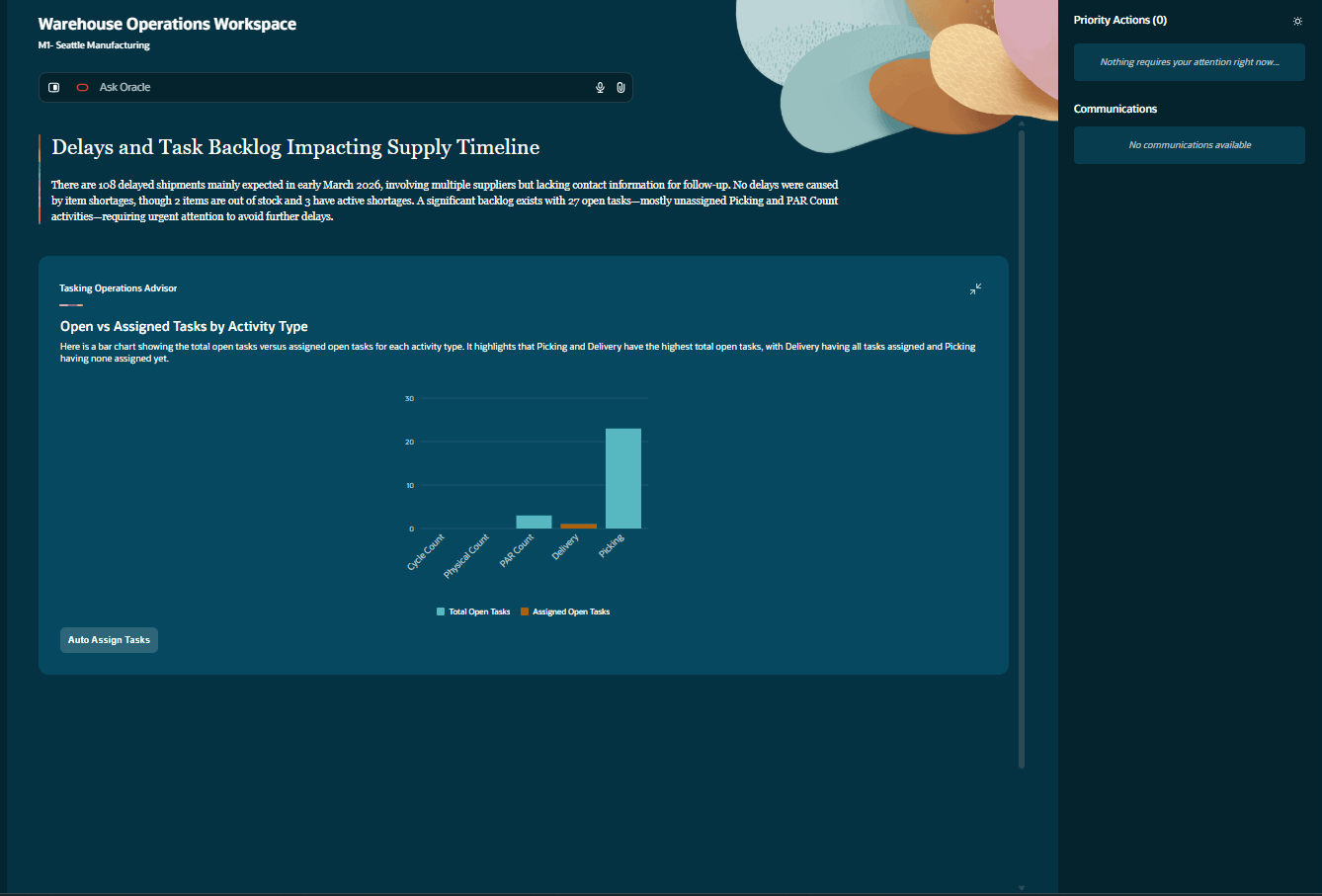
Task Execution Advisor
Together, these advisors combine operational insights with intelligent capabilities such as Ask Oracle, Email Assistant, and automated recommendations. By surfacing high-priority issues and suggesting corrective actions, the Warehouse Operations workspace enables warehouse managers to move from reactive problem solving to proactive operational management. This helps warehouse managers anticipate disruptions, respond faster, and keep warehouse operations running smoothly.
The Warehouse Operations workspace is an AI agentic application that proactively monitors warehouse operations across inventory, inbound, outbound, and workforce activities, and recommends corrective actions before issues impact operations. By combining specialized advisors with intelligent capabilities such as Ask Oracle and Email Assistant, it enables warehouse managers to make faster decisions, reduce manual effort, and maintain smooth, reliable warehouse operations.
Steps to enable and configure
Follow these steps to enable the Warehouse Operations workspace agentic app:
- Navigate to the Setup and Maintenance work area.
- Search for and select the Manage Inventory Profile Options task.
- On the Manage Inventory Profile Options page, search for and select the ORA_INV_WAREHOUSE_OPERATIONS_WORKSPACE_ENABLED profile option code.
- In the Profile Values section, set the Site level to Yes. The default value is No.
- Click Save and Close. The changes will take effect the next time users sign in.
To access the Warehouse Operations workspace agentic app:
- Navigate to Supply Chain Execution.
- Under the Quick Actions section, click Show More to view the complete list of available actions.
- In the expanded list, go to the Inventory Balances section, where you can locate the quick action link for the Warehouse Operations Workspace Agentic App. Selecting this link launches the application.
To enable permission groups for roles, take these steps:
- In the Setup and Maintenance work area, search for the Manage Administrator Profile Values task using the search link in the Tasks panel tab.
- Search for the Enable Security Console External Application Integration (ORA_ASE_SAS_INTEGRATION_ENABLED) profile option and set the Site profile level to Yes.
Tips and considerations
- Review the operational advisors available in the Warehouse Operations workspace to understand the types of operational risks and exceptions that can be proactively monitored. Advisors include:
- Item Quantity Monitor
- Outbound Processing Assistant
- Inbound Operations Advisor
- Task Execution Advisor
- Identify the operational scenarios most critical to your warehouse operations, such as stock shortages, shipment delays, inbound supply disruptions, or task execution bottlenecks, and prioritize monitoring these scenarios within the workspace.
- Ensure transactional data such as inventory balances, purchase orders, transfer orders, and shipment information is accurate and up to date, as recommendations and insights are generated based on available operational data in Oracle Fusion.
- Use the workspace as a primary operational monitoring interface to identify and respond to issues quickly rather than relying solely on traditional reports or manual monitoring processes.
- Users can review and execute recommended actions directly from the workspace, enabling faster response to operational issues such as inventory shortages, shipment delays, inbound supply discrepancies, or task execution bottlenecks.
- Operational recommendations, such as inventory transfers, replenishment actions, or fulfillment adjustments, may require appropriate user privileges and organizational approvals before execution.
- Capabilities such as Email Assistant processing and cross-docking recommendations depend on correctly configured supplier communications, shipment information, and operational data.
- Results and operational insights are limited to the data and organizations that the user is authorized to access based on assigned roles and privileges.
- Some capabilities in the workspace may continue to evolve, and additional functionality may be introduced in future updates.
Key resources
Access requirements
Users assigned a configured job role that contains the following duty role and SAS role can access this feature:
- Warehouse Operations Workspace Duty (ORA_INV_WAREHOUSE_OPERATIONS_WORKSPACE_DUTY)
To interact with AI agents in product pages, users must be assigned a configured job role that contains this duty role:
- Fai Genai Agent Runtime Duty (ORA_DR_FAI_GENERATIVE_AI_AGENT_RUNTIME_DUTY)
For advanced inventory users, the respective duty role and SAS role must also be assigned based on the inventory functionality they need to access.
- Advanced Inventory Management (ORA_DR_INV_ADVANCED_INVENTORY_MANAGEMENT_DUTY)
- Advanced Inventory Management (ORA_INV_ADVANCED_INVENTORY_MANAGEMENT_DUTY)