Derive Containment Task Owners on the Recall Tasks and Send Notifications
You can now map inventory organizations, departments (cost centers) or subinventories to one or more employees so recall containment tasks generated in the bypass count and disposal tasks workflow automatically derive task owners and send notifications to the appropriate coordinators using AI workflow agent. This reduces manual notification rules configuration and helps ensure containment tasks notify the correct coordinators based on location and date-effectivity.
Location-to-employee mapping for containment task ownership:
- Define mappings for:
- Inventory organization only
- Inventory organization + department (cost center)
- Inventory organization + subinventory
Note: Department and subinventory cannot both be populated for the same mapping.
- Assign multiple task owners per mapping. Mappings are date-effective, and the owner active at task creation time is used.
- Support manual entry and bulk upload/download using a provided XLS template.
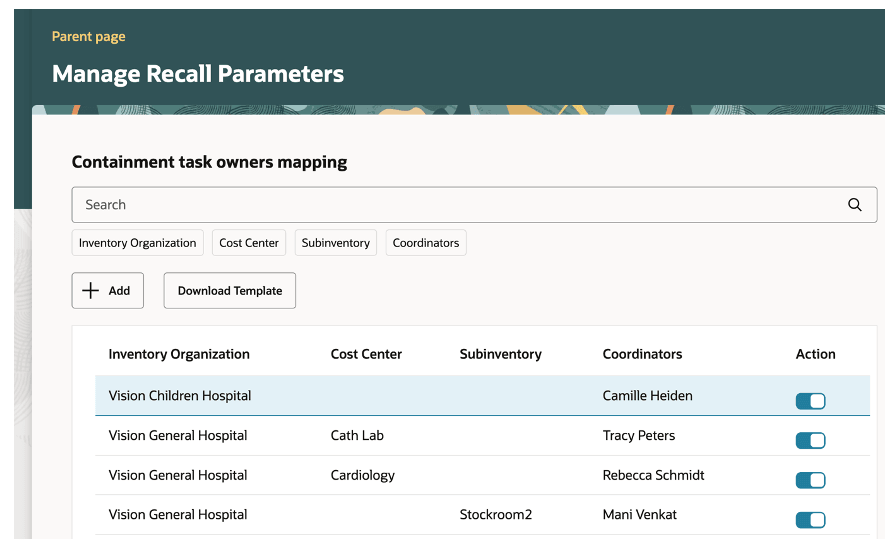
Containment task owners mapping
Automatic notification of derived task owners
- Email notifications are sent once per distinct organization-department or organization-subinventory grouping (or per organization when only org is present), regardless of multiple items for which the tasks exist.
- Date effectivity of mappings is honoured — the task owner(s) active at the task creation time are notified.
- Task owners can drill directly into the application from the email by clicking the recall number to manage related containment tasks.
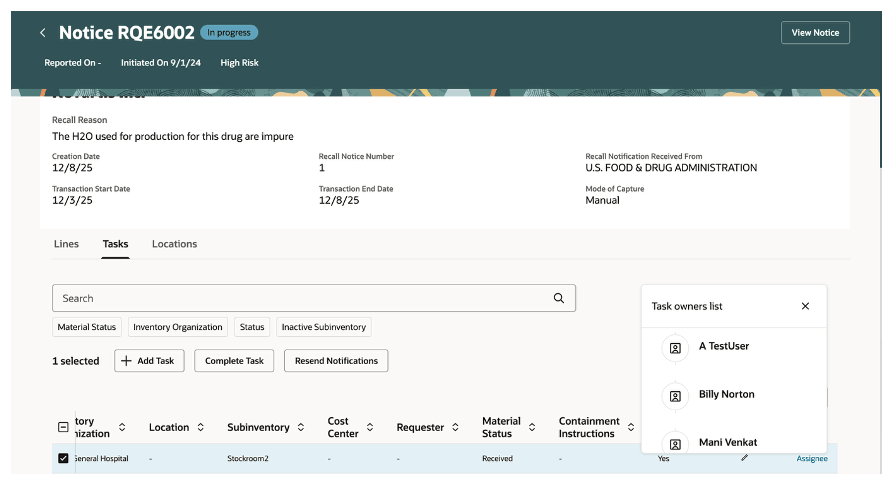
Recall tasks showing the task owners
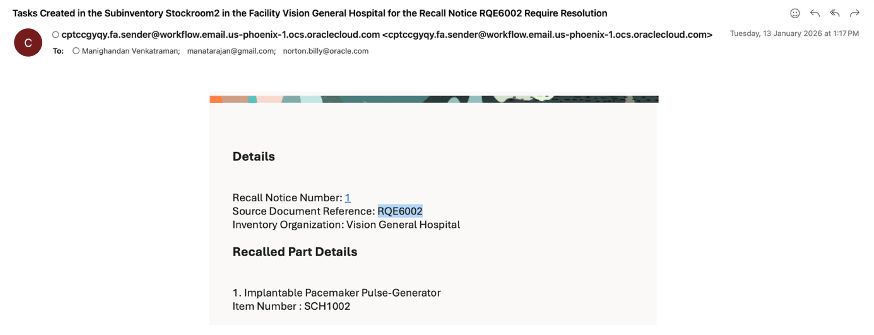
Email notification of recall task assignment
Rules and exceptions for notification triggering
- If a task contains organization only, notification matching is based on organization.
- If a task contains organization + subinventory, notification matching is based on organization and subinventory.
- If a task contains organization + department, notification matching is based on organization and department.
- If a task contains a location other than department or subinventory, mapping-based derivation is ignored and existing BPM worklist rules are applied.
- Notifications for in-transit tasks continue to be triggered based on BPM rules and are unchanged in this release.
Eliminates manual notification maintenance and ensures containment tasks are sent to the correct coordinators using location-based and date-effective ownership mappings.
Steps to enable and configure
- Make sure you have the following duty role under Role Hierarchy > Roles and Permission Groups tab for the configured job role that is used to configure the AI agent.
- ORA_DR_FAI_GENERATIVE_AI_AGENT_SCM_ADMINISTRATOR_DUTY
Note: Following steps are required to provision this duty role
- Go to Home > Setup and Maintenance > Tasks > Search > Manage Administrator Profile Values, then set the profile Enable Security Console external application integration (ORA_ASE_SAS_INTEGRATION_ENABLED) to Y at the site level.
- Enable the permission groups for the configured job role.
- Make sure you have the following duty roles under Role Hierarchy > Roles and Privileges tab for the configured job role that is used to configure the AI agent.
- ORA_RCS_SCM_AI_AGENT_MANAGEMENT_DUTY
- ORA_RCS_SCM_AI_AGENT_ MANAGEMENT_DUTY_HCM
- Go to Home Page > Tools > AI Agent Studio, set the Family to SCM, the Product to Product Recall Management, search for Recall Tasks Notification Agent, then click Copy Template on Recall Tasks Notification Agent.
- Enter the number 1 for the suffix, then click Continue. It's recommend that you use the suffix to indicate versions, such as 1, 2, 3:
- Click . . . > Edit:
- Use the predefined values on the Details tab or modify them to meet your needs:
- Click Security, then assign the configured job role or seeded role which would be used to create a recall notice by uploading the recall letter.
Note: Do the following to assign this job role under Security tab in the AI Agent configuration.
- Enable the permission groups for this configured job role or seeded role.
- Make sure you have the ORA_DR_FAI_GENERATIVE_AI_AGENT_RUNTIME_DUTY duty role provisioned under Role Hierarchy > Roles and Permission Groups tab for this configured job role.
- Click Publish.
- Click Agent Teams, search for and open Recall Tasks Notification Agent1, then verify the status is published.
- Go to Home > Setup and Maintenance > Tasks > Search > Manage Profile Options, then define a profile option as follows.
- Profile Option Code should be RECALL_TASKS_NOTIFICATION_AGENT
- Profile Display Name: It is an user-defined name
- Application: Supply Chain for Healthcare
- Module: Recall Management
- Start Date: Current date
- Enable this profile at site level
- Go to Home > Setup and Maintenance > Tasks > Search > Manage Administrator Profile Values, then search for the above defined profile and set the value with agent team code.
Tips and considerations
- Do not create mapping records that duplicate an active inventory organization + cost center/subinventory + task owner combination. Identical active combinations are not allowed.
- A mapping record must use either cost center or subinventory; both cannot be populated on the same row.
- Existing BPM worklist rules and notifications remain in effect and may be sent in addition to mapping-based notifications, where applicable.
- Notifications generated from this mapping are delivered via email only and do not appear as workflow notifications under the Bell icon in the application.
- Reminder / resend capability: Administrators can resend notifications for tasks that are still In Progress. Automatic reminder scheduling (for example, after three days) is a future enhancement and is out of scope for this release.
- Grouping logic prevents duplicate notifications when multiple items belong to the same organization–department or organization–subinventory grouping.
- This feature is controlled by the Define Coordinators Mapping for Recall Tasks and Notify Task Owners profile option.
- By default, the profile option is enabled, allowing you to define containment task owner mappings and send notifications at task creation.
- You may disable this option to continue using BPM-based notification rules instead of mapping-based notifications defined on the Recall Parameters page.
Key resources
- Oracle Supply Chain Management guide, Using Product Recall Management guide, available on the Oracle Help Center.
- Oracle Supply Chain Management guide, Implementing Product Recall Management guide, available on the Oracle Help Center.
Access requirements
Users who are assigned with configured job role that contains the following privileges can access this feature:
- Manage Product Recall Parameters (ENQ_MANAGE_PRODUCT_RECALL_PARAMETERS) – To define the mapping in Recall Parameters page.
- View Recall Trace Details and Tasks (SCH_VIEW_RECALL_TRACE_TASKS) – To drill down from the email notification to manage the tasks in application.