Prepare for Upcoming Sales Meetings with AI-Generated Pre-Meeting Briefs
As part of their day, sellers often manage multiple customer meetings. Preparing for each meeting usually means piecing together context from several Sales records, such as the related account, opportunity or lead, contacts, activities, notes, and recent engagements, including emails and interaction wrap-ups. This takes time and can still leave sellers at risk of missing important details before a customer conversation.
With the 26C update, sellers can now use AI-generated Pre-Meeting Briefs to prepare for upcoming sales appointments. The Meeting Preparation Assistant Agent gathers the CRM context sellers would otherwise review manually and synthesizes the information into a concise, actionable briefing document. Sellers can quickly understand what the meeting is about, review account and deal insights, assess contact influence and sentiment, use recommended talking points and objection-handling guidance, and catch up on recent customer engagements before the meeting starts. This helps sellers plan the conversation and drive the discussion toward the desired outcomes.
A Meeting Preparation Scheduler Agent identifies upcoming sales appointments using a configurable look-ahead window and generates briefs in advance. Generated briefs are stored in the AI Outcome Store and surfaced across Sales Command Center, CX Sales Mobile, and Redwood Sales Web UI. In Redwood Sales Web UI, sellers can open the brief from the Prepare for Call action on upcoming appointments. In CX Sales Mobile, sellers can use the Prepare action for upcoming sales appointments.
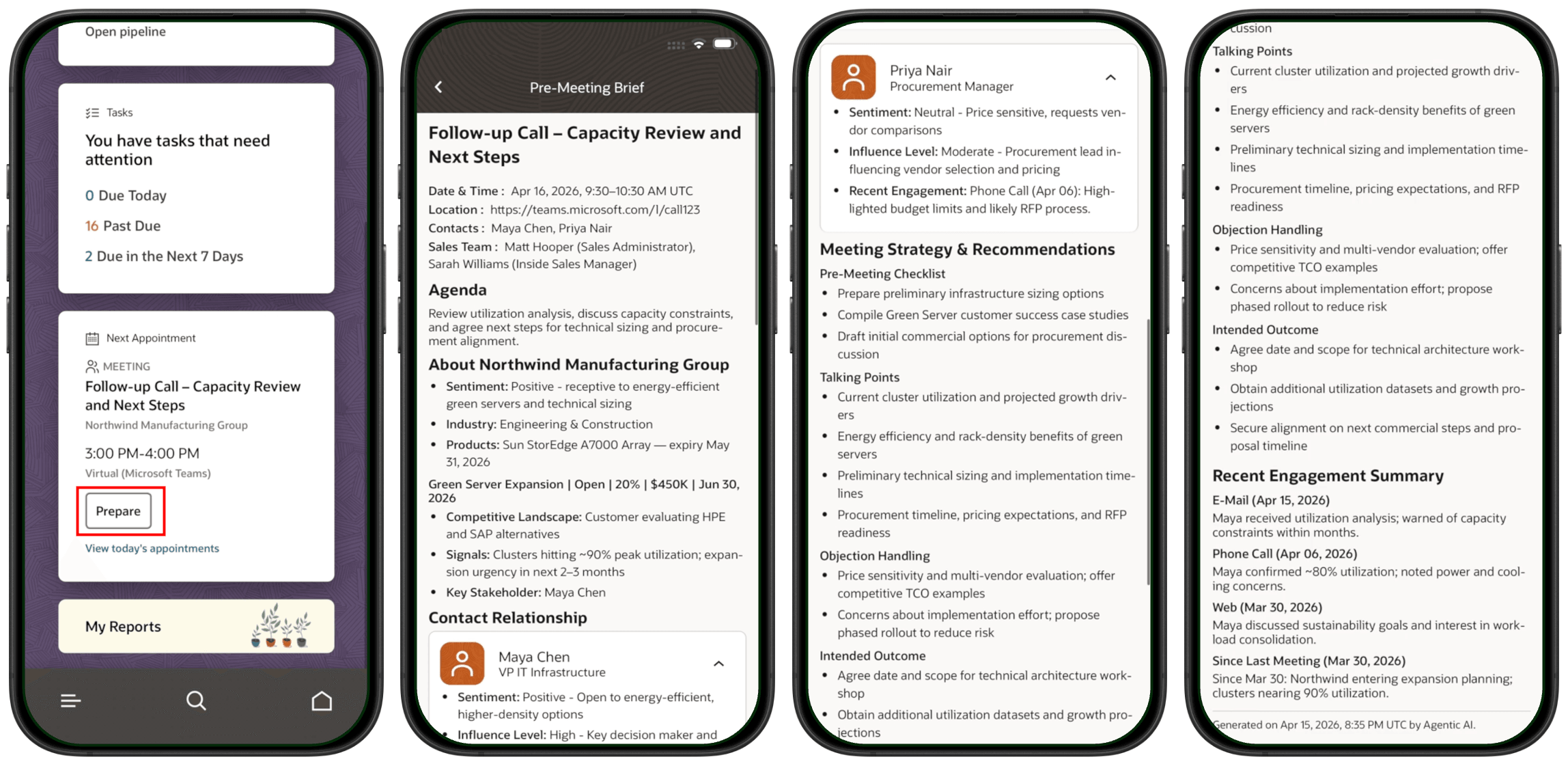
Pre-Meeting Brief experience in CX Sales Mobile
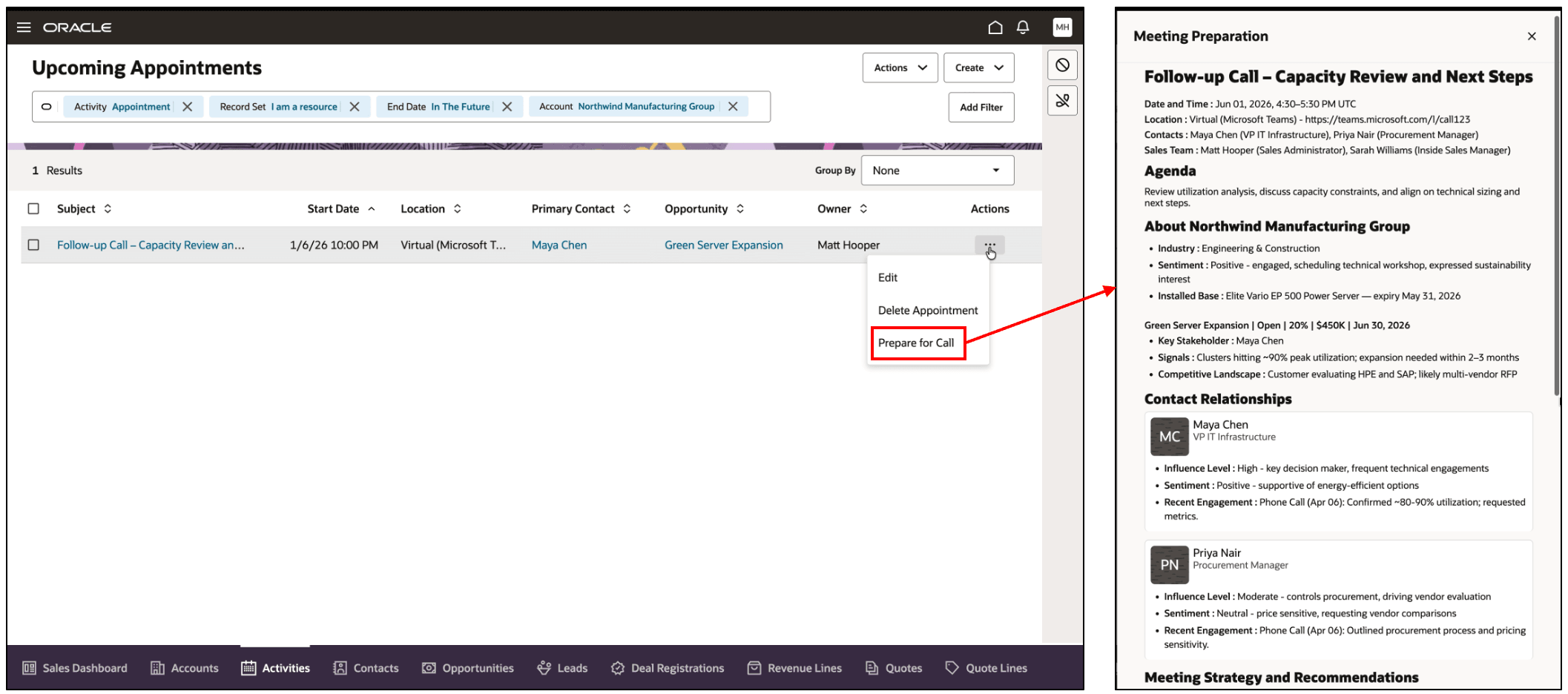
Pre-Meeting Brief experience in Oracle Sales Web Application
When Opportunity Engagement Insights are available for the associated opportunity, the Meeting Preparation Assistant Agent uses the Opportunity Assistant Agent Team to include Sales Play and Sales Motion-aware guidance in the meeting strategy and recommendations.
This capability helps sellers save time otherwise spent reviewing fragmented CRM records, improves readiness before customer conversations, and supports more informed, outcome-oriented sales meetings.
Steps to enable and configure
As a prerequisite, this is an AI Agent-powered capability and requires AI Agent Studio to be enabled. See Access Requirements for AI Agent Studio.
To enable Pre-Meeting Briefs:
- In AI Agent Studio, verify that the Meeting Preparation Assistant Agent is available.
- Clone or import the Meeting Preparation Scheduler Agent.
- Rename the cloned or imported scheduler agent as needed.
- Assign the Fai Batch Job Manager Duty (ORA_DR_FAI_BATCH_JOB_MANAGER_DUTY) role to the custom role used by the administrator or service user who schedules workflow agent teams.
- Open the Meeting Preparation Scheduler Agent.
- Go to Settings > Triggers.
- Under Scheduler, click Add.
- Select Recurrence as the schedule type.
- Select Daily as the recurrence mode.
- Enter the execution time in UTC.
- Update the scheduler settings and save your changes.
- To verify scheduler invocation, go to Monitoring and Evaluation > Activities > Schedules.
Tips and considerations
- Meeting Preparation Scheduler Agent setup is required so that Pre-Meeting Briefs are generated proactively before sellers need them.
- The scheduler uses the configured look-ahead window, for example 7 days, to identify upcoming meetings for proactive brief generation.
- Pre-Meeting Briefs are generated for eligible sales appointments that have at least one Sales contact.
- Pre-Meeting Briefs are automatically regenerated when eligible meeting details, such as attendees, agenda, or schedule, are updated.
- Ensure that the required Sales objects and attributes are enabled in Elasticsearch so that the agent can use relevant CRM context from activities, accounts, contacts, opportunities, leads, and recent engagements such as emails and interaction wrap-ups.
- Scheduler execution time must be configured in UTC.
- Brief quality depends on the completeness and accuracy of CRM data.
- When Opportunity Engagement Insights are available, the brief can include Sales Play and Sales Motion-aware guidance in the meeting strategy and recommendations.
- As with all AI-generated content, users should review the generated brief for correctness and accuracy before using it in customer conversations.
Key resources
Follow Access Requirements for AI Agent Studio chapter in How do I use AI Agent Studio?
Access requirements
Administrators configuring proactive brief generation must have access to AI Agent Studio and the required role to schedule workflow agent teams.
Pre-Meeting Briefs respect existing Sales access controls. Information from records that a user doesn’t have permission to access isn’t included in the generated brief.