Align end dates of active subscriptions via Self-Service
Beginning in 26B, Organization Buyers can align the end dates of multiple active subscription lines. This capability enables buyers to co-term subscriptions by selecting alignment options and viewing prorated charges during the modification process.
Capability Highlights:
- Allow organization buyers to view end dates and select subscription lines to align.
- Propose alignment options for longest end date or custom end date during subscription line modifications.
- Calculate and clearly display prorated charges.
- Ensure subscription period compliance (preventing sales of shorter-than-allowed terms unless excepted).
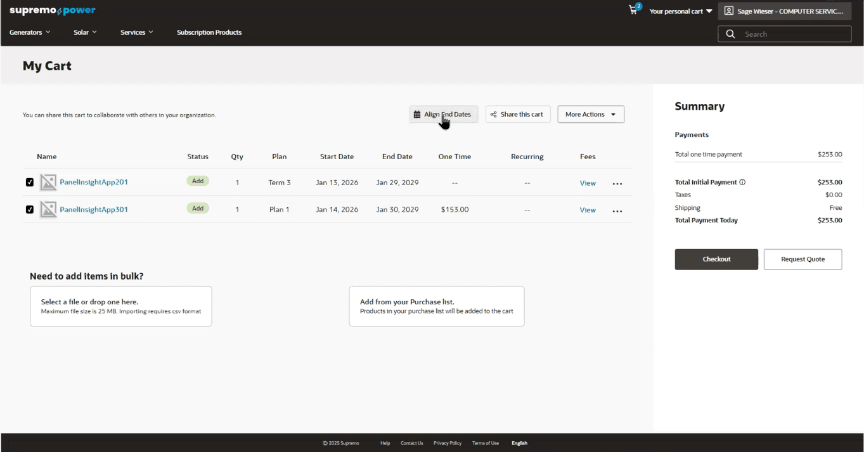
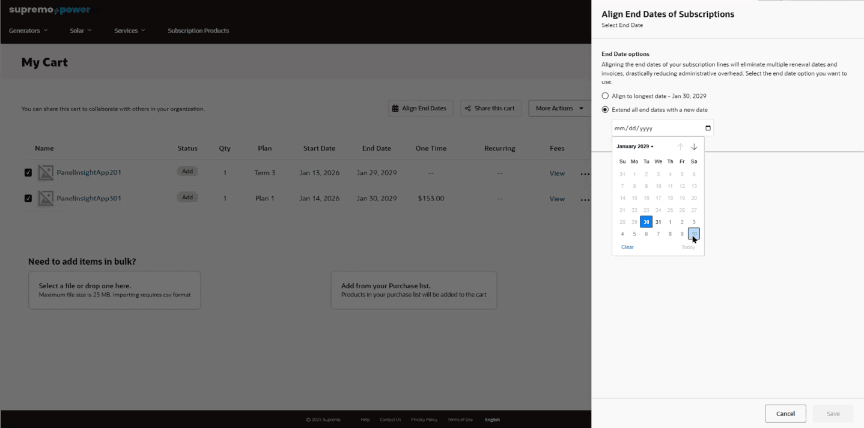
This feature delivers mutual benefits by simplifying billing and renewal management through aligned end dates, which reduces administrative complexity for sellers and improves budgeting predictability for buyers. Sellers gain operational efficiency through automated compliance checks, streamlined contract management, and reduced billing errors, while buyers enjoy greater flexibility, transparent pricing, and a consolidated renewal experience. This alignment enhances customer satisfaction, minimizes revenue leakage, and supports scalable subscription growth for both the buyer and seller.
Steps to enable and configure
- In the Administration Console, navigate to Settings > Oracle Integrations. Select Self Service CPQ from the drop down and configure the integration settings. Please refer to the section 'Set Up the Integration of OCC and Oracle CPQ for Self Service' of the Self Service Setup guide for more information.
- In Self Service CPQ settings, set CPQ Rest API Version to 19. Publish the changes.
- Enable CPQ Pricing:
URI: PUT /ccadmin/v1/priceSettings
Payload:{
"enabled": true
} - Enable Standard Asset-Based Ordering feature in Oracle CPQ. For more information on Standard ABO, refer to this documentation.
Tips and considerations
- Existing Package ABO merchants who want to move to Standard ABO will need to be on the Standard Commerce Process. This may involve moving transactions from the existing Commerce process to the Standard Commerce Process or sunsetting the existing Commerce process.
- Existing customers looking to use this functionality must refer to Oracle CPQ Administration Online Help > Integrations > Oracle Integrations > Commerce Cloud > Self-Service Portal: Administration section. Ensure to perform steps documented in the Enable Self-Service Cart to CPQ Transaction Synchronization for Oracle Commerce Cloud Orders section.
- This feature is only available when merchants use native order integration with Oracle CPQ.
- Ensure the subscription products being modified exist in OCC and the Sales Product Type property on the product is set to SUBSCRIPTION.
- Only contacts with Organization Buyer role will be able to use this feature.
- This feature is built-in on the htim-reference-store. Please make sure to upgrade to the latest version of this reference storefront.
- This feature is applicable only for Commerce on CPQ customers.