Log Action Items from Activity Summary as Task or Appointment
With the Activity Summary feature made available in 25A update, Sales Managers and Reps can already use Generative AI to get a concise summary of recent engagement on a Sales Record by invoking the Show Activity Summary smart action from the Action Bar. Generated Activity Summary is shown on a drawer panel with insights on - Customer Sentiment, Overall Summary, and Key Action Items.
Now with the 26A update, sellers can also log their AI recommended action items as Tasks or Appointments directly from Activity Summary panel, with key details like Subject, Description and Appointment Date/Time pre-filled using AI on the create page.
As a direct benefit, sellers realize productivity gains with reduced manual entry for logging their Sales follow-ups and can sustain deal momentum with timely, AI-guided follow-ups.
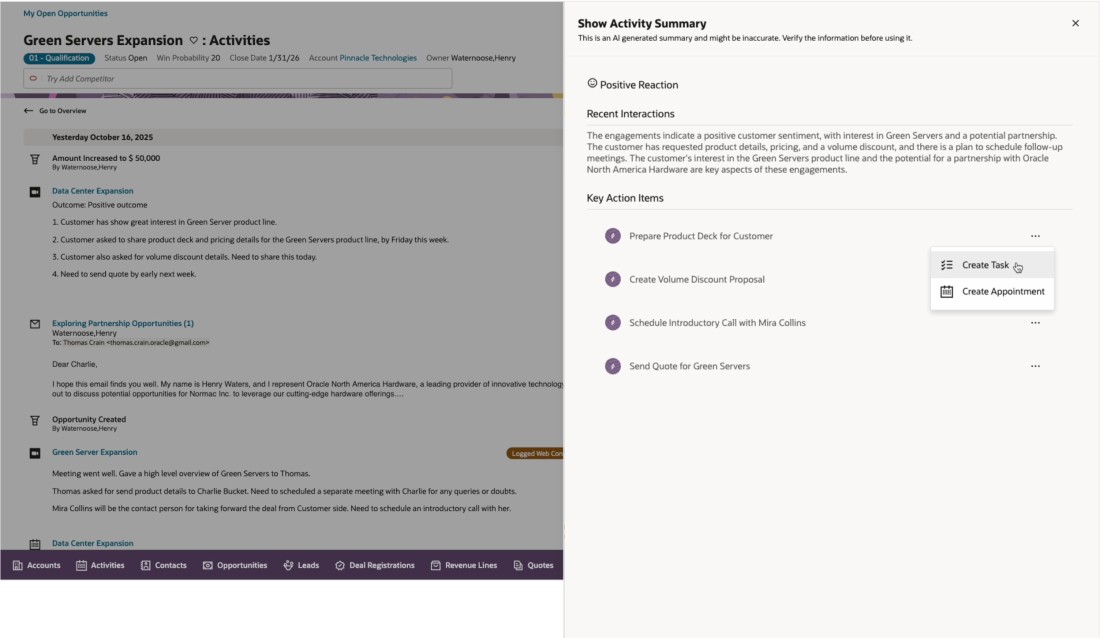
Log Action Items from Activity Summary
Steps to enable and configure
You don't need to do anything to enable this feature.
Tips and considerations
- Action Items are generated with awareness of currently logged Activities in open status, thereby minimizing duplicates.
- Up to 5 unique, net new Action Items are generated and displayed under Key Action Items.
- User can create Task or Appointment from the context of each Key Action item.
- As with all generative AI features, it's important that your users verify the generated content for correctness and accuracy.