Workforce Orchestration Command Center
Use Workforce Orchestration Command Center to identify workforce conditions that need attention and prepare evidence-backed follow-up actions. The workspace helps leaders and operations roles assess changes affecting workforce stability, capacity and economics, and organizational structure without making direct changes to HCM.
Key capabilities include:
- Viewing a concise executive summary and only the workforce indicators that exceed a defined threshold or materially changed.
- Reviewing workforce stability, capacity and economics, and organization-change signals with supporting context.
- Leveraging suggested priority actions for critical workforce conditions for review and execution.
- Generating outcome research evaluations and reviewing research artifacts, and follow-up recommendations.
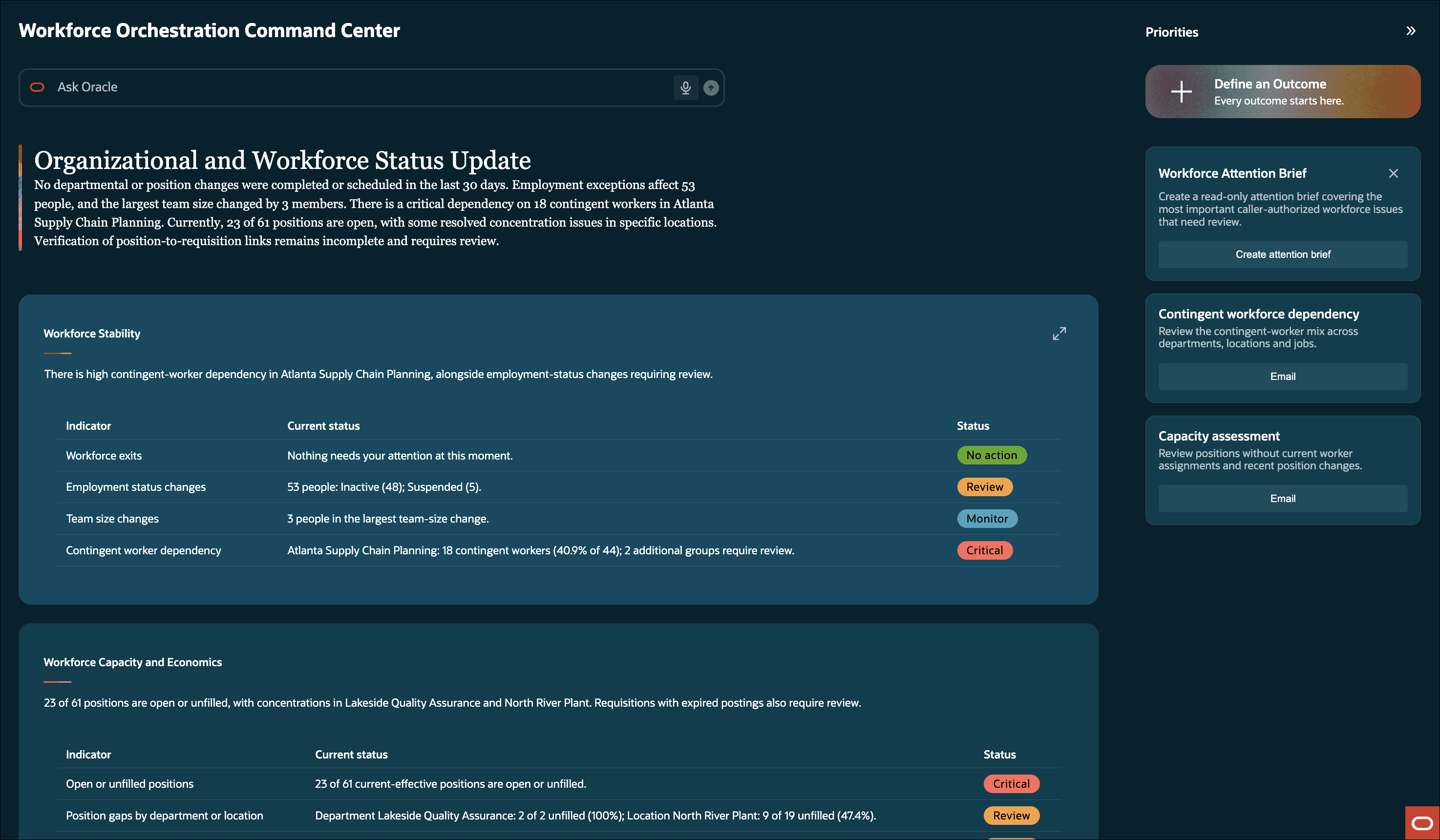
Workforce Orchestration Command Center
Here's a sample outcome prompt:
We have had increased demand at the Altanta Distribution Center and need 5 more material planners. What’s the quickest and cost-effective to acquire them? Give me a couple of options using plain business language and precise numbers.
Business benefit
Workforce Orchestration Command Center helps leaders focus on the workforce conditions that warrant review instead of manually sorting through routine data. It provides relevant signals, supporting evidence, and suggested next steps together so that leaders and operational roles can evaluate workforce impacts and prepare efficient, informed responses.
Steps to enable and configure
No additional setup other than configuring the agent is required for this feature. However, you must grant users a privilege. See the Access Requirements section.
Configuring the agent
- Your environment must have certain necessary configurations. Ask your help desk to contact Oracle Support, who can verify what your environment has and address these gaps. For more information, see FAQ2521 on My Oracle Cloud Support.
- Set the Enable Security Console External Application Integration (ORA_ASE_SAS_INTEGRATION_ENABLED) profile option to Yes and enable permission groups for the appropriate roles. See Access Requirements for AI Agent Studio.
To learn how to set up AI agents, see Create AI Agents Using Preconfigured Agent Team Templates.
Tips and considerations
- The workspace is read-only. It summarizes, analyzes, and recommends; it doesn’t perform HCM transactions such as transfers, terminations, requisition postings, or position updates.
- Suggested actions are evidence-backed prompts that users can review, edit, and run. They aren’t automatically executed.
- Only indicators that meet configured thresholds or show a material change are surfaced. Normal or expected values aren’t displayed as priority items.
- Communications are suggestions for preview or copy; they aren’t sent from the workspace.
Key resources
- This feature uses Oracle Fusion Claw, a governed and agentic runtime capability for enterprise execution. Learn more about Fusion Claw.
- Explore AI Agents for Oracle Fusion Cloud Applications
- How do I use AI Agent Studio?
- Choose How to Create Workflows and Agentic Applications
Access requirements
Assign this privilege to a custom HR role to give access to the Workforce Orchestration Command Center. The Human Resource Specialist role is granted this privilege as an out-of-box solution. See How can I give users access to AI agents and Access Requirements for AI Agent Studio.
| Privilege | Code | Description |
|---|---|---|
| HCM Professional Concierge Workspace Access Duty | ORA_HRL_HCM_PROFESSIONAL_CONCIERGE_WORKSPACE_ACCESS_DUTY | Allows users to access the HCM Professional Concierge Workspace. |
Access to workforce information and available actions is determined by assigned roles, data roles, and security profiles.