Display Flex Credits Using a Custom Unit of Measure
Flex Credits can display a custom unit of measure, such as Points, instead of the program currency.
Use this Feature to:
- Hide the default program currency symbol or code for Flex Credit amounts.
- Display a custom unit of measure for Provided, Used, and Unused Flex Credits. When configured, Flex Credits can display values such as 150.00 Points instead of $150.00.
- Use terminology that better represents your organization’s Flex Credit program.
These pages support this enhancement:
- Self-Service Benefits:
- Elections Guided Process
- View All Enrollments
- Enrollment Journey
- Benefits Activity Center:
- Program Plan Selections
- Benefits Summary
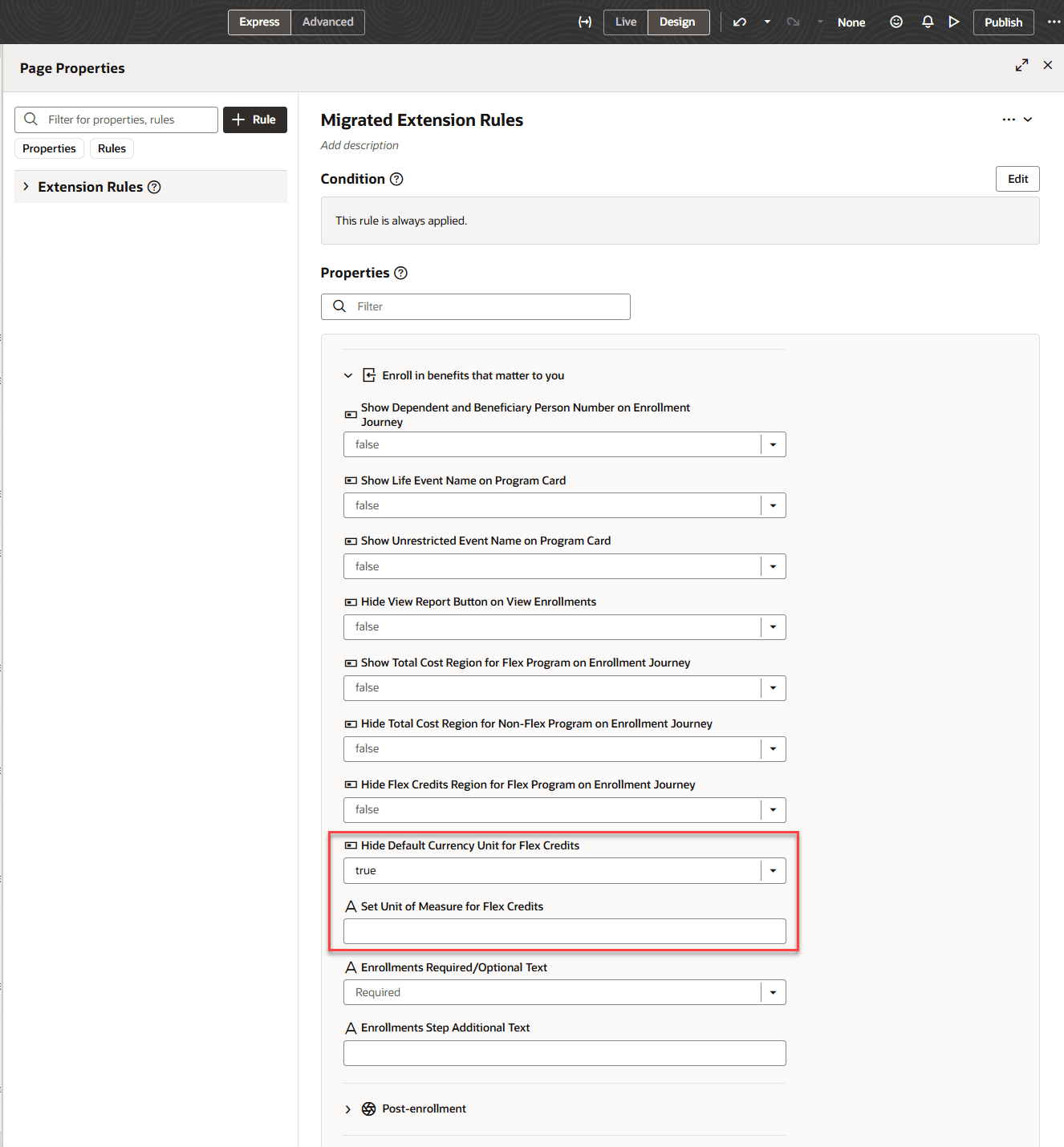
Page Properties to Display Custom Unit of Measure
This enhancement helps organizations represent Flex Credits using terminology that better reflects their Flex Credit program rather than presenting the credits as monetary amounts.
Steps to enable and configure
- Open the page, open the Settings and Actions menu, and select Edit Page in Visual Builder Studio.
- Set Hide Default Currency Unit for Flex Credits to true.
- For Set Unit of Measure for Flex Credits, enter the value you want to display, such as Points.
Tips and considerations
Configure the custom unit of measure only after hiding the default currency unit.