Collector Workspace Agent for Prioritized Work Queue and Guided Resolution
The Collector Workspace introduces an AI-powered collections experience that helps organizations improve collector productivity, accelerate cash recovery, and drive more consistent customer engagement.
The Collector Workspace Agent transforms collections from a manual, fragmented, and search-intensive process into an AI-driven, prioritized, and action-oriented experience. It helps collections teams quickly identify the customer accounts that require attention, understand the factors driving urgency, and take the next best action from a unified workspace.
Collections teams often need to review customer and receivables information across multiple systems before engaging with a customer or completing an internal review. Critical context such as invoices, disputes, payment history, promises to pay, and information captured from incoming customer emails may be distributed across various systems and email channels. This fragmentation makes it difficult for collectors to quickly understand the full account context, identify the reason for non-payment, and determine the right follow-up action.
With the Collector Workspace Agent, collectors can access key customer and receivables insights in one unified experience. The agent uses governed collections policies and AI-driven reasoning to prioritize accounts, explain urgency drivers, summarize account context, and recommend policy-aware next-best actions. This enables collectors to work from a more complete and consistent understanding of each customer, respond faster, and make more informed decisions.
Key Capabilities
- AI-Prioritized Customer Worklist - Provides collectors with a ranked list of customer accounts that require attention, guided by governed collections policies. The worklist surfaces the key priority drivers behind each account, helping collectors quickly understand what needs attention, why it matters, and where to focus first.
- Customer Drilldown and Account Context Summary - Enables collectors to drill into a specific customer account and view a consolidated summary of receivables status, prior activity, payment history, disputes, promises to pay, and recommended next steps.
- Next-Best Action Recommendations - Recommends policy-aware next actions based on account context and collections priorities, such as requesting promise to pay or calling customers.
- Conversational Account Inquiry - Enables collectors to ask natural-language questions about customer accounts, such as open invoices, disputes, payments, and promises to pay, and receive contextual answers without navigating across multiple screens.
- Incoming Email Intelligence - Extracts and summarizes key details from incoming customer emails, helping collectors quickly identify customer intent and required follow-up actions, such as promises to pay.
- Customer Communication Drafting - Assists in drafting policy-aware customer emails and follow-up messages using available account context, prior activity, incoming email details, and recommended actions.
- Collections Activity Support - Helps collectors complete common collections activities such as surfacing collection call scripts, creating call notes, and capturing promises to pay.
- Policy-Governed Guidance - Uses governed collections policies to support consistent prioritization, recommendations, communications, and collector actions across customer accounts.
Collector Workspace Experience
The Collector Workspace Agent provides a focused collections experience through two primary views that help collectors prioritize customer accounts, understand account context, and take timely action.
Prioritized Customer List: Collectors can start their day with a ranked list of customer accounts that require attention. The list is driven by policy-defined prioritization signals such as overdue balances. For each customer, the workspace highlights the key priority drivers and recommends the next best action, helping collectors decide where to focus first and what to do next.
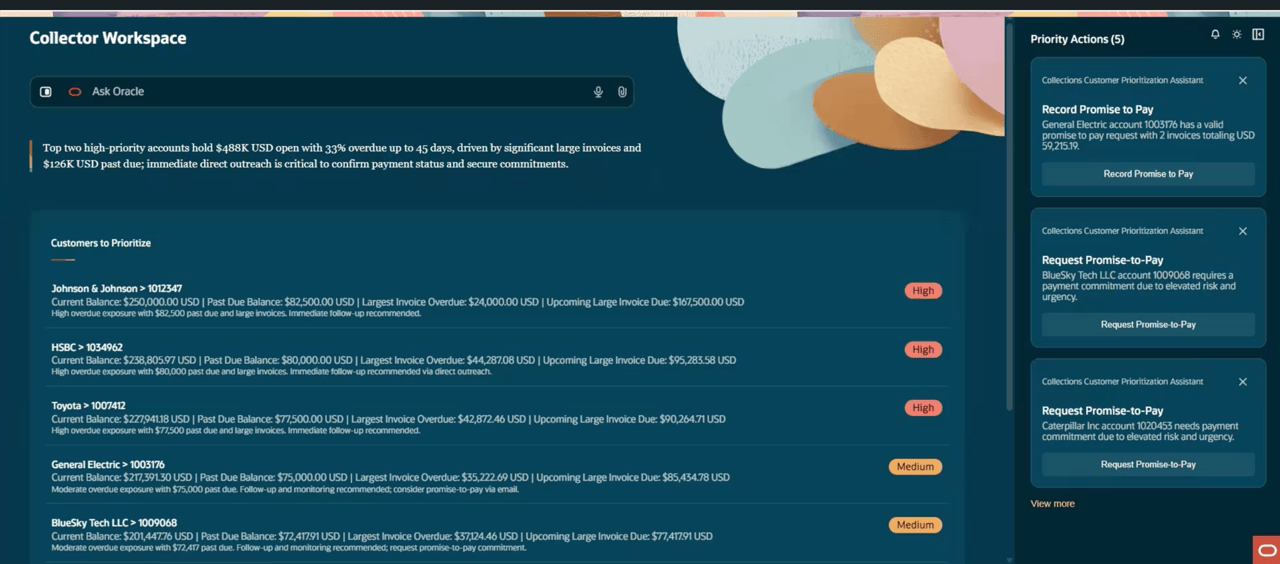
Collector Workspace - Prioritized Customer List
Customer Drill-Down: Collectors can drill into a specific customer account to get a complete view of the collection context in one place. This includes aging, overdue balances, prior Collections activity, and recommended next steps. This detailed view helps collectors engage customers with the right context, make faster decisions, and act without switching between multiple systems.
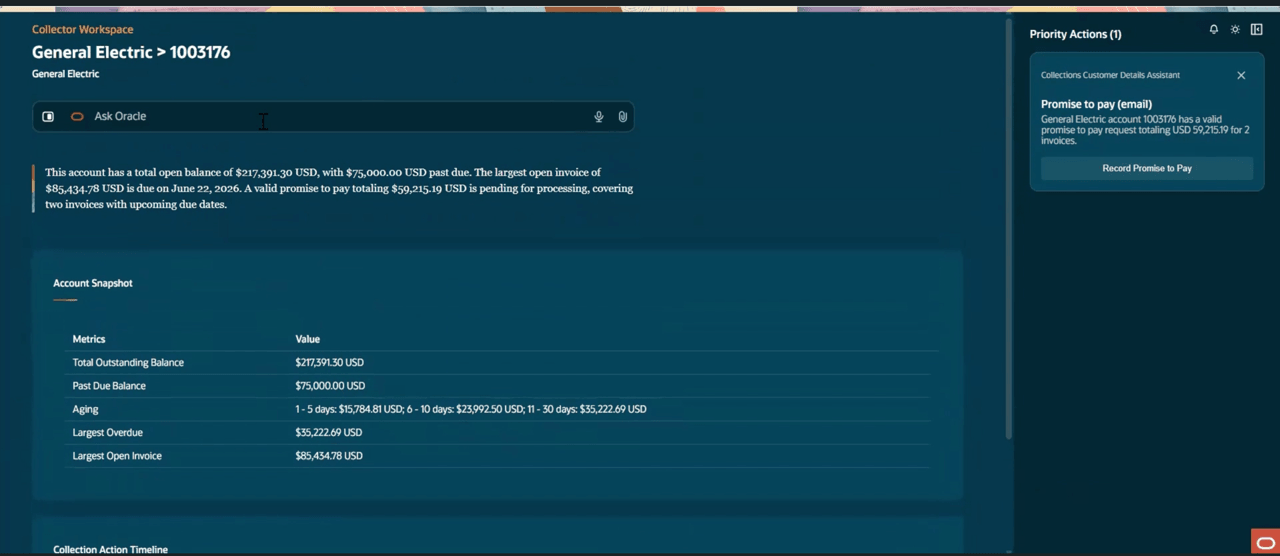
Collector Workspace - Customer Detail
The Collector Workspace Agent delivers measurable business value by accelerating cash recovery, improving collector productivity, standardizing collections execution, and enhancing customer engagement through AI-driven insights and automation.
- Accelerated receivables recovery - Helps collectors focus on the highest-priority accounts first, take timely follow-up actions, and reduce delays in cash collection.
- Higher collector productivity - Reduces time spent searching across multiple systems and streamlines routine collections activities, such as reading incoming customer emails to identify intent and follow-up actions, and drafting responses based on customer context. This enables collectors to spend less time on administrative work and more time on value-added recovery activities.
- Consistent, policy-driven execution - Applies business-defined prioritization rules, so collectors focus on accounts based on risk, urgency, exposure, and collection impact.
- Improved customer experience - Equips collectors with complete and accurate context, enabling faster responses, clearer communication, and fewer repeated information requests.
- Better business decisions - Uses AI-driven insights and account-level collections data to recommend next best actions and support informed, policy-aligned decisions.
- Lower operational risk - Reduces errors from manual data gathering and inconsistent processes, helping teams follow standardized collections practices.
- Stronger cash flow visibility - Gives collections teams a clearer view of outstanding receivables, high-priority accounts, payment commitments, and disputes, improving visibility into collection priorities and cash flow impact.
Steps to enable and configure
Enable Access to AI Agent Studio through Quick Actions
- Use the Oracle Cloud Applications URL, and sign into Oracle Cloud Applications using the user name and password that were provided to access Oracle Identity Management.
- On the Home page, navigate to the Setup and Maintenance work area. You can access the Setup and Maintenance work area in the following three ways:
- Click Navigator > Setup and Maintenance.
- Click the Setup and Maintenance icon on the Home page.
- Click the Profile icon on the Home page and select Administration > Setup and Maintenance.
- Open the Tasks panel tab on the right side of the page and click Search.
- Type Manage Administrator Profile Values and select the task from the search results.
- Type the Profile Option Code as ORA_HCM_VBCS_PWA_ENABLED in the search criteria fields.
- Select the matching profile option from the search results table.
- Locate the Profile Values section at the bottom of the page.
- Choose the Profile Level as Site for the entire environment.
- Enter or select Profile Value column as “Y”.
- Click Save and Close.
Now, you can access AI Agent Studio through Quick Actions using the navigation: Me > Quick Actions > Show More > AI Agent Studio > AI Agents .
Upload and Approve Collections Policy
- Use the Oracle-provided Policy document as template. Before uploading, fill in your organization’s details and customize the content to reflect your organization’s specific policies. The Policy document template is available here.
- After finalizing the policy, upload it using the Collections Policy Execution Assistant. For information about access to this assistant, see the Access Requirements section. The policy document should be uploaded in DOCX or PDF format.
- To upload and approve the policy:
- On the Oracle Fusion Cloud Applications home page, navigate to Me > Quick Actions > Show More > AI Agent Studio > AI Agents to open the AI Agents explorer.
- Go to the Explore tab and search for the Collections Policy Execution Assistant.
- Select the Collections Policy Execution Assistant to open it.
- In the assistant, select the Attach icon and choose the finalized policy document.
- After attaching the document, enter a prompt such as “Upload this document”.
- Review the uploaded policy and approve it.
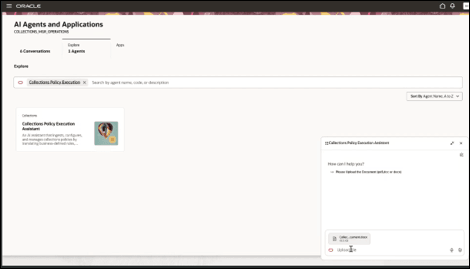
Upload Collections Policy
For details on defining and uploading the policy, refer to the Collector Workspace - Customer Connect session.
Set Up Incoming Email Intelligence
- Register an email account with AI studio from which the incoming emails will be read. For instructions, see Add Email Accounts
- Associate the registered email account with the Collections Email Response Assistant :
- The Collections Email Response Assistant is a template agent. To associate a registered email account, create a copy of this template and associate the email account with the copied agent. Administrator access to AI Agent Studio is required to access and copy template agents. For information about granting administrator access, see Provide Access to Configure AI Agents in Oracle Fusion Cloud Financials.
- The mailbox is accessed using the user context of the administrator who configures the email account. The administrator who registers the email account must have access to the relevant business units and be assigned the Collections Email Response Assistant Role.
To create and configure a copy of the template:
1. Go to AI Agent Studio.
2. From the AI Agents subtab, search for the Collections Email Response Assistant template, and then select Copy Template.
3. Enter a suffix for the new agent team, and then select Continue.
4. In the newly created copy, select Agent Team Settings, update the agent team details as required, and then select Update.
5. Go to Settings > Triggers and select the email account registered with AI Agent Studio. This associates the email account with the agent team.
6. Select Publish to activate the agent
Each agent can be associated with only one email account. To associate multiple email accounts, create a separate copy of the template agent for each email account.
Enable Access to Collector Workspace
- Collections Workspace Assistant Duty role is needed to use the Collector Workspace Agentic Application within the AI Agent Studio. Refer to the Access Requirements section for details.
- After the access is enabled, use the following navigation to launch the Collector Workspace:
- On the Oracle Fusion Cloud Applications home page, navigate to Me > Quick Actions > Show More > AI Agent Studio > AI Agents
- Go to the Apps tab and search for the Collector Workspace.
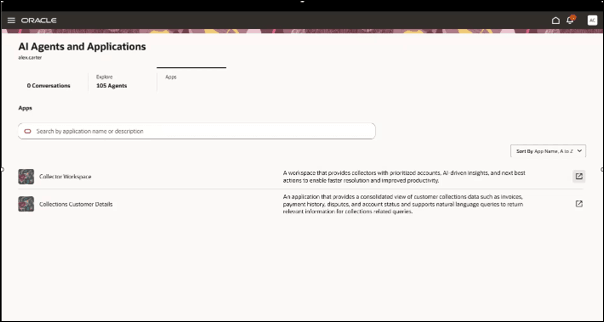
Launch Collector Workspace
Tips and considerations
- The Collector Workspace doesn’t replace standard Receivables setup, approval rules, or dispute resolution processes.
- The information shown is based on customer account-level receivables data, including related transactions, receipts, disputes, promises, and activities.
- There is no requirement to run Collections delinquency programs, including Refresh Receivables Transactions for Customer Balance and Delinquency Management, before using the Collector Workspace.
- Collection priorities depend on the freshness and completeness of customer account, transaction, receipt, dispute, promise, and activity data.
- Aging and overdue balances depend on transaction due dates, payment terms, and open receivables data. Currently, the following aging buckets are supported: Current, 1-5 days, 6 - 10 days, 11 - 30 days, 31 - 60 days, 61 - 90 days, over 90 days.
- Promise and broken-promise visibility depends on collectors consistently recording and updating promise-to-pay information and running the promise reconciliation program.
- Workspace information reflects the state of application data at the time it’s viewed or refreshed.
- If receipts, disputes, promises, adjustments, or customer account data change after a work item is reviewed, users should refresh the application to get the latest snapshot.
- Sending dunning letters is not in scope for the Collector Workspace Agent. Existing dunning letter setups and processes should continue to be used.
- The workspace operates within the user’s existing Oracle Fusion security, data access, approval, and segregation-of-duties framework.
- Users can view and act only on customers, accounts, business units, and transactions they’re authorized to access.
- The workspace doesn’t bypass existing Receivables validations, dispute controls, approval rules, write-off controls, or customer account security.
Key resources
- How do I use AI Agent Studio?
- Explore AI Agents for Oracle Fusion Cloud Applications
- Promise to Pay Overview
- Overview of Dunning
- Customer Connect - Collector Workspace
Access requirements
Use the following steps to provide users with access to the Collector Workspace and the Collections Policy Execution Assistant.
- Scenario 1 - If You Have Implemented Custom Job Roles
Use these steps for users who aren’t assigned the Oracle-provided seeded Collections Agent or Collections Manager job roles. To enable access, create and assign a custom role with the required assistant duty role.
- Navigate to the Security Console.
- Search for the custom job role you want to use.
- Click Edit Role.
- Select Enable Permission Groups.
- Save your changes.
- Navigate to Role Hierarchy > Roles and Privileges.
- Add the appropriate duty role:
- For access to the Collector Workspace, add the Collections Workspace Assistant duty role to your Collectors
- For access to the Collections Policy Execution Assistant, add the Collections Policy Execution Assistant duty role to your Collection Managers
- Navigate to Role Hierarchy > Roles and Permission Groups.
- Add the same duty role you added in the previous step:
- Collections Workspace Assistant
- Collections Policy Execution Assistant
- Save your changes.
- Scenario 2 - If You Have Used Oracle-Provided Seeded Job Roles
Use these steps for users who are assigned the Oracle-provided seeded Collections Agent or Collections Manager job roles. These users can access the corresponding workspace or assistant without additional role assignment:
- Users with the Collections Agent job role can access the Collector Workspace.
- Users with the Collections Manager job role can access the Collections Policy Execution Assistant.
Also, the following configuration must be completed:
- Navigate to the Security Console.
- Search for the applicable seeded job role, or the custom role derived from it:
- Collections Agent
- Collections Manager
- Click Edit Role.
- Select Enable Permission Groups.
- Save your changes.
- Data Access Requirements for the Collector Workspace
Users must also have the appropriate data access for the business units, customer accounts, customers, and Receivables data they are expected to review. The Collector Workspace displays customer balances, transactions, promises, disputes, and activities only for the data the user is authorized to access. Use the Manage Data Access for Users task in the Users and Security functional area to assign users the appropriate data access based on their job roles.
Users will only see customer accounts for which they are assigned as collectors. Collector assignments are managed at the customer account profile level.