Data Extraction Using Read-Only Replicated Data
Extract data with improved reliability and speed, with less impact on core application performance. The simplified extraction experience includes support for full or incremental extracts, on-demand runs or schedules, and status monitoring. Use this functionality to extract data for reporting, analytics, or building integrated solutions that complement Fusion Applications.
Data extraction improvements are achieved through the introduction of an automatic, near real-time replication of Fusion Cloud data into a dedicated, read-only data store within Oracle Autonomous Data Warehouse. Predefined business views provide a functional perspective and simplify the underlying complexity.
The solution supports:
- Selecting one or more business views
- Full and incremental extracts
- On-demand or scheduled extractions
- Monitoring and viewing extract statuses
This approach is recommended for all new data extracts, and will eventually replace data extracts using BI Cloud Connector (BICC) and BI Publisher.
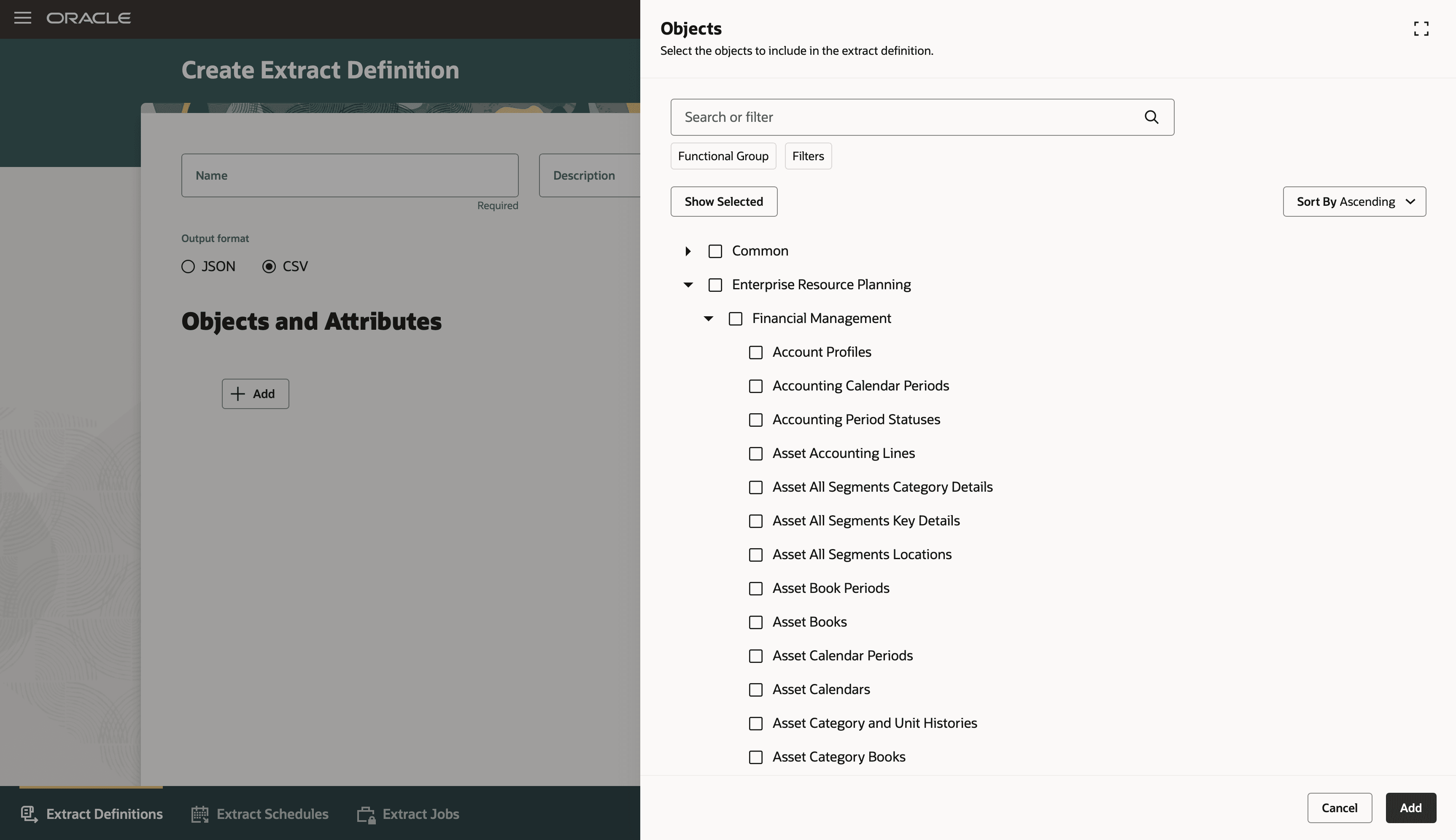
Selecting business objects to include in the extract definition (Navigation: Tools > Data Extraction)
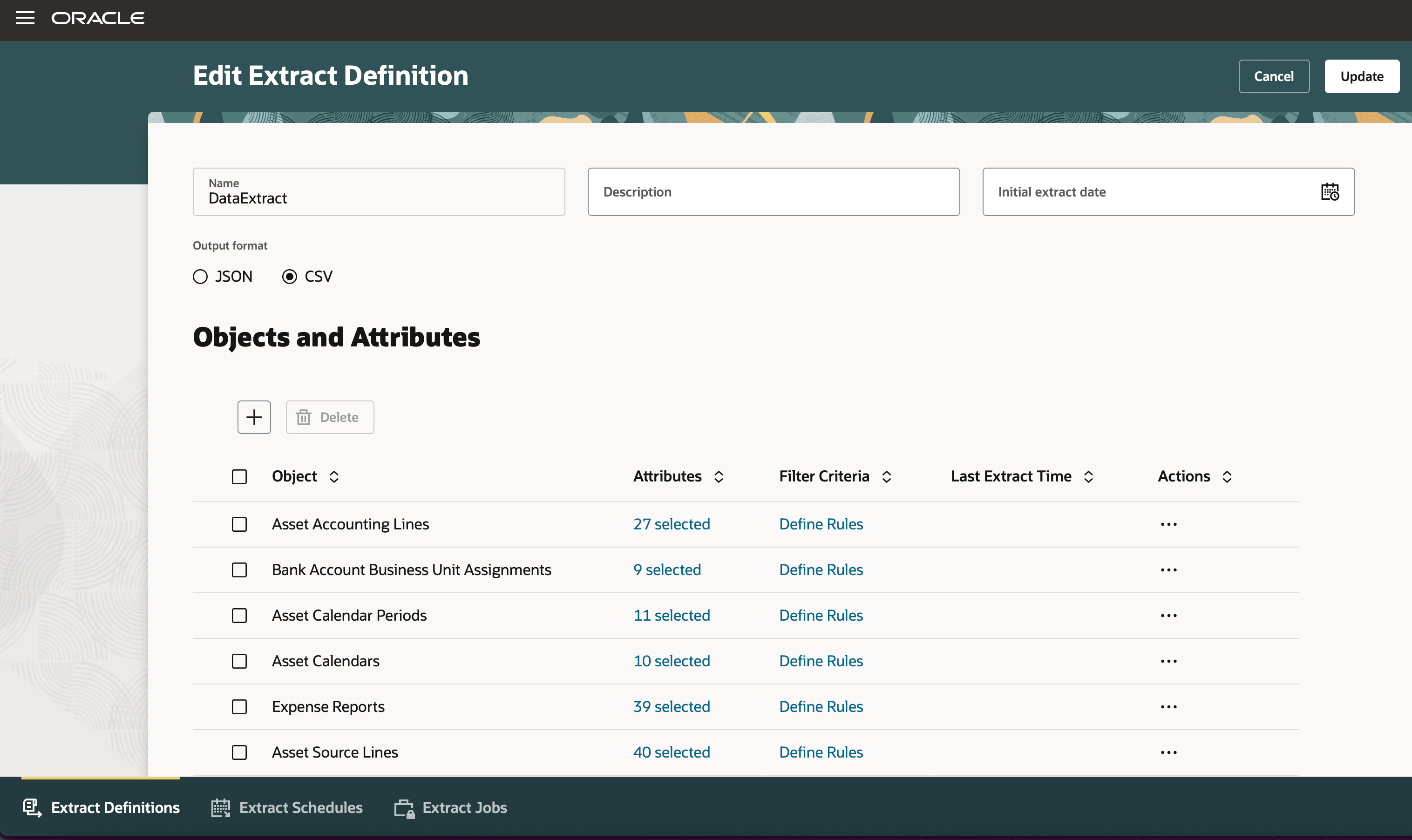
Selecting attributes and filter criteria for the extract definition
This feature enables you to now extract your application data from a read-only data store. Data extraction is no longer performed on the transactional instance but is instead done on a replicated Autonomous Data Warehouse instance, synchronized with transactional data in near real-time.
The business benefits include:
- Extract data with minimal impact on Fusion Applications performance.
- Optimized for data extraction performance and reliability.
- Supports near real-time data extraction requirements.
- Simplifies data access through a business object data model, rather than exposing underlying database tables and views.
- Supports full and incremental extracts, on-demand or scheduled runs.
- Consumer-grade Redwood user experience for defining and monitoring extracts.
Steps to enable and configure
-
Use the Opt In UI to enable the Redwood: Extract Application Data from a Read-Only Data Store Using a Redwood Page feature under Financials Offering.
- Make sure that the feature’s parent in the hierarchy is also enabled.
- No matter which offering you enable this feature under, the feature can be used to extract data from any of the available product families.
- Set the Enable Security Console External Application Integration (ORA_ASE_SAS_INTEGRATION_ENABLED) profile option to Yes. If you find that this profile option is already set to Yes, then don't change it.
- Give users access to this Data Extraction tool by assigning them all the duties in the Access Requirements section.
Note: Make sure that the custom roles involved have permission groups enabled. - Give users access to view and download extract files by assigning them the Upload and download data from on-premise system to cloud system (OBIA_EXTRACTTRANSFORMLOAD_RWD) role.
Note: If you have questions regarding your environment and enablement, then ask your help desk to contact Oracle Support, who can verify your environment's readiness and address any concerns.
Tips and considerations
- When moving from BICC, you will need to map BICC business objects to the new business objects. There will not be a direct 1:1 correspondence in all cases. See the documentation on how to Map BICC Data to Business Object Data for more details.
- For both existing BICC users and new customers, plan to implement all new extraction use cases using the new data extraction framework.
- Extensible attributes (for example, Descriptive Flexfields/DFFs) are not currently included in the predefined business views.
- Language support is currently limited to English.
Key resources
Access requirements
Users can only access this feature after updating their job roles to incorporate the following duties:
- Data Extraction Tasks Management Duty (ORA_RCS_EXTRACT_SPECIALIST_DUTY)
- Data Extraction Services Management Duty (ORA_DR_RCS_EXECUTE_EXTRACT)
- Data Extraction Services Integration Access Duty (ORA_DR_RCS_EXTRACT_INTEGRATION)