 Cross-Currency Settlements in Netting
Create netting settlements for Payables invoices and Receivables transactions when the invoice currency is different from the transaction currency. This allows companies that transact in multiple currencies to offset the supplier and customer balances which may be in different currencies.
Previously, netting was restricted to Payables and Receivables in the same currency. With this update, you can include transactions with differing currencies in a single netting settlement. All selected Payables and Receivables are converted to a designated settlement currency using defined cross-currency conversion rates.
These are the business benefits:
- Enhances organization liquidity management.
- Streamline reconciliation processes.
- Supports multinational businesses transacting with suppliers and customers in multiple currencies.
- Provides greater flexibility in offsetting obligations and reducing settlement costs.
Steps to enable and configure
To set up for cross-currency settlements:
- Navigate to the Create Netting Agreements page. Create a netting agreement with the Netting Currency Rule as "Net across currencies".
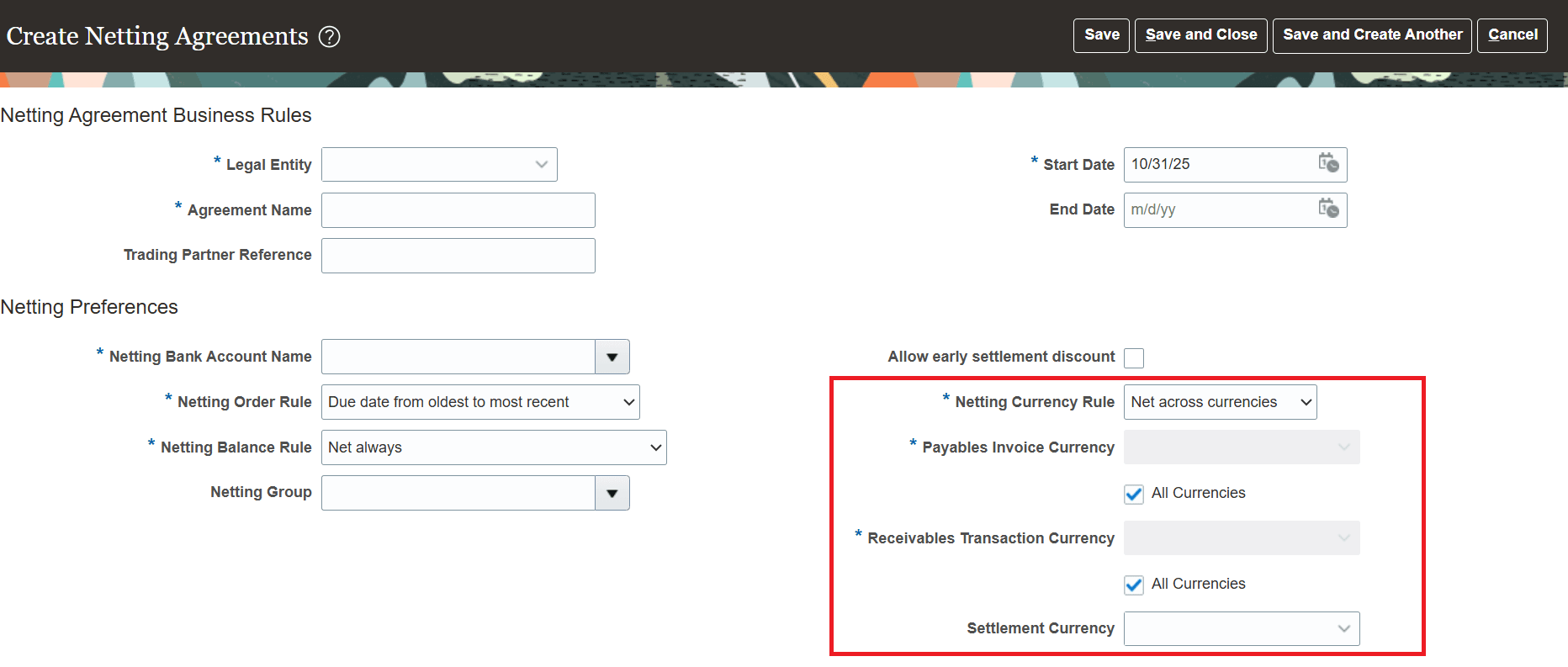
Netting Agreement Setup
- Choose a settlement currency. This is the currency in which the amounts would be settled.
- Choose "All Currencies" or a specific currency for the Payables Invoice Currency and Receivables Transaction Currency. This selection determines the invoices and transactions that are selected for netting.
The Netting Agreements Import FBDI spreadsheet now has a new column "Transaction Currency" for defining netting agreements for cross-currency settlements.
Netting Agreements Import spreadsheet
| FBDI spreadsheet column | New or existing | Usage |
|---|---|---|
| Netting Currency Rule | Existing | Use ORA_JE_CROSS_CURRENCY for cross-currency agreements. |
| Invoice Currency | Existing | The Payables Invoice Currency for cross-currency agreements. Specify a value e.g., GBP or leave blank to choose all currencies. |
| Transaction Currency | New | The Receivables Transaction Currency for cross-currency agreements. Specify a value e.g., GBP or leave blank to choose all currencies. |
| Payment Currency | Existing | The Settlement Currency for cross-currency agreements. Specify a value e.g., GBP. |
Tips and considerations
- The payment currency of the Payables invoices must match the settlement currency of the netting agreement for the invoice to be selected.
- All the conversion rates must be defined prior to running the netting settlement. These include the cross-currency conversion rates and payment conversion rates.
- You can't update the amounts for a cross-currency settlement at the review stage.
- You can't add or remove transactions for a cross-currency settlement at the review stage.
- You can't use REST API to create agreements for cross-currency settlements. They can only be created using Create Agreements page or the Netting Agreements Import FBDI spreadsheet.
- For cross-currency settlements, a new column "Netted Amount in Settlement Currency" is added to both Payables and Receivables worksheets in the Netting Settlement spreadsheet to show netted amounts in settlement currency for invoices and transactions.
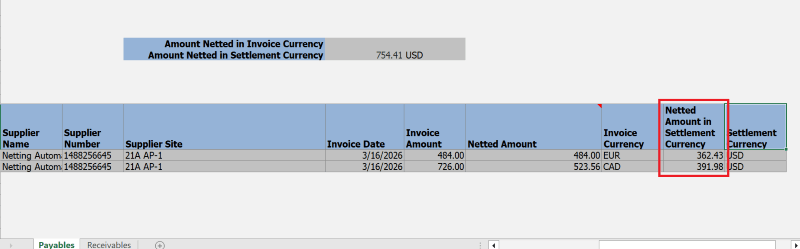
New field in Netting Settlement spreadsheet - Payables
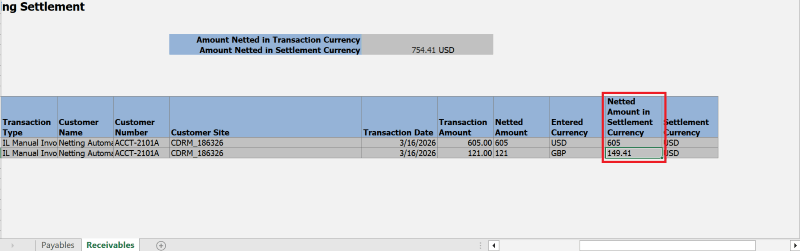
New field in Netting Settlement spreadsheet - Receivables
- The Netting Settlements summary spreadsheet has 2 new columns: "Proposed Netting Amount in Settlement Currency" and "Settlement Currency". These are only populated for cross-currency settlements.
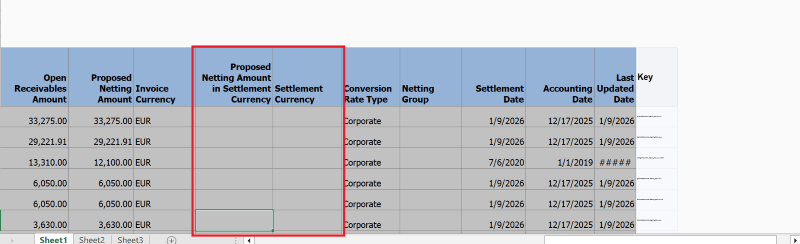
Netting Settlement Summary spreadsheet
- The Netting Settlement Report and Netting Settlement Letter don't show the totals for cross-currency settlement as the transactions may be in different currencies.
Key resources
Based on Idea 635626 from the Receivables & Collections Idea Lab on Oracle Cloud Customer Connect.
Access requirements
No new access requirements