Measure AI Impact with the Value Dashboard
You can now measure the business impact of your AI agent teams using the Value dashboard. This visual dashboard provides an overall view of your AI fleet, performance by Oracle Fusion Cloud Applications products, and individual agent team metrics. These metrics are designed to help you estimate and visualize the tangible ROI of your AI initiatives. Track deployment, usage, and estimated time and cost savings for your published agent teams in one visual view.
To use this functionality, go to Navigator > Tools > AI Agent Studio. From the Monitoring and Evaluation tab, select the Value subtab. The dashboard generates reports for review with automatically populated performance data. You can filter the data displayed on the dashboard by date ranges, agent teams, or business functions.
By monitoring key indicators, such as Total Time Savings, Total Cost Savings, Total Usage, and Total Agents, organizations can move beyond qualitative feedback to accurately quantify how AI agents drive operational efficiency and user satisfaction.
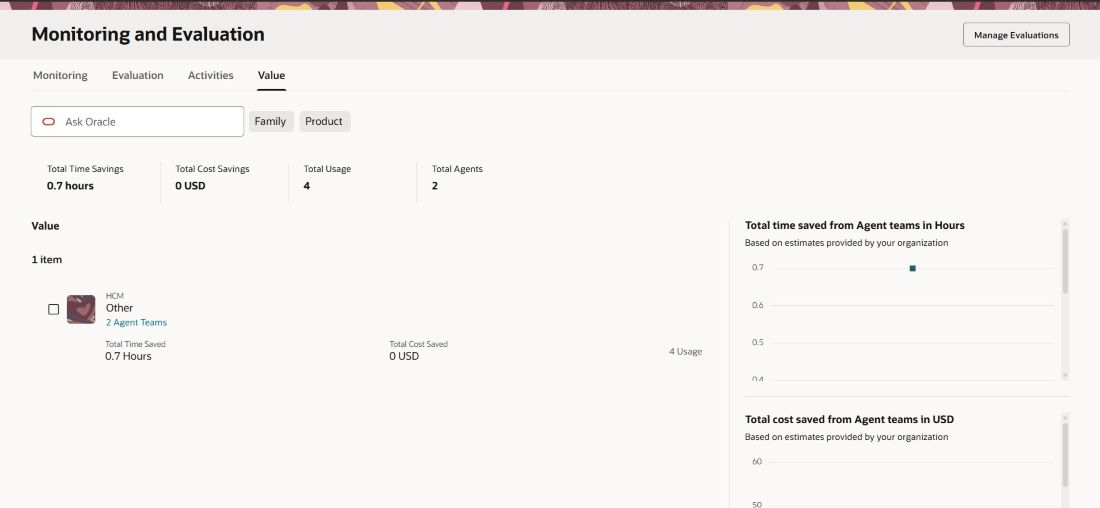
Value Dashboard
Steps to enable and configure
You must have access to use AI Agent Studio. Also, here are the steps to configure performance metrics for a specific agent team.
- From the Agent Teams tab of AI Agent Studio, search for and select the agent team you want to edit.
- Select Edit
 to modify the agent team.
 - Select Agent Team Settings
 to edit the agent team details.
 - On the Details page, scroll to the Capture estimated Cost and Time savings section.
- Configure the estimated values for ROI tracking metrics by setting Time saved each agent run and Cost saved each agent run. If you don't enter a value, the default values are applied.
- Select Update to save your changes.
- Publish your agent team.
Key resources
View the Measured Value of Agents
Access requirements
See Access Requirements for AI Agent Studio.