Importing Lease Records
To import lease records:
-
Go to Setup > Import/Export > Import CSV Records.
-
In the Import Assistant Step 1 - Scan & Upload CSV File screen:
-
From the Import Type list, select Transactions.
-
From the Record Type list, select Leases.
-
Select the proposal CSV file.
-
Click Next.
-
-
In the Import Assistant Step 2 - Import Options screen:
-
Set Data Handling to Add.
-
Click Next.
-
-
In the Import Assistant Step 4 - Field Mapping screen:
-
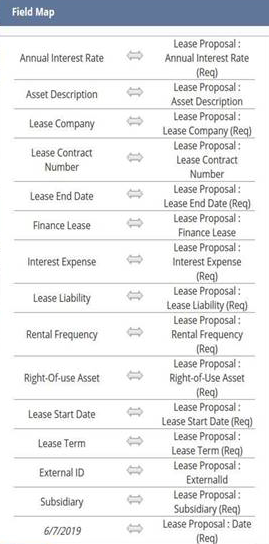
Map the fields in your CSV to the NetSuite fields.
-
Review the CSV fields and NetSuite fields to ensure that all required fields are mapped.
Note:If you remove the Date field from the import file, the system uses the current date.
-
Click Next.
Sample mapping:
-
-
In the Import Assistant Step 5 - Save Mapping and Start Import screen:
-
Enter an Import Map Name and Description.
-
Click Save & Run.
-
The Lease record contains the following subtabs: