Error Report
The Error Report page displays more details about errors encountered by the Salesforce Connector. In addition to the information displayed on the Error Report portlet (the integration type, integration name, description, date last updated, and status) the Error Report page also identifies the actions you can take. An integration is also known as a data sync, or simply a sync.
Every 30 minutes, the automatic retry functionality picks up any pending and failed records. To manually retry a sync, address the problem based on the Error Report page, then click Retry.
A failed record posting is limited to 10 total retry attempts, with five (5) automatic retries and five (5) user-initiated retries. When the retry limit is reached, the retry action is disabled and the you need to correct the record then save to initiate posting again. Editing the record with the error resets the retry count to zero (0) and aborts stale failed instances. When a later retry succeeds, old failed instances are removed or cancelled and the latest completed status remains visible.
View Error Details and Retry
-
Open the Error Report page.
-
To filter the results in the list of errors:
-
Select the Integration Type (or data sync type). Choose ALL to include errors from every type of data sync.
-
Select an appropriate time range in the Time Window field.
-
Select the error Status to view.
-
Adjust the Pagination if necessary.
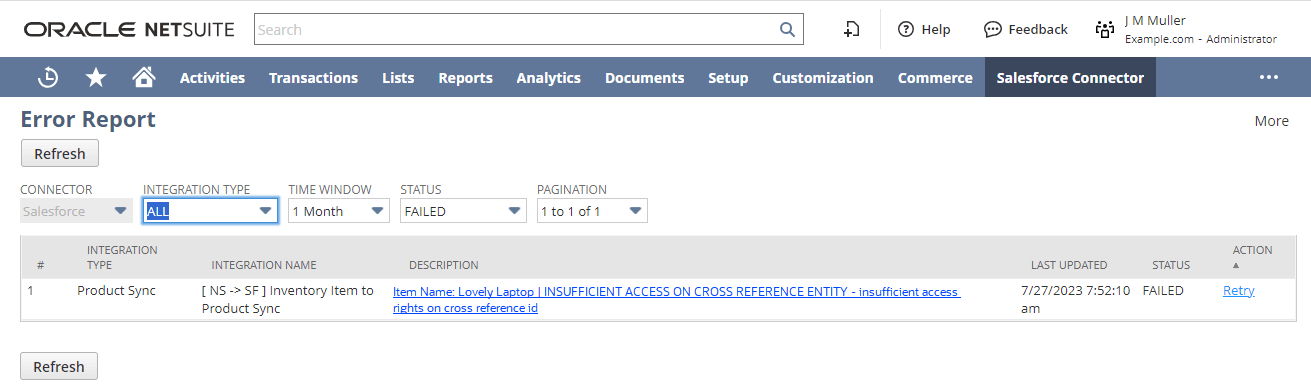
-
-
Review the error details and resolve the error, then retry the sync.
-
Click the link in the Description column for more detail about the error. The detailed error includes the following information
-
Root Cause
-
Possible Fix
-
OIC Tracing Info
-
Raw Error
-
-
Address the problem that caused the error. A script runs every 30 minutes that automatically retries any failed data flow. You can click Retry in the Action column to retry immediately. You will see a success message in the UI, and In Progress in the Action column.
-
If the problem has been addressed, it will be removed from the error list. Click the Refresh button to see the results of the manual retry.
-