Set Up the Reporting Configurations

Specify the report parameters for your data model file.

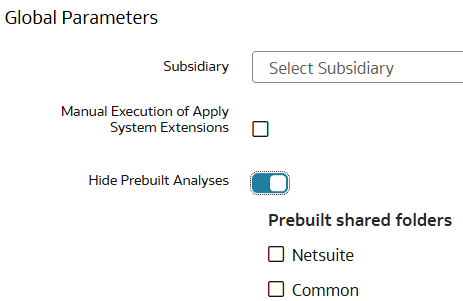
  1. In Oracle NetSuite Analytics Warehouse Console, click Reporting Configuration.
  2. On the Reporting Configuration page, under Global Parameters, in Subsidiary, select a subsidiary to transfer data from that subsidiary.
  3. Optional: Select Manual Execution of Apply System Extensions if you want to run the system steps manually instead of running automatically based on the configurations such as data augmentations, applications, and custom data configurations (for example, Descriptive Flex Fields, Configurable Account Analysis, Fusion Accounting Hub, and Supply Chain Planning Application).

    If you select Manual Execution of Apply System Extensions, then you must manually apply system extensions for the Sandbox and reapply system extensions for the External Application if applicable.

    See Apply System Extensions.

  4. Click Save.