About Calculating Models 2.0
Calculating models using the 2.0 Calculation Control screens has the same functionality as the original 1.0 screens, but it provides a more modern and updated user interface with more streamlined actions. In addition, you are now able to copy multiple points of view at one time.
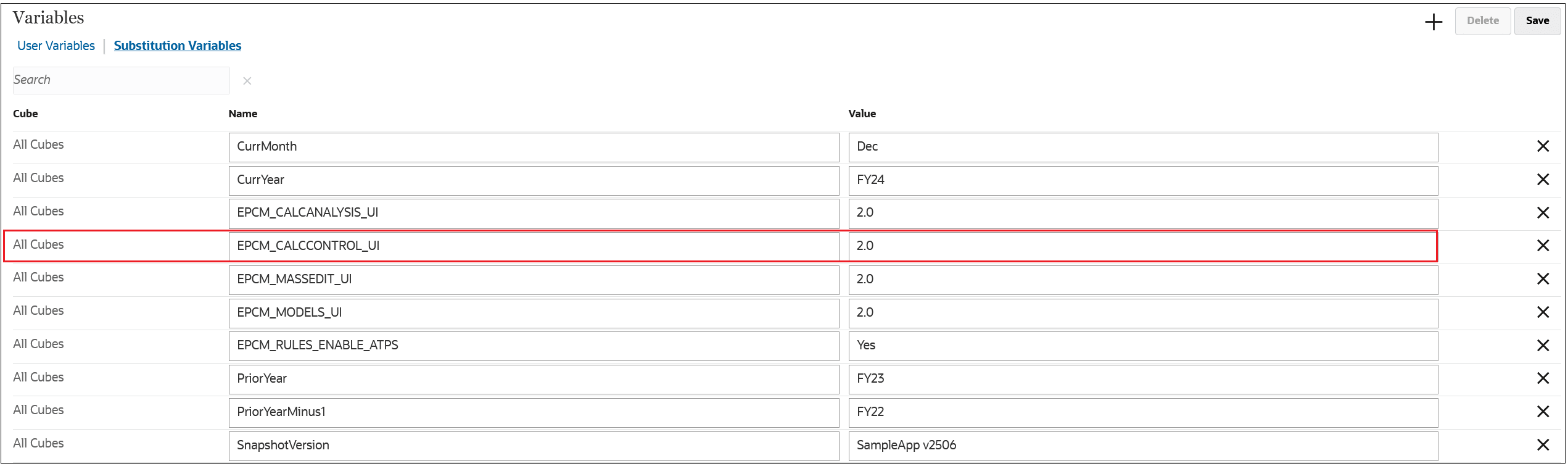
In the April 2026 release (26.04), Calculation Control 1.0 is the default. You can preview and start using the new Calculation Control 2.0 screens by entering an EPCM_CALCCONTROL_UI substitution variable to specify 2.0.
-
From the Home page, select Tools, and then Variables.
-
On the Variables tab, click Substitution Variables, and then click the plus sign to define a new variable.
-
Leave the Cube field set to All Cubes, and enter the EPCM_CALCCONTROL_UI substitution variable for the Calculation Control 2.0 screens as follows:
Timeline going forward:
Starting in in the May 2026 release (26.05), Calculation Control 2.0 will be the default when you open your application. If desired, you can temporarily revert to the original Calculation Control 1.0 screens by setting the substitution variable value to 1.0.
Starting in release 26.07, the original Calculation Control 1.0 screens will no longer be available.