Creating Application Folders
Describes how to download and extract the EPMAgent.zip to your
Agent Home directory.
After downloading and extracting the
EPMAgent.zip to your Agent Home
directory, use the createAppFolder.bat to create the Application
folder structure to store data, logs, and configuration files. The configuration
file contains all initialization parameters.
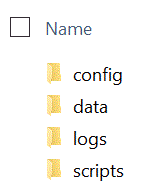
The following image shows the Application folder that contains folders named: config, data, logs, and scripts.
To create the Application folder structure:
-
At a command prompt, change the working directory by typing:
cd AGENT HOME/bin directory.AGENT HOMEis the directory where you extracted theEPMAgent.zip. -
At the command prompt, type:
createAppFolder.bat C:\EPMAgentData.When the
createAppFolder.bathas finished running, the following message displays: "Create application folders script completed."When you run the
createappfolder.bat, the script creates an INI file that contains the populatedEPM_AGENT_HOMEandEPM_APP_DATA_HOMEparameters.