Start an Action Chain From an Action Chain
You add the Fire Event action to an action chain when you want to start another action chain from within it. Typically you would do this when you want to trigger a notification, like displaying a popup window with a message, or perhaps when you want to transform some data. For example, there might already be a showMessage action chain that displays a notification. You can add a Fire Event action to your action chain to start the showMessage action chain.
To start an action chain from an action chain:
-
Open the Layout’s Actions editor, then select the action chain which you’ll edit to add the Fire Event action.
The editor only lists the action chains in the Layout that you can edit.
-
In the Diagram editor, drag the Fire Event action from the palette and drop it in the action chain where you want the event to occur.
- Select the Fire Event action in the action chain, then specify the custom event it should trigger in the Properties pane.
- If the action should trigger an existing custom event, select it in the Event Name dropdown list.
-
If the action should trigger a new custom event, click Create, then set the event’s Scope to
Layoutand type an Event ID. Click Create.
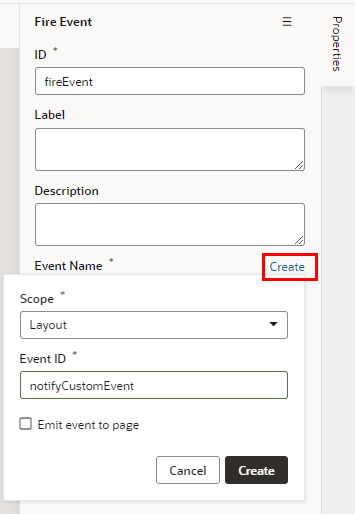
Description of the illustration layouts-fire-event.png
Note: You can choose Emit event to page (or Emit event to container for fragments) if you want to allow the event to be listenable in the parent container. For details on how this works, see Raise Fragment or Layout Events that Emit to the Parent Container.
-
Click Go to Custom Event in the Properties pane to open the Events editor.
You use the Events editor to edit the event’s Behavior and Payload properties. For details on these properties, see Choose How Custom Events Call Event Listeners.
- Create an event listener for the custom event.
- Open the Layout’s Event Listeners editor, then click Add Event Listener.
-
In the Create Event Listener dialog box, select the custom event for the Fire Event action in your action chain. Click Next.
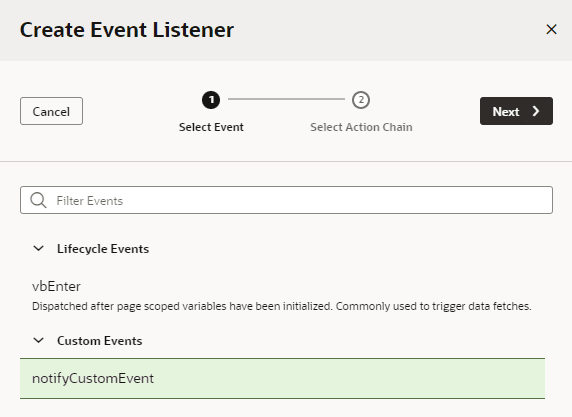
Description of the illustration layouts-listener-custom1.png
- Select the action chain you want the event listener to start. Click Finish.