Manage Code Editor Settings
To customize a code editor to your liking or to enforce consistent code formatting styles for everyone who works on an App UI, use the Editor Settings option in a code editor’s context menu. Doing this brings up the settings.json file, which you can use to control how a code editor functions:
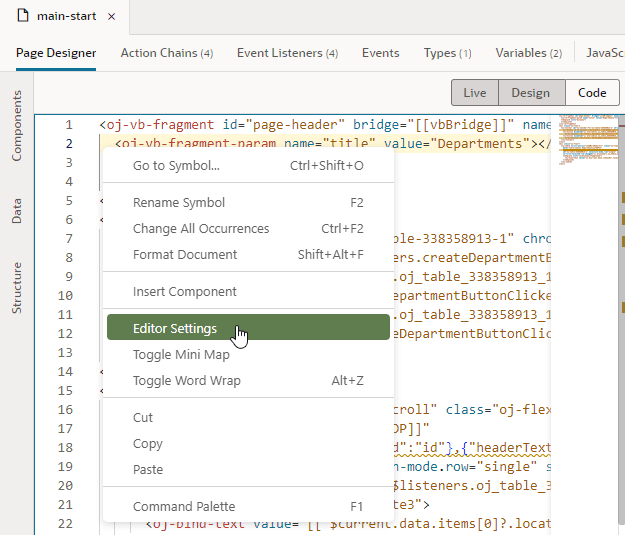
Description of the illustration code-editor-settings.png
Use settings.json to control tab width, font size, and more. By default, only a handful of settings show, but you can include several more properties as listed here. Enter double quotation marks (“) in the editor to see the available options:
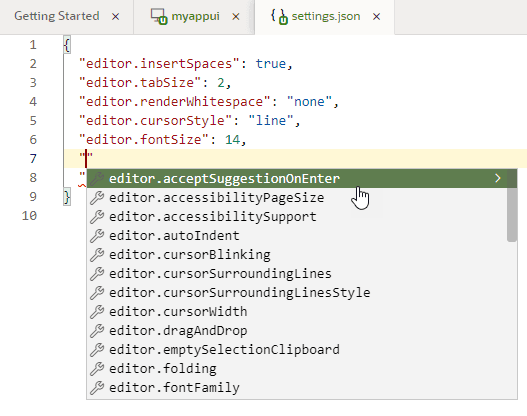
Description of the illustration settings-json1.png
| Setting | Description | Default |
|---|---|---|
editor.acceptSuggestionOnEnter |
Whether insight suggestions should be accepted on pressing the Enter key, in addition to the Tab key:
|
on |
editor.accessibilityPageSize |
Number of lines read out by a screen reader | None |
editor.accessibilitySupport |
Whether the editor should be optimized for use with screen readers:
|
on |
editor.autoIndent |
Control automatic indentation while typing:
|
advanced |
editor.cursorBlinking |
Control cursor blinking:
|
blink |
editor.cursorStyle |
Control the appearance of the cursor:
|
line |
editor.cursorWidth |
When cursorStyle is set to line, controls the width of the line |
2 |
editor.cursorSurroundingLines |
Minimum number of lines visible above and below the cursor, starting with 0 | 0 |
editor.cursorSurroundingLinesStyle |
Whether cursorSurroundingLines should be enforced:
|
default |
editor.dragAndDrop |
Enable or disable drag and drop of a selection: true or false |
false |
editor.emptySelectionClipboard |
Whether copying without selection should copy the current line: true or false |
true |
editor.folding |
Enable or disable code folding: true or false. The folding margin disappears when folding is disabled. |
true |
editor.fontFamily |
Font family to use in the editor | monospace |
editor.fontSize |
Control text font size in pixels, starting with 10. A value under 10 may be difficult to read. | 14 |
editor.fontWeight |
Weight of the font used in the editor: normal, bold, or numbers between 1 and 1000 |
normal |
editor.formatOnPaste |
Whether pasted content should be automatically formatted: true or false |
false |
editor.formatOnType |
Whether a line should be automatically formatted while typing: true or false |
false |
editor.insertSpaces |
Insert spaces (instead of tabs) when the Tab key is used for indentation | true |
editor.letterSpacing |
Control spacing between letters, in pixels | None |
editor.lineHeight |
Control height of a line | None |
editor.matchBrackets |
Whether matching brackets should be highlighted when the cursor is at a brace: always, never, or near |
always |
editor.mouseWheelScrollSensitivity |
Numbers of lines to scroll when the mouse wheel is used | 1 |
editor.mouseWheelZoom |
Whether pressing the Control key and the mouse wheel should change font size: true or false |
false |
editor.multiCursorModifier |
Modifier to be used with a mouse click to create multiple cursors:
|
alt |
editor.occurrencesHighlight |
Whether to track cursor and highlight other occurrences of the current word or variable: true or false |
true |
editor.renderLineHighlight |
Controls how the current line is highlighted:
|
all |
editor.renderWhitespace |
Control how the editor should render whitespace characters:
|
selection |
editor.selectOnLineNumbers |
Whether the line should be selected if the line number is clicked: true or false |
true |
editor.showFoldingControls |
Control when folding controls show:
|
mouseover |
editor.showUnused |
Whether unused variables should be faded out: true or false |
None |
editor.suggestFontSize |
Font size for insight suggestions | None |
editor.suggestLineHeight |
Line height for insight suggestions | None |
editor.suggestOnTriggerCharacters |
Whether insight should be triggered by special characters: true or false |
true |
editor.suggestSelection |
Controls how suggestion history works:
|
None |
editor.tabCompletion |
Enable or disable completion by pressing the Tab key:
|
None |
editor.tabSize |
Number of spaces a tab is equal to, starting with 1 | 2 |
editor.theme |
Changes the editor’s color theme: redwood, vs, vs-dark, or hc-black |
redwood |
editor.wordWrap |
Controls word wrap in the editor:
|
off |
editor.wordWrapColumn |
Number of columns to use when wordWrap is set to wordWrapColumn, starting with 20 |
None |
editor.wrappingIndent |
Controls how a wrapped line is rendered:
|
same |
editor.minimap.enabled |
Show or hide the code minimap. | true |
editor.minimap.size |
Control the size of the minimap:
|
fit |
editor.minimap.side |
Where to render the minimap: right or left |
right |
editor.minimap.renderCharacters |
Render characters on a line as opposed to color blocks: true or false |
true |
editor.minimap.scale |
Scale for rendering the minimap, starting with 1 | 1 |