What are Referenceable and Extendable Fragments?
Just because a fragment is listed in the App UIs pane, or is already used in some of your dependency’s pages, doesn’t necessarily mean you can customize it or add it to pages in your extension:
-
To add a fragment from a dependency, it must be referenceable, which means the developer has made it accessible to extensions. A fragment could be referenceable, and not be extendable. For example, you might be able to add a fragment to a page, but there is nothing in the fragment that you can customize. You can find referenceable fragments in the Page Designer’s Components palette.
When creating a fragment in your extension, if you don’t make the fragment referenceable, it can only be used in the pages where you’ve added it—others won’t be able to use it in other pages. For more about making your fragment referenceable, see Make a Fragment Available to Other Extensions.
-
To customize a fragment from a dependency, the fragment must be extendable, meaning it contains some artifacts—for example, variables or components—which the fragment developer has made extendable. A fragment could be extendable, and still not be referenceable. For example, you might be able to customize some components and variables in a fragment from a dependency, but if the fragment is not referenceable you can’t add the fragment to a page. You can find accessible fragments in a page’s Properties pane.
When creating a fragment in your extension, if you make artifacts in your fragment extendable, others will be able to customize them.
Looking at the Properties pane in the page below, you can see that the page contains some fragments that their developers have made accessible to extensions:
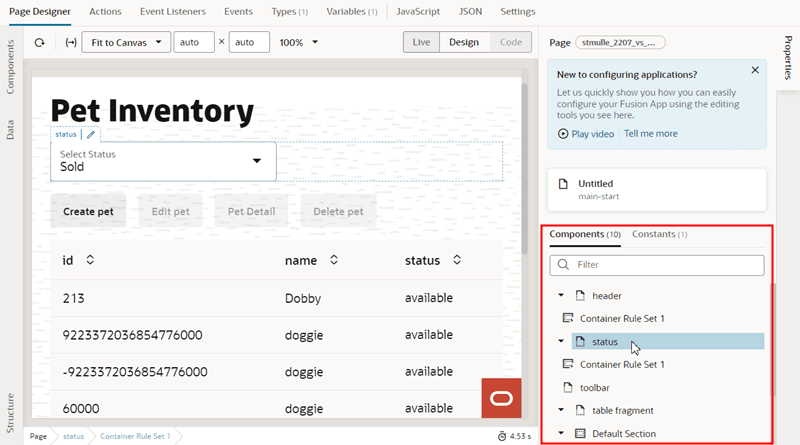
Description of the illustration fragments-pagedesigner-extending1.png
You can tell you can configure the fragments because they’re listed in the Properties pane. This page might also contain other fragments that you can’t configure, but they wouldn’t be listed in the Properties pane.
When you select a fragment in the Page Designer (you can select it on the canvas, in the Structure view, or in the Properties pane), the Properties pane will display a list of the fragment’s extendable items. To open the fragment in the Fragment Designer, on the canvas you can click the icon (  ) that appears next to the fragment name, or, in the Properties pane, click the Configure button or any of the fragment’s extendable items:
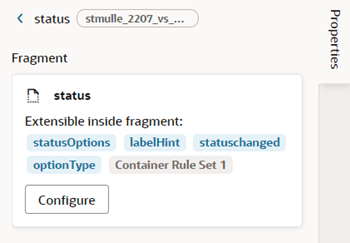
Description of the illustration fragments-pagedesigner-propertiespane.png