How Does the Identity Propagation Authentication Method Work?
Authentication methods that use identity propagation pass the identity of the logged in user to the service for authentication.
To use identity propagation, the service must be able to understand the IDCS identity token coming from VB Studio and extract the user (or subject) from it. VB Studio supports JWT tokens issued by IDCS procured using OAuth 2.0-user assertion flows.
Tokens are a way of encoding the calling user identity into a string according to different specifications, like SAML or the JWT format. For example, if the user is John.Doe, the corresponding JWT token takes the format <header.body.signature> and looks like this:
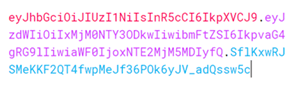
Description of the illustration auth-jwt-token.png
Decoding the body of the token reveals details about the user identity and possibly the resources to which that user is allowed access. The signature part is encrypted by the authority that authenticated the user, and can be easily verified by using the authority’s public key. A valid user’s identity is encoded into the token so services (namely REST APIs) that receive this token can consider the user as authenticated. This token is usually passed to REST services by passing it as a “Bearer <token>” in the Authorization header.
Identity propagation authentication methods are available for both local and in-source servers, however they are only applicable for Oracle Cloud Applications REST APIs.
Here are the authentication methods that use identity propagation:
| Authentication method | Description | Available for: |
|---|---|---|
| Oracle Cloud Account | This method is used in extensions to communicate with Oracle Cloud Applications. Since you will always have an out-of-the-box backend (available through the Unified Application) representing Oracle Cloud Applications and its child instances, you will probably not need to use this authentication type. | In-source servers Local servers |
| OAuth 2.0 User Assertion | Select this method to call an Oracle Cloud Application REST API with a different scope. Note: This authentication is not supported by Fusion to be used to call external REST APIs, even if they are in the same Identity domain as Fusion. |
In-source servers Local servers Runtime server configurations |