Decide Between Direct Calls and Using a Proxy
An extension can call external REST services either directly or through a proxy. Which method you use depends in part on which authentication method you’ve chosen.
Let’s take a look a the two primary connection types:
-
Direct calls: When using direct calls, the REST API is called directly from the browser JavaScript using the browser’s Fetch API. This method can have a performance benefit, as the call is routed directly from the browser to the REST service in question without any intermediary. However, the external REST service that you call must add your app’s domain to its CORS allowlist, as illustrated here:
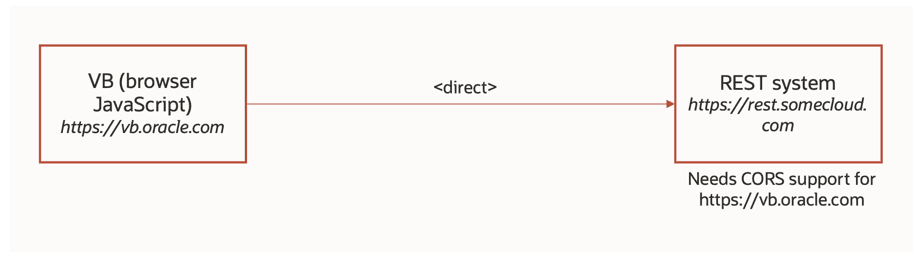
Description of the illustration servcon-direct-call.png
When using direct calls, the browser determines when to timeout the call to the REST API, if the REST API doesn’t respond.
-
Proxy: If you’re using a local server, you can use the proxy flow by setting the Connection Type attribute to Always Use Proxy or Dynamic - Service doesn’t support CORS. The proxy is a VB Studio trusted server-side component that calls external REST services hosted on external domains on behalf of your App UI. One benefit of this method is that there is no need to configure CORS settings for the external REST service. However, you incur the cost of an extra network call, as each request and response must first go through the proxy. Some authentication types, like Basic and OCI Signature Authentication, automatically use the proxy to avoid security issues, regardless of what’s specified on the Connection Type attribute. The proxy times out if the REST API doesn’t respond within 234 seconds.
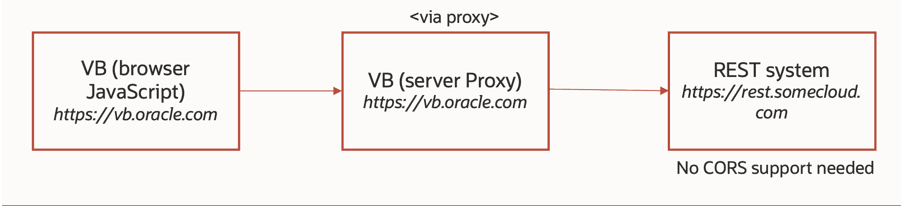
Description of the illustration servcon-proxy-flow.png
When you are previewing or running a deployed App UI that calls an external REST API, you may need to add the Oracle Cloud Applications domain to the CORS allow list of the external REST API, depending on which backend configuration you have chosen.
This table describes what kind of CORS support you need for your external REST API, depending on which type of server/configuration you’re using:
| In-source Server | Local Server | Oracle Cloud Application Runtime Configuration | |
|---|---|---|---|
| Where is it applicable? | If a backend has an in-source server, the server details are used for any call to the backend from VB Studio (where the extension is being developed) or from the Oracle Cloud Applications instance (where the extension is deployed). | If the backend has a local server, the server details are used for any call to the backend from VB Studio only (where the extension is being developed). | If the backend has a runtime configuration, the server details are used for any call to the backend from the Oracle Cloud Applications instance (where the extension is deployed). |
| What kind of CORS support does your REST API need? | There is no Connection Type attribute available to circumvent CORS. The external REST system must provide CORS support irrespective of the authentication type used. |
If the external REST system doesn’t have CORS support, you can change the Connection Type attribute to “Always use proxy” or “Dynamic, Service doesn’t support CORS”. Authentication types—Basic and OCI Signature—always use the proxy and are therefore not subject to CORS. |
There is no Connection Type attribute available to circumvent CORS for individual backends. However, authentication types—Basic, OAuth 2.0 Client Credentials, and OAuth 2.0 Resource Owner Password—always use the proxy and therefore are not subject to CORS. |