Create Oracle APEX Workspaces in Autonomous AI Database
An Autonomous AI Database instance does not have pre-created Oracle APEX workspaces. Create a workspace if you have not already done so or use these instructions to create additional workspaces.
To create an Oracle APEX workspace:
-
Sign in to Oracle APEX Administration Services.
See Access Oracle APEX Administration Services for more information.
-
Click Create Workspace.
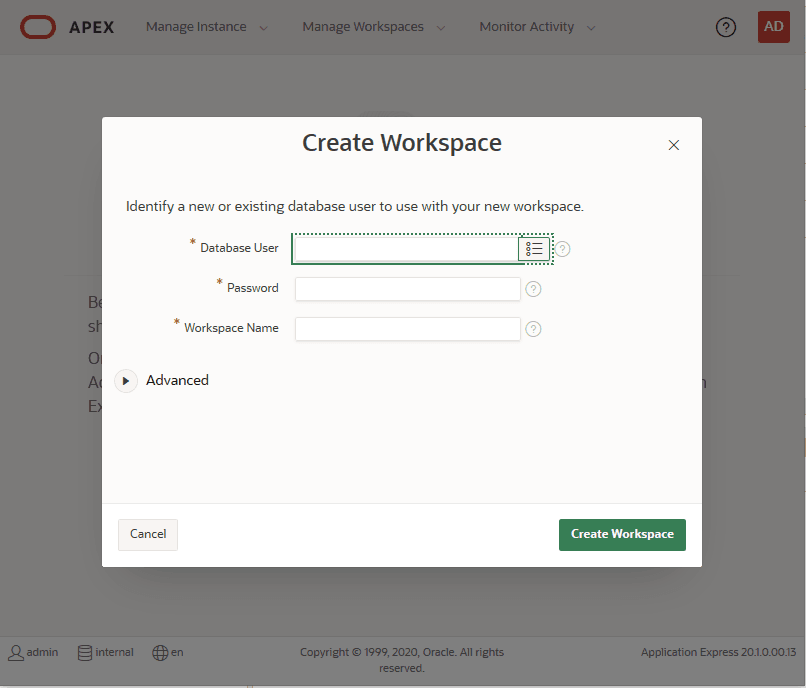
Description of the illustration adb_apex_create_workspace2.png
-
On the Create Workspace page, in the Database User field, enter a new database username or choose an existing user from the list.
The ADMIN database user cannot be associated with a workspace.
-
In the Password field, provide a strong password if the database user is a new user. If the user is an existing database user you do not enter a password.
See About User Passwords on Autonomous AI Database to learn more about the default password complexity rules.
-
(optional) In the Workspace Name field, change the name of the workspace that was automatically populated.
-
Click Create Workspace.
See Access Oracle APEX App Builder and Create Oracle APEX Developer Accounts to create additional developer accounts.