Insert Zuora Product Details into a RabbitMQ Queue with the RabbitMQ Adapter

The RabbitMQ Adapter enables you to transfer Zuora product details into the RabbitMQ queue seamlessly. Similarly, you can insert other records from an application into the RabbitMQ queue using the RabbitMQ Adapter.

The following adapters and their operations are used in this use case:
  • List All Products (Zuora Adapter): Enables you to receive all product details from Zuora.
  • Publish to Queue (RabbitMQ Adapter): Enables you to publish received product details from Zuora into the RabbitMQ queue.

This implementation pattern provides an overview of the steps.

  1. Create Zuora Adapter and RabbitMQ Adapter connections.
  2. Create a schedule integration.
  3. Drag a Zuora Adapter into the integration canvas as an invoke connection.
  4. Configure the Zuora endpoint as follows:
    1. Provide an endpoint name on the Basic Info page.
    2. Select Catalog as the business object, then select List all Products as the action.
    3. Review your selections on the Summary page.
  5. Drag a RabbitMQ Adapter into the integration canvas as an invoke connection.
  6. Configure the RabbitMQ endpoint as follows:
    1. Provide an endpoint name on the Basic Info page.
    2. Select the exchange type, routing key, and message payload structure to publish a message to the bonded queue on the Operations page.

      Note:

      You can provide the Zuora response payload either by uploading a JSON file or entering inline JSON.
    3. Review your selections on the Summary page.
      The mapper is generated as per the payload passed through the Adapter Endpoint Configuration Wizard.
  7. In the mapper, perform the required mappings to publish the product details into the RabbitMQ queue.
  8. When complete, activate the integration.

    As a result, the integration invokes product details from Zuora. The same product details are published into the RabbitMQ queue through the RabbitMQ Adapter.
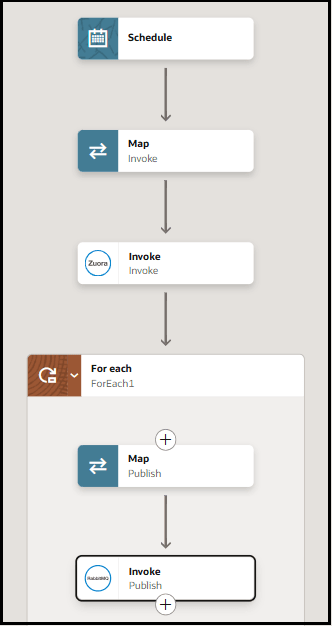

    The schedule integration shows a map action, an invoke, a for-each action, a map action, and an invoke.