Synchronize External Application Data with the Coupa Sourcing Adapter

The Coupa Sourcing Adapter provides seamless synchronization of application data received from external systems to appear in Coupa, ensuring a consistent data mapping and workflow integration.

This use case provides an overview of capturing events with REST-based integrations and subsequently reflecting the same information in Coupa.

The following adapters and their operations are used in this use case:
  • REST Adapter trigger connection: Captures incoming application data from external applications and triggers the integration.
  • Coupa Sourcing Adapter invoke connection: Synchronizes the application data into Coupa across supported modules such as suppliers, invoices, and expense reports.

This implementation pattern provides an overview of the steps.

  1. Create a REST Adapter trigger connection and Coupa Sourcing Adapter invoke connection.
  2. Create an application integration.
  3. Drag a REST Adapter into the integration as a trigger connection.
    1. On the Basic Info page, provide an endpoint name.
    2. Select the required trigger details to capture incoming REST application data from external systems.
    3. Review and confirm your selections on the Summary page.
  4. Drag the Coupa Sourcing Adapter into the integration as an invoke connection.
    1. On the Basic Info page, provide a meaningful endpoint name.
    2. On the Operations page, select the Coupa module (for example, suppliers, invoices, expense reports) and the operation that reflects the external application data in Coupa.
    3. Review your selections on the Summary page.
  5. In the mapper, perform the required mappings to align the external REST payload with the corresponding Coupa fields.
  6. When complete, activate the integration.
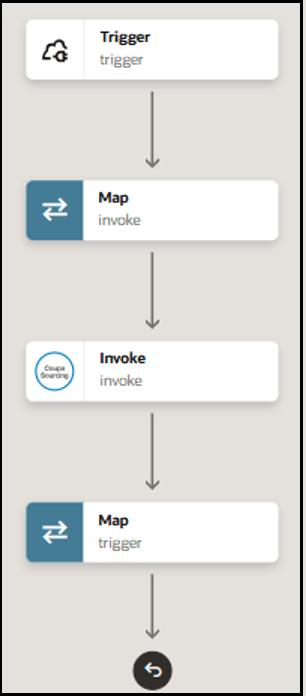
    The integration shows a trigger connection, map action, invoke connection, and map action.