Create a Product in Shopify by Subscribing to an SNS Topic

This use case describes how a product is automatically created in Shopify whenever an Amazon SNS topic is subscribed. When a message is published to the topic through an API or application, the integration workflow is initiated. The workflow maps the message data and invokes the Shopify API to create the product.

The following adapters and their operations are used in this use case.
  • Amazon Simple Notification Service (SNS) Adapter (configured as a trigger connection): Triggers the integration by subscribing to an SNS topic.
  • Shopify Adapter (configured as an invoke connection): Invokes the Shopify API to create a new product.

This implementation pattern provides an overview of the steps.

  1. Create an Amazon Simple Notification Service (SNS) Adapter trigger connection and Shopify Adapter invoke connection.
  2. Create an application integration.
  3. Drag the Amazon Simple Notification Service (SNS) Adapter into the integration canvas as a trigger connection.
  4. Configure the Amazon Simple Notification Service (SNS) Adapter endpoint as follows:
    1. On the Basic Info page, provide a meaningful name.
    2. On the Configuration Page, select the topic on which you want to receive the message.
    3. Select the message format and provide a message sample.
    4. Select Enable decoding only if you have specified the message format as JSON or XML.
    5. Select Enable Subscription Filter Policy.
    6. Select Enable Redrive Policy.
    7. If necessary, select Configure Message Attributes and Configure Delivery Policy.
    8. On the Summary Page, review and confirm your selections.
  5. Drag the Shopify Adapter into the integration canvas as an invoke connection.
  6. Configure the Shopify Adapter endpoint as follows:
    1. On the Basic Info page, provide a meaningful name.
    2. On the Actions page, select Create as the action.
    3. On the Operations page, select Product as the Module and Create Product as the Operation.
    4. On the Summary Page, review and confirm your selections.
  7. In the mapper, map the SNS message body to the Shopify product fields.
  8. Once complete, activate the integration.

    The completed integration looks as follows:
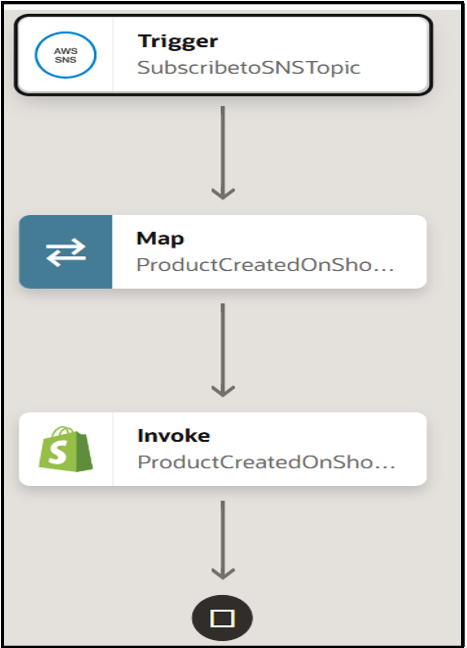

    The integration shows a trigger connection, map action, and invoke connection.

    Once activated, the integration is automatically triggered whenever a message is published to the configured SNS topic through an API or application. The subscribed integration processes the message and creates a new product in Shopify.