Delegated Subnet
Creating a delegated subnet is a prerequisite for creating Oracle Exadata VM Cluster(s), and Oracle Exascale VM Cluster(s), including Oracle Autonomous AI Database Serverless.
Note:
Before you create a new delegated subnet in your VNet, review Azure advanced network features for Oracle AI Database@Azure capabilities. For example, a database instance may require connecting to an Azure private endpoint or to an Oracle AI Database cluster in a peered virtual network in a different region. For more information on use cases, see Advanced network features.
Activating advanced network features after deploying resources will not provide this extended functionality to existing resources. Existing resources must be terminated and redeployed.
To enable Azure advanced network features, register the required features in Azure before creating a new delegated subnet for Oracle AI Database@Azure.
Advanced network feature registration is required per Azure subscription.
-
From the Azure portal, navigate to Virtual networks.
-
Click the + Create button to begin the process of creating a virtual network.
-
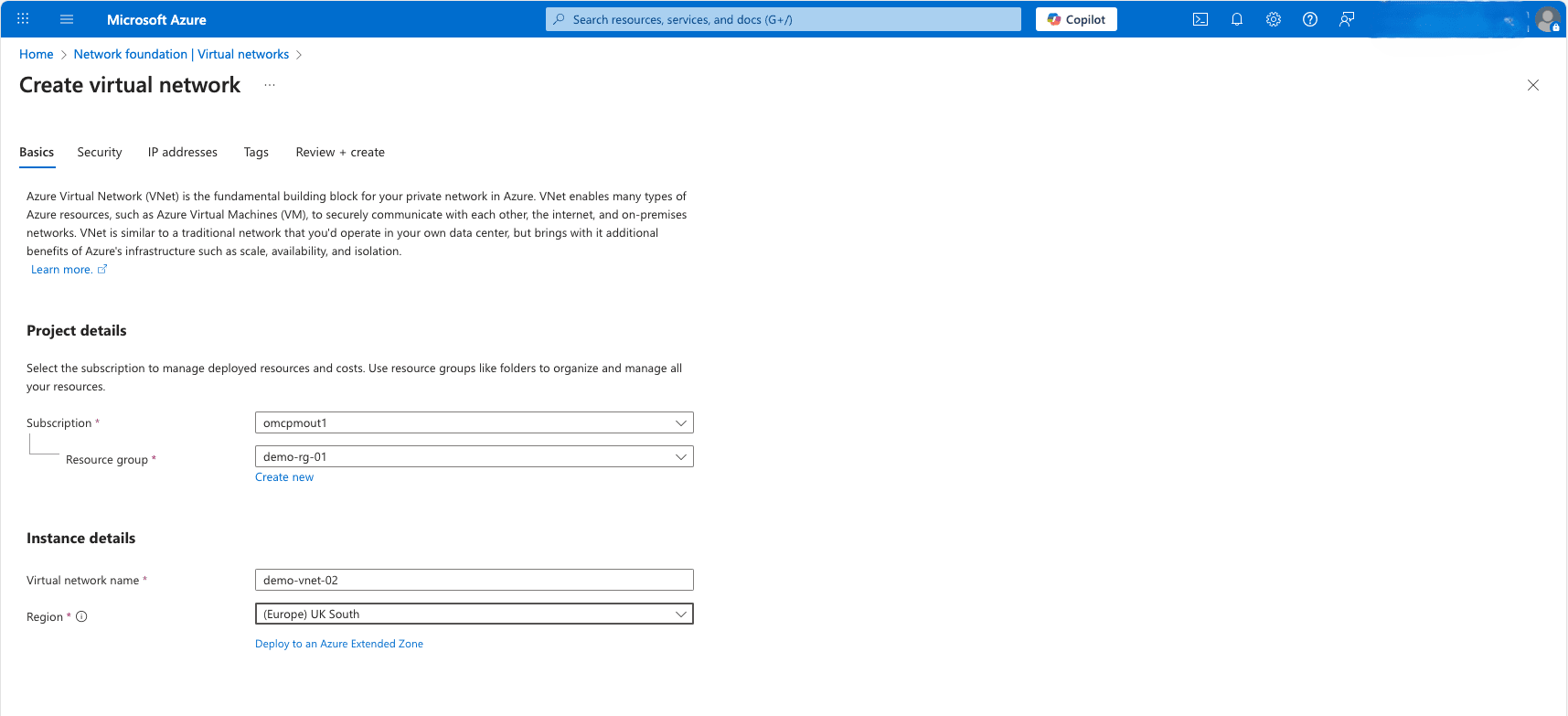
From the Basics tab of the Create virtual network flow, enter the following information:
-
From the Subscription dropdown list, select your Microsoft Azure subscription to which the virtual network will be created.
-
A resource group is a collection of resources sharing the same lifecycle, permissions, and policies. For the Resource group field, you can either select an existing Resource group or select the Create new link to create and use a new one.
-
Enter a unique name in the Virtual network name field. The name must begin with a letter or number, end with a letter, number or underscore, and may contain only letters, numbers, underscores, periods, or hyphens. The name must be between 1 and 80 characters.
-
The Region field allows you to select the physical location of your resource. Select the region where you intend to create Oracle AI Database@Azure resources.
-
Select the Next button to continue the creation process.
-
-
From the Security tab of the Create virtual network flow, select the Next button to continue the creation process.
Note
Note: If you want to configure any additional security settings, you can do them after creating a virtual network.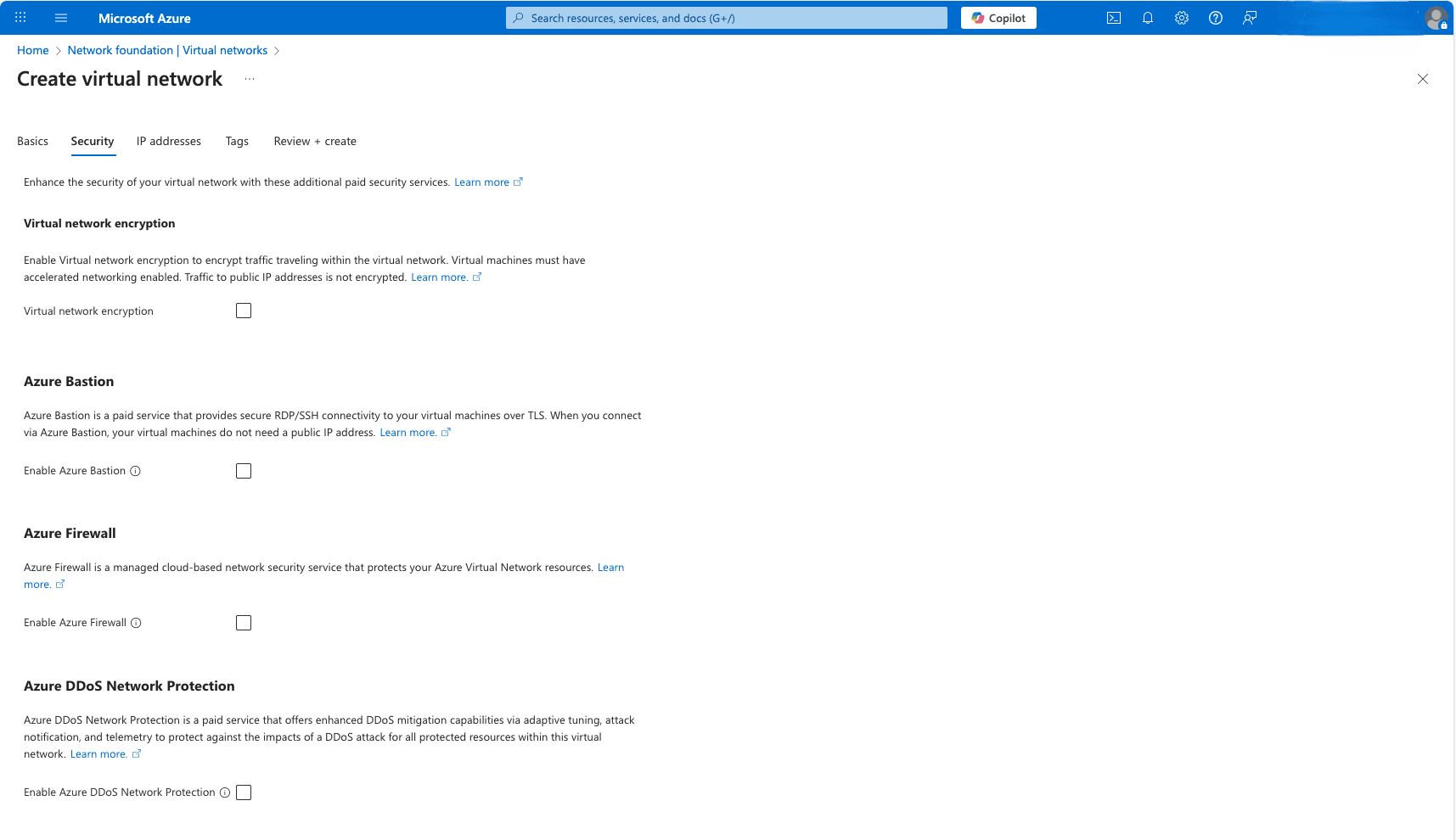
-
From the IP addresses tab of the Create virtual network flow, enter the following information:
-
Enter an IP CIDR range for your virtual network (VNet).
-
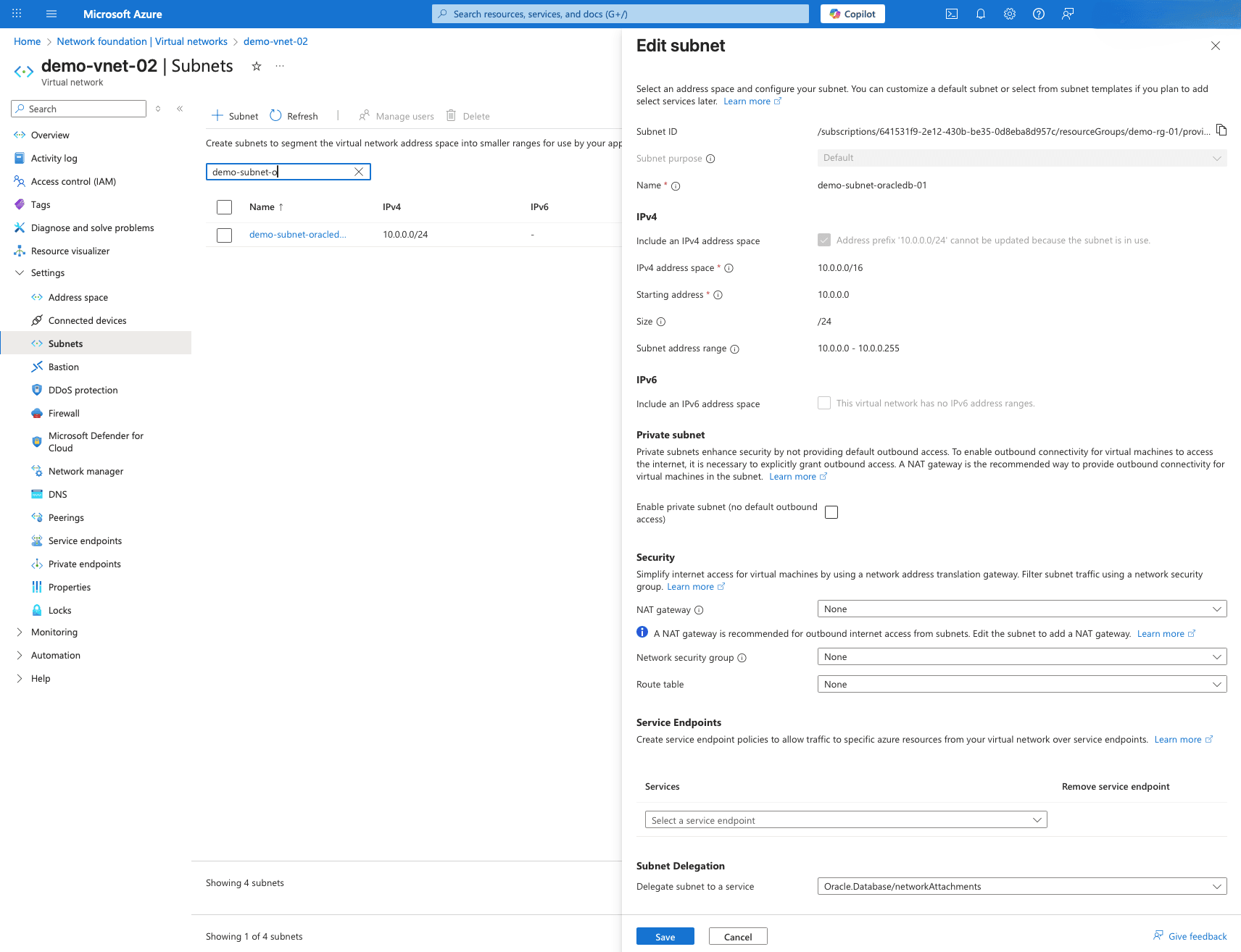
Select the default subnet, and then complete the following substeps:
-
The Default option is selected for the Subnet purpose field.
-
Enter a unique name in the Name field for your subnet. The name must begin with a letter or number, end with a letter, number or underscore, and may contain only letters, numbers, underscores, periods, or hyphens. The name must be between 1 and 80 characters.
-
Select the Include an IPv4 address space checkbox.
-
From the IPv4 address range list, select the virtual network address space where you want to create the subnet.
-
From the dropdown list, select Starting address and Size.
-
By default, the Private subnet option is not selected. If you want to enable private subnet, you can select the checkbox.
-
The NAT gateway, Network security group and Route table fields are set to None by default.
-
From the Subnet Delegation section, select the
Oracle.Database/networkAttachmentsoption for the Delegate subnet to a service field. -
By default, the Private endpoint network policy field is set to Disabled.
-
Select the Save button to create a subnet.
-
-
Select the Next button to continue the creation process.
-
-
From the Tags tab of the Create virtual network flow, you can create tags for categorize resources. Once you enter the information, select the Next: Review + create button.
-
From the Review + create tab of the Create virtual network flow, review the information you selected. A short validation process allows you to check the values that you entered from the previous steps. You must correct any errors before you can create a virtual network.
-
Select the Create button to create a virtual network.
-
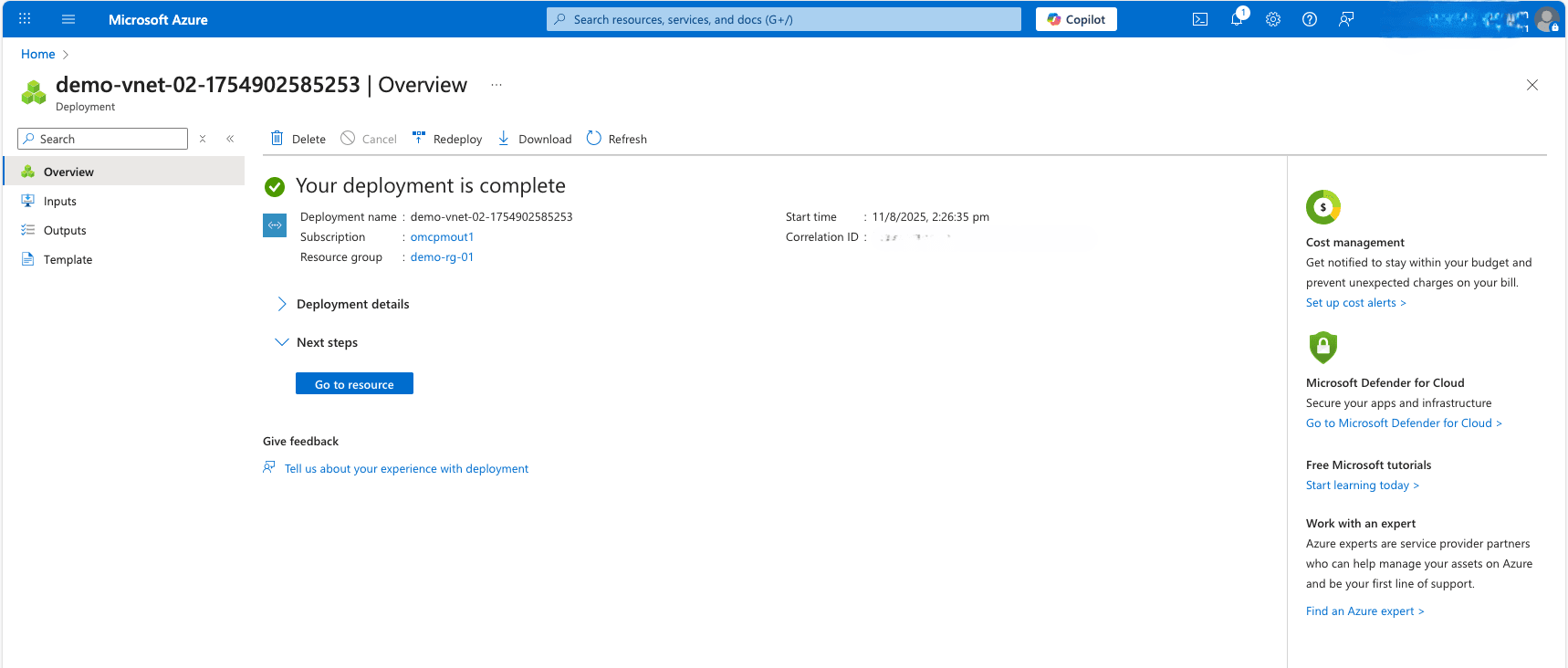
You can monitor the status of your Virtual Network from the Overview page. Once your Virtual Network is created, select the Go to resource button to view its details.
-
Delegated Subnet creation is only available through Azure Portal and Azure CLI.
You can provision a Delegated Subnet in Azure using the Azure CLI.
Prerequisites
-
Azure CLI installed
-
Azure CLI configured
-
Azure CLI version >= 2.87.0
-
oracle-database(extension) version >= 2.0.4
Sample Azure CLI Command
# Define variables RESOURCE_GROUP="demo-rg-azcli" LOCATION="eastus" VNET_NAME="demo-vnet-azcli" ADDRESS_PREFIX="143.0.0.0/16" SUBNET_NAME="demo-application-subnet" SUBNET_PREFIX="143.0.1.0/24" DELEGATED_SUBNET_NAME="demo-client-subnet" DELEGATED_SUBNET_PREFIX="143.0.2.0/24" # Create a Resource Group az group create \ --name $RESOURCE_GROUP \ --location $LOCATION # Create the Virtual Network and the default subnet az network vnet create \ --resource-group $RESOURCE_GROUP \ --name $VNET_NAME \ --address-prefixes $ADDRESS_PREFIX \ --subnet-name $SUBNET_NAME \ --subnet-prefixes $SUBNET_PREFIX # Create the delegated subnet for Oracle AI Database@Azure az network vnet subnet create \ --resource-group $RESOURCE_GROUP \ --vnet-name $VNET_NAME \ --name $DELEGATED_SUBNET_NAME \ --address-prefixes $DELEGATED_SUBNET_PREFIX \ --delegations "Oracle.Database/networkAttachments"-
Delegated Subnet creation is only available through Azure Portal and Azure CLI.
You can provision a Delegated Subnet in Azure using either AzureRM or AzAPI Terraform provider.
Prerequisites
-
Terraform or OpenTofu installed
-
HashiCorp Azure provider version >= 4.0
Sample Terraform Configuration using AzureRM
# Set Azure Provider source and version
terraform {
  required_providers {
    azurerm = {
      source  = "hashicorp/azurerm"
      version = "~> 4.0"
    }
  }
}

# Configure the Microsoft Azure Provider
provider "azurerm" {
  resource_provider_registrations = "none" # This is only required when the User, Service Principal, or Identity running Terraform lacks the permissions to register Azure Resource Providers.
  features {}
  subscription_id = "64153xxx-2exx-43xx-bexx-0d8eba8dxxxx" # Replace with your actual subscription ID
}

# Create a resource group
resource "azurerm_resource_group" "resource_group" {
  name     = "demo-rg-tf-azurerm"
  location = "eastus"
  tags = {
    env = "dev"
  }
}

# Create a VNET with Delegated Subnet
resource "azurerm_virtual_network" "vnet" {
  name                = "demo-vnet-tf-azurerm"
  address_space       = ["133.0.0.0/16"]
  location            = azurerm_resource_group.resource_group.location
  resource_group_name = azurerm_resource_group.resource_group.name
  tags = {
    env = "dev"
  }
}

resource "azurerm_subnet" "db-subnet" {
  name                 = "demo-subnet-tf-azurerm"
  resource_group_name  = azurerm_resource_group.resource_group.name
  virtual_network_name = azurerm_virtual_network.vnet.name
  address_prefixes     = ["133.0.1.0/24"]

  delegation {
    name = "delegation"
    service_delegation {
      name    = "Oracle.Database/networkAttachments"
      actions = ["Microsoft.Network/networkinterfaces/*", "Microsoft.Network/virtualNetworks/subnets/join/action"]
    }
  }
}

data "azurerm_subnet" "db-subnet" {
  name                 = azurerm_subnet.db-subnet.name
  virtual_network_name = azurerm_virtual_network.vnet.name
  resource_group_name  = azurerm_resource_group.resource_group.name
}

data "azurerm_virtual_network" "vnet" {
  name                = azurerm_virtual_network.vnet.name
  resource_group_name = azurerm_resource_group.resource_group.name
}
Sample Terraform Configuration using AzAPI
# Set Azure Provider source and version terraform { required_providers { azapi = { source = "azure/azapi" } } } # Configure the Microsoft Azure Provider provider "azapi" { subscription_id = "64153xxx-2exx-43xx-bexx-0d8eba8dxxxx" # Replace with your actual subscription ID enable_preflight = true } # Create a resource group resource "azapi_resource" "resource_group" { type = "Microsoft.Resources/resourceGroups@2025-04-01" name = "demo-rg-tf-azapi" location = "eastus" tags = { env = "dev" } } # Create a VNET with Delegated Subnet resource "azapi_resource" "virtual_network" { type = "Microsoft.Network/virtualNetworks@2025-05-01" name = "demo-vnet-tf-azapi" location = azapi_resource.resource_group.location parent_id = azapi_resource.resource_group.id tags = { env = "dev" } body = { properties = { addressSpace = { addressPrefixes = [ "183.0.0.0/16" ] } subnets = [ { name = "db-subnet" properties = { addressPrefix = "183.0.1.0/24" delegations = [ { name = "Oracle.Database.networkAttachments" properties = { serviceName = "Oracle.Database/networkAttachments" } } ] } } ] } } } data "azapi_resource_list" "listVirtualNetwork" { type = "Microsoft.Network/virtualNetworks/subnets@2023-09-01" parent_id = azapi_resource.virtual_network.id depends_on = [azapi_resource.virtual_network] response_export_values = ["*"] }-
What’s Next?
- Create an Exadata Infrastructure.